Virtual Insider

Blog archive

How To Give Windows 8 a Classic Start Menu

Apparently the blog I wrote about giving the Windows Server 2012 user a rational user experience is stuck in the Most Popular articles section on the VirtualizationReview.com site, so I am guessing you folks like that article enough to search for it quite frequently

Let's sweeten the deal even more. While I tell you in that article how to give that familiar look to the new server OS, I don't explain how to restore the Start menu. The reason for that is that Microsoft has quite literally removed the components and features that would allow that UI to show up. In other words, Microsoft did not disable the Start Menu -- the developers removed it completely from the source code so there is no registry and no hack that you could use to enable it.

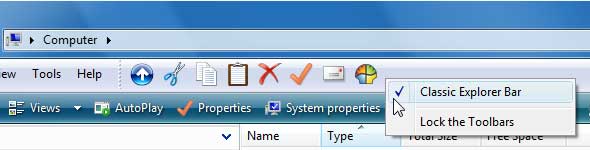
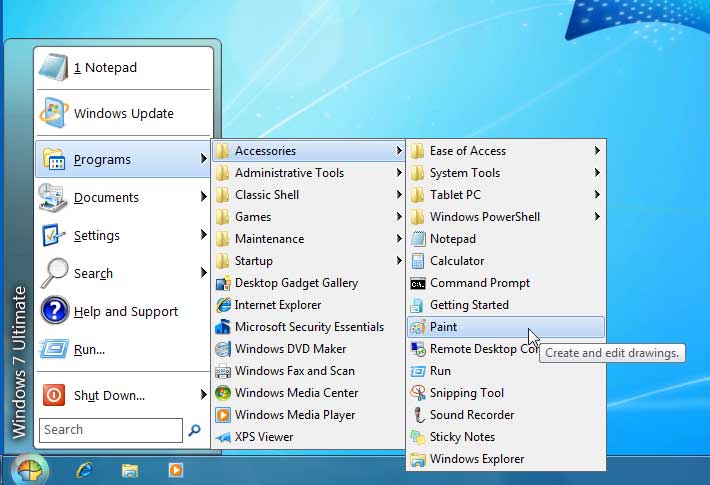
So, there's always someone out there with an answer and that answer is Classic Shell, an open source project that exists on SourceForge. It's a simple application with a very straightforward installation that enables you to restore the Explorer functionality that Microsoft removed. These Explorer functions include the classic Start Menu (Fig. 1) and a classic Explorer (Fig. 2) for browsing your files in addition to a classic Copy and much more. I really enjoyed installing this app and it worked just fine.
Windows 8 Classic Start

Figure 1. Classic Start for Windows 8. (Click image to view larger version.)


Enabling classic toolbars

Figure 2. Enabling classic toolbars. (Click image to view larger version.)

I would love to get some feedback on how you're doing with Windows 8 and if you plan on using workarounds like Classic Shell in your deployments.

Posted by Elias Khnaser on 11/07/2012 at 2:46 PM


What is this?

Reader Comments:

Tue, Nov 13, 2012 RRT USA

I am really trying to use Win8 without any add-on crutches, because I have to be able to support / use any machine, not just my own. But I am finding it really hard to become productive on Win8 (particularly on existing hardware). Why they went sooo far from what everyone already knows without a bridge is beyond me. It forces people to invest effort into a steep learning curve rather than allowing them to migrate a little at a time.

Sun, Nov 11, 2012 sj

Stardocks Start8 for $5 is a better option. It fits the Win8 theme perfectly, right down to the new Windows logo for the start button. Much better solution than the classic shell from sourceforge.

Thu, Nov 8, 2012 Trisklbr Florida

It makes perfect sense that nothing short of the crudely-amputated code is going to have the polish, fit, and finish that the original did, but I know my users won't accept 8 without some absolutely career-limiting blow-back. While 8's interface is actually cool to play with on a surface-device, it's downright debilitating on a classic workstation and has some interesting ramifications in remote sessions. There are a lot of classy new ideas built into 8 that I loved when I was testing it, but I struggled with the interface and had to learn all the hidden keyboard-shortcuts to survive, and even then it wasn't easy to "work" on it. It's like they designed 8 to be strictly for fun? In any case, I imagine that with every business-user in the world clamoring for a solution to replace what Microsoft removed, the project is bound to advance quickly. Who knows? Maybe they'll even make some break-through that eclipses (pun-intended) the original!

Thu, Nov 8, 2012 Tom Pittsburgh

I learned of Clasic Shell some time ago and agree with your general assessment of it. However, I found it wasn't as smooth and worry-free as you said. I can't say how, exactly - I mean it did what it says - it just didn't "feel" right to me somehow. I guess what I am saying is I am sticking with the new paradigm and just going to get used to it, even though I am not a fan.

Add Your Comment:

Your Name:(optional)
Your Email:(optional)
Your Location:(optional)
Comment:
Please type the letters/numbers you see above