How-To
Building Your Own AI Models -- The Easy Way
Recently, someone asked me if there was a way to build your own AI model without having to go through the costly and complex process of training the model from scratch. Believe it or not, there is a way to create a do-it-yourself AI model without having to train it.
The trick is to leverage a base model. A base model is essentially just an existing model that was intended for standalone use, but that you can manipulate for your own purposes. To show you how the process works, I am going to be using the Ollama platform. For the purposes of this article, I am going to assume that Ollama is already installed. The exact process varies a little bit depending on whether you are on Windows or Linux. The commands that I am going to be using are based on Windows.
The first step in the process is to select one of the existing Ollama models to use as a base model. This selection process is important since your new model will inherit the base model's various characteristics. This includes the model's architecture, context length, tokenizer, and performance. When you create a new model, you can configure the model to adopt a personality of your own choosing and you can control the quality and type of output, at least to a degree.
Once you have chosen a model, you can download it by entering this command:
Ollama pull <model name>
So with that said, let's work through a relatively simple example of how to create a model. I am going to be using Llama3 as the base model. Believe it or not, you can create a model using only five lines of code, although it is certainly possible to create a more advanced model.
From inside of the folder that you created, enter New-Item Modelfile. This will create a new file called Modelfile. Once created, you will need to open this file in a text editor. Now, paste the following commands into the model file:
FROM llama3

SYSTEM you are a knowledgeable and helpful assistant who often explains concepts using analogies.

PARAMETER temperature 0.6
PARAMETER top_p 0.0
PARAMETER repeat_penalty 1.1
When you are done, save the file and close the editor. Now, you can build the model by entering this command:
Ollama create My-Model -f Modelfile
You can see what this process looks like in Figure 1.
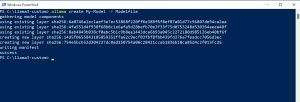 [Click on image for larger view.] Figure 1: I have created a custom Ollama model.
You can see my custom model in action in Figure 2. As you can see in the figure, the model is obeying my instruction to use analogies when possible.
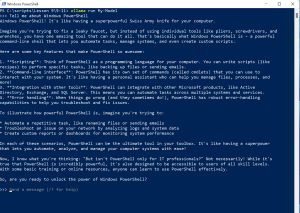 [Click on image for larger view.] Figure 2: My custom model behaves as expected.
OK, so now that I have walked you through the process of building a custom model, I want to take a step back and talk about the parameters that I used in my model file. Keep in mind that there are other parameters that can be used, but I am sticking to these three in an effort to keep the discussion manageable.
The first of the three parameters is Temperature and I set it to use a value of 0.6. The temperature is perhaps the most important of all the parameters. The temperature essentially tells the model whether you want for it to play it safe or to use some creativity. Even so, that explanation oversimplifies things a bit, because there is such a thing as being too safe or too creative. The value that I used (0.6) tells the model to be accurate, but try not to sound too stiff. Here is a breakdown of what the various temperature values do:
- 0.0 to 0.2 -- The model becomes way too literal and sounds robotic.
- 0.3 to 0.5 -- The model is focused, factual, and tries to play it safe.
- 0.6 -- The model is still balanced and factual, but slightly creative.
- 0.7 to 0.9 -- The model becomes creative and expressive.
- 1.0+ -- The model sounds like a fever dream. It tends to be way too creative and also has a tendency to ramble and hallucinate.
The second parameter that I used was Top_p and the value that I assigned to this parameter was 0.0. Large language models work by trying to predict the next word that they should use. The Top_P parameter determines the number of possible words that the model can choose from. Setting a Top_P value tells the model to choose from the words that make the most sense given the current conversation and to ignore other possibilities. Here is what the value range looks like:
- 0.0 to 0.3 -- Selections are very limited and safe.
- 0.4 to 0.5 -- The model behaves in a conservative manner, but without being overly safe.
- 0.6 to 0.9 -- The model acts more naturally and becomes more flexible.
- 1.0 -- Anything goes!
The third parameter was Repeat_penalty. I set the repeat penalty to a value of 1.1. The Repeat_Penalty parameter is designed to prevent the model from repeating itself over and over again. Set the Repeat_Penalty value too low and the model may get stuck in a loop, repeating itself continuously. Setting the value too high can cause the model to begin phrasing things in a very awkward and unnatural way. Here is a breakdown of the values:
- 1.0 -- The model is allowed to repeat itself.
- 1.05 to 1.1 -- The model is discouraged, but not forbidden from repeating itself.
- 1.2 to 1.3 -- Repetition is strongly discouraged.
- 1.4 -- The model may try to avoid individual words that it has already spoken and therefore start using very odd phrases.
In the real world, the parameter values should reflect the model's intended use. As an example, a set of values that cause the model to generate very matter-of-fact output would not be appropriate if you were planning on using the model for creative writing.
About the Author
Brien Posey is a 22-time Microsoft MVP with decades of IT experience. As a freelance writer, Posey has written thousands of articles and contributed to several dozen books on a wide variety of IT topics. Prior to going freelance, Posey was a CIO for a national chain of hospitals and health care facilities. He has also served as a network administrator for some of the country's largest insurance companies and for the Department of Defense at Fort Knox. In addition to his continued work in IT, Posey has spent the last several years actively training as a commercial scientist-astronaut candidate in preparation to fly on a mission to study polar mesospheric clouds from space. You can follow his spaceflight training on his Web site.