In-Depth
Microsoft 365 Backup Blind Spots Enterprises Must Address in 2026
Microsoft MVP and consultant Ben Stegink examined how enterprise backup strategies must evolve to match the scale, complexity and attack surface of Microsoft 365 in 2026.
Ben shared his expertise in a session headlining a recent Redmond Magazine webcast, titled Rethinking Microsoft 365 Backup and Resilience for the Enterprise in 2026 and Beyond, now available for replay. He focused on what many organizations still misunderstand about cloud resilience -- and the blind spots that remain even when backup tools are in place.
 "Retention policies are meant for e-discovery, for legal cases where you need to retain content for a set of period of time for compliance reasons or for legal reasons. This is not a valid backup strategy from a restore perspective."
Ben Stegink, IT Pro, owner of consultancy Intelligink
And that hard-won knowledge is available for replay thanks to the sponsor, Druva, which offers a leading Software-as-a-Service platform for data resilience and also presented at the live event.
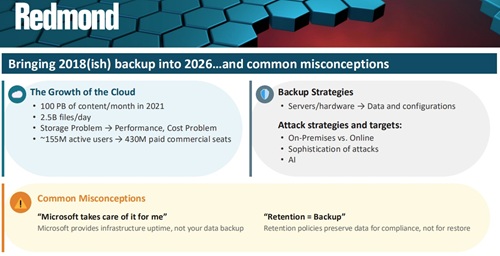 [Click on image for larger view.] Bringing 2018(ish) backup into 2026…and common misconceptions (source: Ben Stegink).
Retention Is Not Backup
Ben opened by addressing what he described as a persistent misconception: that Microsoft automatically protects enterprise data. While Microsoft provides high availability and infrastructure redundancy, he emphasized that organizations remain responsible for protecting their own content.
"They absolutely do all of that, but it's to provide that infrastructure uptime to prevent Microsoft from being compromised," he said. "They don't do this to necessarily protect your data and protect your organization against a compromise."
He also cautioned against equating retention with recoverability. Many organizations rely on retention policies for Exchange or SharePoint and assume that constitutes backup.
"Retention policies are meant for e-discovery, for legal cases where you need to retain content for a set of period of time for compliance reasons or for legal reasons," he said. "This is not a valid backup strategy from a restore perspective."
Data Is More Than Files
Modern Microsoft 365 environments extend far beyond file storage.
 [Click on image for larger view.] What do I need to backup? (source: Ben Stegink).
Ben outlined a growing list of data types that require protection, including SharePoint libraries, OneDrive content, Teams chats, Exchange mailboxes, Planner tasks and Power Platform assets.
Teams conversations are increasingly replacing internal email, he noted, making chat history operationally significant. At the same time, Power Platform applications and workflows often underpin core business processes.
"There are more and more of these configuration settings that companies are changing, customizing, tweaking, more so than back in 2018," he said, noting that backup strategies must now account for both data and configuration.
Configuration elements include Entra ID users and groups, enterprise applications, Conditional Access policies, Exchange mail flow rules and compliance configurations such as data loss prevention and sensitivity labels. These elements, he said, are often overlooked until something breaks or is inadvertently changed.
Teams Conversations and Copilot Gaps
One of the most significant blind spots involves Teams chat recovery.
 [Click on image for larger view.]…but there are gaps & limitations. What are my blind spots? (source: Ben Stegink).
Teams conversations are stored in Exchange mailboxes for compliance purposes, but restoring them seamlessly back into the Teams interface remains difficult.
"There isn't that hardware there," he said earlier when discussing cloud architecture shifts, underscoring how backup assumptions must change in SaaS environments.
On chat recovery specifically, he noted that while content can technically be retrieved, replaying it back into Teams in a native conversational format is not straightforward.
He also addressed a live audience question about AI-generated content and Copilot interactions. While documents created with Copilot are protected if saved into SharePoint or OneDrive, Copilot chat history currently lacks mature backup options.
"I am not aware yet of any backup solutions for those Copilot questions and responses," he said.
Power Platform and Configuration Drift
Power Platform presents additional challenges. While Dataverse provides limited short-term backup options, Ben said the overall story remains incomplete.
"My opinion, there is not a great backup story yet for the Power Platform," he said.
Organizations may export solutions manually, but this approach requires process discipline and does not function as a continuous backup model.
Configuration drift is another emerging risk area. Conditional Access policies, compliance rules and identity configurations are more numerous and complex than in earlier Microsoft 365 deployments. Backup strategies must account for restoring policy states in addition to restoring data.
Restore Speed and Scale Limitations
Even when backup exists, recovery performance can present operational risk. Microsoft 365 Backup currently supports restore speeds of approximately one to three terabytes per hour.
"If you have one of those environments that's 300 terabytes of data, and you have to restore it, that could take you upwards of 100 hours," Ben said.
Recovery point objectives have improved -- with backups available as frequently as every 10 minutes for short-term windows -- but restore time objectives at scale remain a practical consideration for large enterprises.
As Microsoft 365 environments continue to expand in data volume, user counts and configuration complexity, Ben advised organizations to rethink not just whether they have backup, but what exactly they can restore -- and how long it will take.
And More
In addition to the insights shared above, Ben also discussed Microsoft 365 recycle bin behavior, point-in-time restore capabilities for SharePoint and OneDrive, Microsoft 365 Backup service options and recovery intervals, Desired State Configuration (DSC) for exporting tenant settings, API throttling considerations, and the evolving role of AI in modern attack strategies.
You can catch all that in the replay, and while replays are fine, especially if they're timely, as Ben just presented early this week, there are advantages to attending live. You can ask questions, interact with the presenter and get real-time insights that may not be captured in a replay.
With that in mind, upcoming free Virtualization & Cloud Review
and Redmond Magazine
webcasts and summits will present on a range of IT and tech topics including Microsoft 365, Azure, security, identity and enterprise IT strategy.
Here's a list of several coming up soon.
About the Author
David Ramel is an editor and writer at Converge 360.