In-Depth
The Zero Trust Workshop -- Your Free Nitro-Boosted Cybersecurity Strategy
Paul Schnackenburg, our 1-person SOC from Down Under, explains in detail how the Zero Trust workshop guide, workbook, and assessment tool turn principles into a practical roadmap for staged adoption across people, process, and technology.
The consensus among cybersecurity professionals is that a Zero Trust-based cybersecurity strategy is the best approach, and many pundits, including myself, have been banging that drum for years now.
But the big question everyone has is how do you actually "do Zero Trust?" Where do you start? You cannot buy an application or a service, turn it on and "have Zero Trust" (notwithstanding nearly every cybersecurity vendor slapping Zero Trust stickers on their wares, but of course those stickers have now been replaced with "Agentic AI powered"). There are cultural, strategic and structural changes required, as well as tactical configurations across the board, so it's overwhelming to even know where to start, let alone have a map to continue going.
Turns out Microsoft offers a free workshop guide, and a couple of tools that help answer those questions, handy both for partner organizations helping their clients, and for businesses themselves as they're adopting Zero Trust. To be completely accurate, these tools are maintained as free open source by several Microsoft employees, but it's not an official tool that you can call Microsoft support about if you're having issues.
This article will look at Zero Trust at a high level, the challenges of actually making it real in an organization, how to use the tools Microsoft provides, and how to use the workshop guidance to improve cybersecurity.
Zero Trust -- Should that Be 'Trust After verification?'
I've heard many people say, particularly from the academic world, that Zero Trust is a negative term and puts people off, and I can understand that. What it actually means is that implicit trust is dangerous, and trust can only be earned after explicit verification. As an example, in the "old world" your laptop was automatically trusted if it was on the local area network. No matter if it had been compromised and was running malware, or if the user account using it had been compromised by an attacker who was using this beachhead to attack other systems. It was a trusted corporate laptop, on a trusted network and thus OK, and that implicit trust is dangerous and will lead to compromise.
If on the other hand we verify explicitly, the laptop is checked for its current cybersecurity posture, and only after found to be acceptable is access granted, ditto for the user account.
Microsoft lists three principles for Zero Trust:
- Verify explicitly
- Assume breach
- Least privilege access
Across six pillars:
- Identity
- Endpoints
- Applications
- Network
- Infrastructure
- Data
In other words, for identity, endpoints etc. every connection should be explicitly verified and permissions granted should be the minimum any application or user needs to do their work, no more. This access needs to be verified over time -- Entra calls this Access Reviews. And rather than expecting that your defenses will keep the bad guys out, design your systems assuming that they're already in there, by compartmentalizing areas so that a breach doesn't automatically grant access to everyone and everything, plus make sure you have telemetry to spot intrusions when they do happen.
The Open Group offers a vendor-neutral approach, and they list 13 commandments, across four areas:
Practice Deliberate Security
- Secure Assets by Risk
- Validate Trust Explicitly
Support Business Objectives
- Enable Modern Work
- Implement Asset-Centric Controls
- Enable Sustainable Security
Develop a Security-Centric Culture
- Practice Accountability
- Enable Pervasive Security
- Utilize Least Privilege
- Deploy Simple Security
Deploy Agile and Adaptive Security
- Make Informed Decisions
- Improve and Evolve Security Controls
- Utilize Defense in Depth
- Enable Resiliency
As you can see, the challenge with infusing Zero Trust into a company's culture isn't (just) about technical controls and "nerd stuff," it heavily involves those two other cornerstones -- people
and process
. Building a culture around that in an organization is the real challenge.
The question still remains -- how do you actually implement these principles / commandments in a business? What configuration steps do you start with?
The Zero Trust Workshop Version 2
The first version of this workshop was created to help answer the most common question Microsoft's clients had -- "I understand about Zero Trust, but I don't know how to implement it." This new version (I was lucky enough to be part of the private preview testing of it) is more comprehensive and comes with a built-in tool to evaluate the current configuration of a tenant. Access the workshop guide here and the workbook here. Yes, you read that right, it's an Excel workbook, which isn't as crazy as it sounds. It helps you keep track of each pillar (they each have a spreadsheet tab in the workbook), and lays out logical "swim lanes" of steps to follow.
The second tool is a PowerShell script that inventories your current security posture across several areas of Entra ID & Microsoft 365 -- more about this below.
It's called a workshop because it's meant to be delivered as a series of meetings where each individual tile is discussed, and progress is tracked over time. The workshop can be used by an internal IT department, or if a Microsoft partner is delivering it with their client (the guide for customizing the branding of the sheet is here). The accompanying documentation is comprehensive, and there's also a video covering each of the workshop pillars.
To make it real, here's a portion of the Identity Roadmap sheet in the workbook:
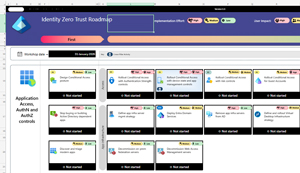 [Click on image for larger view.] Zero Trust Workbook - Identity Roadmap
The first part of this pillar is Design a Conditional Access (CA) posture, and under the Access area swim-lane, there are six tiles to attend to. It starts with CA policies for Authentication Strength, then policies for device state and app management, followed by policies with risk controls. Each tile lets you know the implementation effort (High, Medium and Low), the user impact and also has a hyperlink directly to the relevant portion of the workshop documentation. This documentation has an overview paragraph, followed by links to the relevant technical documentation. Each step has a drop-down to track progress:
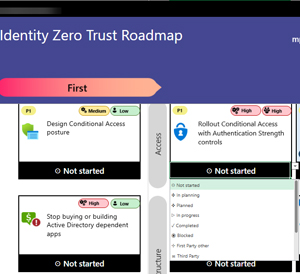 [Click on image for larger view.] Zero Trust Workbook - Progress Tracking
Apart from the obvious In planning, Planned, In progress etc. there's Blocked, First Party other or Third Party. If there's a technical reason you can't roll this out now, you're blocked, if the control is satisfied by another Microsoft technology it is first party and if you're using some other vendor's technology to fulfil this criterion, it's Third Party.
Another handy tip is using the Note functionality in Excel to add comments to each Tile as you work through it with the relevant stakeholders. Each spreadsheet also has a single tile at the start of each swim lane to do first, then one or more in the "then" phase, followed by one or more in the "next" phase -- clearly conveying priorities.
The Identity Roadmap has over 30 swim lanes covering everything from "Stop buying or building Active Directory dependent apps" through "Develop credential (incl. Passwordless) strategy" to "Rollout Privileged Identity Management for Tier-Zero roles".
The Devices Roadmap covers Mobile Application Management, MDM for iOS & Android, Windows, MacOS and more. The Data Roadmap is a bit shorter (but will probably take longer to implement in the real world), and looks at discovering and protecting your data, managing access to it, and protecting critical data assets. In the Network Roadmap you'll look at modernizing VPN and protecting legacy apps, securing access to all internet resources plus network application protection and control. The Infrastructure Roadmap on the other hand has many areas for governance, compliance, servers, containers, storage, databases, APIs and infrastructure services.
Finally, although it's not one of the six pillars, Security Operations gets their own Roadmap. This looks at Defender for Identity, Office 365, Endpoint, Cloud Apps, and Sentinel and how to "processify" Zero Trust for the SOC.
The Application pillar doesn't have a spreadsheet tab yet, I assume that's coming.
In my opinion this is an excellent single place to track and understand Zero Trust across the different technology pillars for an enterprise relying on Microsoft technologies. It's got enough coverage to serve a very large organization with a whole team dedicated to Identity for example. The workshop guide covers which stakeholders to invite, the expected length each meeting will take, how to hold follow up meetings etc.
For smaller businesses the workshop is still a great starting point. Many areas can be quickly marked as Completed (don't run your own containers? That's seven swim lanes, 36 tiles crossed off). The reality is that whether you're a huge company with experts dedicated to each single responsibility area, or a small one with a few IT generalists, there's SO many areas and security configuration options in this modern cloud world, that having this single place to track them all and make sure you don't miss one is very valuable, especially at the cost of free.
The Zero Trust Assessment
The workbook is great, but it's got no knowledge of what you've already got in place (until you hold the workshops and get that feedback from the people who have the information). The Zero Trust assessment on the other hand is a PowerShell module that inventories your tenant configuration and recommends ways to improve it.
On a machine with PowerShell 7, simply run:
Install-Module ZeroTrustAssessment -Scope CurrentUser
Connect-ZtAssessment
Invoke-ZtAssessment
Which I did here:
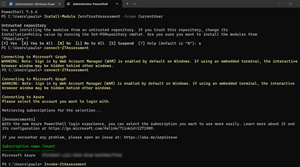 [Click on image for larger view.] Running the Zero Trust Assessment
Note that you have to accept installation from an untrusted repository (a normal step, unless you've set up trusted repositories), and you have to authenticate against the tenant you want to inventory as a Global Administrator (unless Microsoft Graph has already been granted the required permissions) a giant list of (read-only) permissions, and you have to wait for the output. For my SMB tenant with ~ 130 users it only took a few minutes, for large organizations it can take over 24 hours.
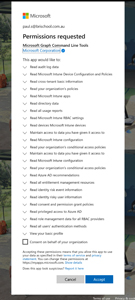 [Click on image for larger view.] Zero Trust Assessment - Permissions Requested
The output is an HTML file, which takes data from a set of generated JSON files in subfolders. This report has three tabs, Overview, Identity and Devices. Some basic tenant info, along with number of users, groups, devices (total and Intune-managed) and Entra ID registered apps. Then there are diagrams that show user authentication protected by CA policies, another for privileged users' authentication and one that breaks down the authentication methods in use across the entire user base (note that this is a school, with all students using only passwords at the time of this report, this coming week that will be replaced by phishing resistant Windows Hello for Business sign-ins with fingerprint or face scan).
Hovering your mouse over the diagrams shows the actual number of users or sign-ins shown.
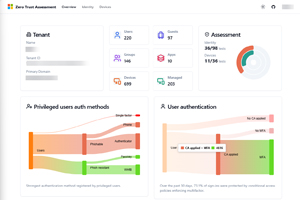 [Click on image for larger view.] Zero Trust Assessment - Report Output Top
Here is the rest of the overview page, showing the data displayed with the mouse cursor. It's a great way to understand the security posture of your identities, Conditional Access policies, device compliance policies, etc. and it's also a great companion to the Zero Trust workbook.
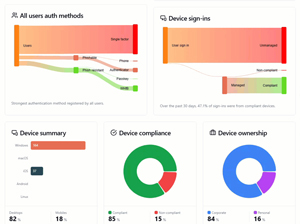 [Click on image for larger view.] Zero Trust Assessment - Report Output Bottom
The Identity tab gives a list of every configuration setting against the Configure Microsoft Entra for increased security guide, with a pass or fail for each control. Clicking on any of the controls brings up a short explanation of it, what it's currently set to in your tenant, and the remediation steps to achieve a pass.
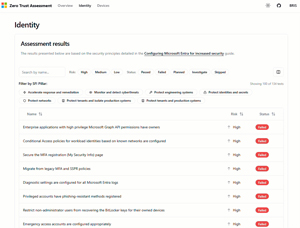 [Click on image for larger view.] Zero Trust Assessment - Identity assessment results
On the Devices tab you can see the configuration policies you have in Intune, plus a list of all the checks performed, and again if your tenant is configured for a pass.
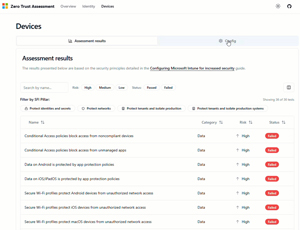 [Click on image for larger view.] Zero Trust Assessment - Device Assessment Results
Both tabs have filtering options for the risk of each control and the status.
Conclusion
Most businesses say they "take cybersecurity very seriously," at least after they've been compromised and yours and millions of others sensitive personal data is now public. Actually, taking security seriously starts with adopting a Zero Trust-based approach to it -- and the workbook and tool offered by Microsoft is a great place to start.
Just remember, it's a never-ending journey, you'll never "be secure" as that's an unachievable endpoint, but instead you should aim for "more secure today than yesterday." Good luck in your quest for Zero Trust nirvana.
About the Author
Paul Schnackenburg has been working in IT for nearly 30 years and has been teaching for over 20 years. He runs Expert IT Solutions, an IT consultancy in Australia. Paul focuses on cloud technologies such as Azure and Microsoft 365 and how to secure IT, whether in the cloud or on-premises. He's a frequent speaker at conferences and writes for several sites, including virtualizationreview.com. Find him at @paulschnack on Twitter or on his blog at TellITasITis.com.au.