In-Depth
Resilient Identity Foundation
Every user of Microsoft 365 or Azure relies on being able to sign in, or, in other words, we rely on Entra ID. Back in the Jurassic era of cloud, circa 2017, there were several high-profile, large outages in Entra ID, but since then there have been very few global disruptions.
This is a large service. In 2023, Microsoft said there were 610 million monthly active users of Entra, and at Ignite 2025 they said 1 billion users were managed by Entra (that includes internal users as well as invited guest accounts).
In this article, we'll look at Entra ID resiliency from two angles: the architecture of the service itself, what's changed since those early days, and the admin-facing resilience features, including soft delete, the new Backup and Recovery, and more.
One note: when it comes to the "architecture behind the scenes," I'm basing the information on publicly known data. For obvious security reasons, Microsoft doesn't reveal exact details in many areas, so some of these descriptions may be out of date, or not 100% accurate. Nevertheless, understanding the foundation that everyone using any Microsoft cloud service relies on is useful.
Built for Uptime
The two main changes that Microsoft enacted since those early outages are fault-isolated cells and the backup authentication system.
Let's start with the cells where each of the 117 scale units is completely isolated from all others, drastically reducing the blast radius of outages. None of the cells carry more than 2% of the total traffic, so if there is a problem with a cell, only those tenants are affected; the other 98% aren't impacted. The data in the global service that's Entra is replicated to at least four datacenters (up to 13), with multiple copies stored in each datacenter. Each directory's data has at least 36 copies, and any writes (changes) are only acknowledged when at least one is committed to an out-of-region datacenter, so that even a complete region failure doesn't lead to data loss. Authentication requests can be served by multiple data centers.
There's also over-provisioning of infrastructure resources built in, so that an outage of a portion of a cell, and subsequent failover to other parts don't overwhelm them as so often happens in simple failover systems.
Furthermore, after 2018 Microsoft adopted an assume failure approach and made sure all services Entra ID depends on also have redundancy, for example using multiple DNS providers in active-active mode. For SMS-based MFA (please don't use it anymore, it's not wise to rely on the phone network for security) there are multiple carriers in each region.
It's interesting to note that this approach isn't foolproof. There was an Entra ID outage on the 29th October 2025 that lasted for several hours; the root cause was traced back to a problem with Azure Front Door. The core point, though, is that as long as cloud providers adopt the same approach as airline safety and learn from each incident and make changes to ensure it doesn't happen again, overall resiliency improves. This episode of the Entra.chat podcast covers these architectural changes in detail.
You'd assume that as a global service, spreading instances across many geographical locations would always increase resiliency, but interestingly some features have adopted regional isolation features, such as Managed Identities. These are supported by more and more resource types in Azure and allow them to authenticate with no secrets stored, with the whole identity handled by Entra. By 2022, 95% of these authentications were served by regional endpoints, providing resiliency in case the global service has an issue.
Another major influence comes from the Safe Deployment Process (SDP), where software updates are pushed out gradually, first to internal testing, then to Microsoft's own tenant, then slowly to broader production, with automated health checks at each step. This should lead to issues being caught early. Further improvements to the system were made in 2020 after a latent bug caused a test deployment to be rolled out to all rings at once, causing a global outage.
The Entra ID team have also adopted chaos engineering, just like any other major, complex cloud service. Pioneered by Netflix back in the day, this is essentially injecting various random failures into the system and infrastructure, forcing engineers to build resilient code from day one, and thus handling real issues when they show up as well.
Backup Is Key
Another huge change in the underlying architecture was the introduction of a Backup Authentication System in 2021 as a completely separate system. It runs active-active on independent infrastructure and separate network paths, and stores authentication artifacts (tokens and sessions) for up to three days and also handles a small percentage of logins to make sure it's working as expected. If the primary system fails, it takes over and validates cached tokens transparently to allow access without user impact. Initially it just handled Microsoft workloads but it's now also covering many third-party apps. Note that creating new accounts and group membership changes won't work during the outage, but existing sessions from the last three days should continue to function.
 [Click on image for larger view.] Non-Interactive Sign-In Served by Entra ID Backup Authentication Service.
Working in tandem with this is Continuous Access Evaluation (CAE) introduced in 2022 to improve both security and resiliency. From a security point of view, this allows the rapid revocation of user sessions (near real time, minutes for Exchange Online workloads), rather than having to wait up to an hour for a refresh token to expire. Likewise, if a user or device changes their security context (take a laptop from corporate office to a local cafe on public Wi-Fi), Conditional Access policies can be re-evaluated in real time. CAE also means the default token refresh interval is extended from 1 hour to 24 hours for supported applications, which again means minimal user impact for shorter outages.
As a side note, if you're using Global Secure Access which gives you Zero Trust Network Access you can extend CAE to all applications, not just the ones that support it.
Where Do You Keep Your Keys?
There was a high-profile breach in July 2023 where a group tracked as Storm-0558 (Chinese state-sponsored attackers) gained access to an expired signing key from the personal Microsoft Account side of Entra ID (then called Azure AD), which still worked (validity wasn't verified properly) and also allowed them access to the Entra tenants of 25 US government organizations, including the Department of Justice.
One issue highlighted by these failures was that signing key and secrets management in Entra ID had to be hardened. One large project was moving key storage from software into Hardware Security Modules (HSMs). Think of these as tamper-proof devices with secured network access where you can store digital keys and verify them, but not extract them. These hardware appliances are FIPS 140-3 Level 3 compliant. The challenge here was that Entra ID is a global service, so keys must be stored in multiple HSMs and when updated, it must happen in all HSMs.
The Numbers Tell the Truth
Microsoft publishes their SLA numbers for Entra ID here. Just like the numbers for Microsoft 365 overall, the immense scale of these cloud services means that even if you have an impactful outage that affects your business operation for, say, a full day, that'll have no impact on the figure for the whole service.
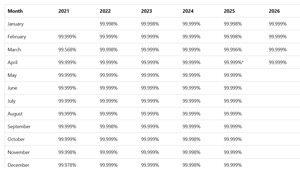 [Click on image for larger view.] Entra ID Monthly Uptime Percentage from 2021 to 2026.
Incidentally, 99.999% ("five nines") means a maximum of 26.3 seconds downtime per month, or 5.26 minutes in a year. However, as a customer you don't really care that much about the overall SLA figure, so Microsoft also provides the figure for your tenant. If you have the right role, sign in to entra.microsoft.com, scroll down to Monitoring and Health > Health and select the SLA Attainment tab to see the figure for your tenant.
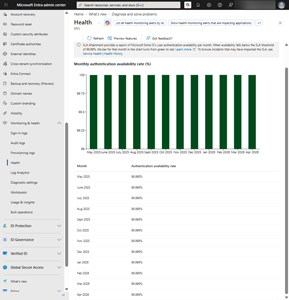 [Click on image for larger view.] Tenant SLA and Health in the Entra ID Portal.
On the Health Monitoring tab, you can also see any alerts related to specific features in your tenant and also dig further into any past issues (up to 30 days) by clicking on any of them.
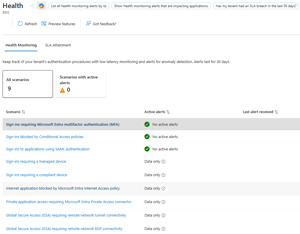 [Click on image for larger view.] Health Monitoring Alerts for Your Tenant.
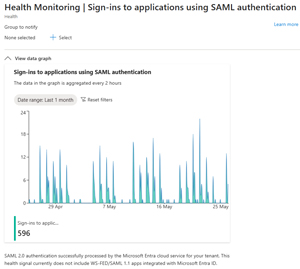 [Click on image for larger view.] Health Monitoring Graph for Apps Using SAML Authentication for Your Tenant.
You can also set up notifications for failures in any of these features, including selecting groups or configuring webhooks.
Entra Administrator Resiliency Features
Apart from tracking your tenant's Entra ID uptime, and configuring alerts for any failures, there are quite a few features you can take advantage of. Here I'm only covering the built-in safety features, but there are third party products out there that provide Entra ID backup with various levels of coverage.
First, user accounts, groups and Conditional Access Policies have a soft delete and recycle bin feature that keeps any deleted object for 30 days, after which it's permanently removed.
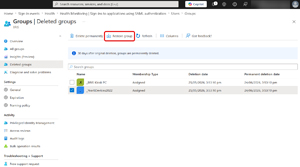 [Click on image for larger view.] Restoring a Deleted Group in Entra ID.
This is a lifesaver in scenarios where you've deleted a user or group by mistake, as all their properties are restored. You can also delete objects permanently if you're really sure you want to get rid of them, and don't want to wait 30 days.
But if you've made a configuration mistake (rather than outright deleted an object) and want to revert to a previous state, you can use the Backup and Restore feature (currently in preview). This is on by default for every tenant, and runs once every 24 hours, keeping five days' worth of snapshots. We don't know which licensing levels will include it when the feature becomes Generally Available, but if I had to guess, I'd say that all tenants will get five days as part of their existing licensing, and if you need longer retention, or more frequent snapshots than every 24 hours, you can pay for that.
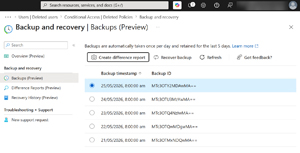 [Click on image for larger view.] Five Days Backup Snapshots.
For each snapshot you can create a difference report that compares the current state of objects with the state stored in the snapshot. You can do this for all objects or only select types of objects (if you know you messed up a group's membership, just create a report for groups, or better yet, pick specific objects by their ID).
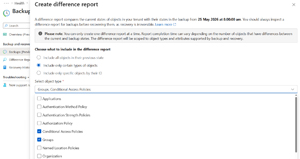 [Click on image for larger view.] Creating a Difference Report for Specific Objects.
Once you've looked at the difference report to make sure you have the right object(s), in the right state, from the right snapshot time, you can proceed with recovering a backup.
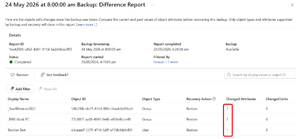 [Click on image for larger view.] Viewing a Difference Report and Selecting Objects to Recover.
For each object in the difference report you can also see changed attributes by selecting the link, if the object wasn't deleted but a configuration detail was changed.
The list of objects that are protected is comprehensive (compared to the three that are supported by soft delete):
- User
- Group
- Conditional access policy
- Named location policy
- Authorization policy
- Authentication methods policy
- Application
- Service principal
- Organization
Applications and service principals are particularly welcome here, as they're often very complex objects and restoring them after either an accidental deletion or a misconfiguration could be very time-consuming. Note that Recovery can only restore deleted users and groups and conditional access policies if they're in the soft deleted state. There are also some limitations and guardrails to be aware of, as creating reports and restoring large amounts of objects in large tenants is far from instantaneous.
Conclusion
Entra has increased the underlying resilience of the service over the last few years, and yet, outages still happen. However, it's been a long time since we've seen a truly global outage and now you know why.
But it's not all on Microsoft and the Backup and Recovery feature gives administrators built-in flexibility when inevitable mistakes are made. I suggest practicing with some test objects ahead of a real outage, to give you confidence in taking the right steps when under pressure in a disaster situation.
About the Author
Paul Schnackenburg has been working in IT for nearly 30 years and has been teaching for over 20 years. He runs Expert IT Solutions, an IT consultancy in Australia. Paul focuses on cloud technologies such as Azure and Microsoft 365 and how to secure IT, whether in the cloud or on-premises. He's a frequent speaker at conferences and writes for several sites, including virtualizationreview.com. Find him at @paulschnack on Twitter or on his blog at TellITasITis.com.au.