Everyday Virtualization

Blog archive

vSphere Consolidation Ratio Point -- vSwitch Ports

With vSphere and VI3, VMware virtualization environments can hit some very lofty consolidation ratios. Consolidation ratios of 30, 40 or 50 or more VMs per host are not at all out of reach today with host RAM of 128 GB or more and über quick processors. Guest operating system inventory makes a big difference as well. Consolidation ratios are aided by similar guest operating systems that will take advantage of the transparent page sharing technology and as-needed RAM provisioning to the guests.

When all of the stars are in alignment, you can find yourself with these high ratios. Both vSphere and VI3 have a default configuration that you may discover the hard way. The default number of ports for a vSwith on the host is 56 ports. You can easily increase this as part of your host build process to higher numbers such as 120, 248 or more. This is configured in the properties of the vSwitch (see Fig. 1).
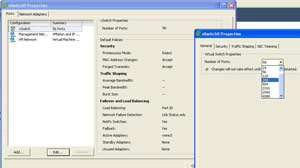
vSphere Client
Figure 1. vSphere Client shows the configured number of ports for a vSwitch. (Click image to view larger version.)

There will not be an obvious indicator that a host has a full vSwitch, other than VMotion tasks failing when another host goes into maintenance mode. Changing the number of ports does require a reboot (not sure why) for the vSwitch to be reconfigured.

I configure vSwitch port inventories at 120. This is a number that I really don't foresee occurring for the workloads that I have virtualized. VDI implementations or other situations may see a higher number of guests per host. Do you configure your vSwitch away from the default? Share your comments below.

Posted by Rick Vanover on 08/03/2009 at 10:43 PM


Reader Comments:

Tue, Oct 5, 2010 easy loans company kanpur

vsphere consolation ratio is not a better thing for switches and its important and very useful for me and others.

Wed, Aug 12, 2009 JC Canton, OH

I absolutely agree with Dave. We have 3 hosts running 150 vm's. They had the default vSwitch port settings and when I began doing maintenance upgrades to Update 4, I noticed some of the vm's were lossing their network connections. The automated VMotions did not fail either. I opened a case with VMware and was surprised to find out that this was not one of the checks that were done before a Vmotion occurs. Hopefully this has been added in newer releases of the product. We have increased all our vm networks to 120 ports as a results.

Wed, Aug 12, 2009 Bryan D. Dallas, TX

We increase the number of switch ports to 120 on the vSwitches that will handle VM traffic. For the VMotion and Service Console vSwitches, we leave those at default though I have heard recommendations to decrease them from the default as the extra switch ports that are unneccessary and not used do incur a small amount of resource overhead.

Wed, Aug 5, 2009 Ryan El Segundo, CA

When I bring up a new ESX box I usually set it to a really small number like 16 or 24 (I think 16 is the next smallest option). As we begin to load up the box we'll increase the number but I've always kept it to the smallest number possible...

Wed, Aug 5, 2009 Rick Vanover Grand Rapids, MI

Dave: Thanks for the comment - 248! Wow, nice consolidation ratio.

Wed, Aug 5, 2009 Dave B.

Actually, we no longer leave any of our vSwitch's at the default. When VMotion was used for guests, it wouldn't tell you that the limit had been exceeded to fail it. Instead the machine would be migrated and you would lose your network connectivity. For small boxes, we started using 248 ports and for the really large ones we went to 1016. The switch ports take memory and that is why the reboot is required.

Add Your Comment:

Your Name:(optional)
Your Email:(optional)
Your Location:(optional)
Comment:
Please type the letters/numbers you see above