In my 2015 predictions article, I predicted that Citrix would acquire FSLogix, and that it would introduce new products and enter the hyperconvergence market. Well, that didn't take long: The company announced at Citrix Summit this week the introduction of WorkspacePOD, its hyperconvergence solution, along with the acquisition of Sanbolic.
This wasn't the first time I suggested that Citrix enter the hyperconvergence market. I wrote about Citrix acquiring Nutanix back in 2012, and more recently spelled it out in a blog post.
The Sanbolic Acquisition
I've repeatedly suggested that Citrix needs a virtual SAN capability, which would be the catalyst to any hyperconverged infrastructure offering. I didn't expect the company to go after Sanbolic, however. I thought Atlantis or Infinio would make the list before Sanbolic. That being said, Sanbolic Melio FS is a technology Citrix customers have used, because its clustered file system enables Citrix Provisioning Server high availability for its vDisk.
The introduction of SMB 3.0 and its impressive performance and resilience capabilities diminished the need for a clustered file system of the type Sanbolic provides. I honestly even stopped monitoring Sanbolic; but when I look at the company today, I realize that it made quite a transformation in solution capabilities. It now offers workload-specific acceleration, virtual SAN capabilities and much more. This acquisition puts Citrix back on the map, and while its track record of integrating solutions hasn't been great, it's been far better than most of its competitors.
WorkspacePOD Goes After EVO:RAIL
It would have been better if Citrix had acquired Nutanix back in 2012, jumping ahead of VMware, rather than being forced to respond three years later. While WorkspacePOD, introduced this week, is definitely a response to VMware, it's still a welcome step in the right direction. It's absolutely necessary for Citrix to provide a fully certified, turn-key solution for a desktop virtualization project -- a single SKU with support wrapped around it.
If you want to make WorkspacePOD awesome, treat it as a product -- not a reference architecture. What I mean by a product is that it has a single support hierarchy. If a user calls with an issue about WorkspacePOD, he should be able to get support from one team, not a collage of teams from XenApp, XenServer, XenDesktop, Provisioning Server and so on; one call, one team and a quick resolution.
Another important differentiator is to treat the product updates for WorkspacePOD differently from the individual products that make up the solution. Updates for WorkspacePOD should be validated and certified to work with the different components in the solution. This is the entire value proposition; Citrix should be offering a closed-stack, controlled environment.
WorkspacePOD comes in two iterations: A lightweight configuration for smaller environments is offered by DataON, and a more robust version geared for larger environments is supported by HP. The DataON version supports 150 XenDesktop VDI sessions, or 750 XenApp Sessions. The HP version can potentially run up to 675 XenDesktop VDI sessions and up to 2,250 XenApp sessions. That's pretty impressive.
Atlantis Also Joins the Hyperconvergence Movement
When it rains, it pours: Citrix wasn't the only company to enter the hyperconvergence market. One of its closest partners, Atlantis, announced this week -- also at the Citrix Summit -- the introduction of its new product, USX.
What's the difference between WorkspacePOD and USX? Basically, the difference is between the virtual storage capabilities. One's based on Citrix solutions, and the other on Atlantis. The latter has been building software that accelerates Citrix products for a long time.
Only time will tell if USX will be able to stand on its own, especially compared to the Citrix solution. But remember that Nutanix also differentiates itself from EVO:RAIL and others with its software. In the same way, it may be that the difference between WorkspacePOD and Atlantis USX is the same as the difference between Nutanix and EVO:RAIL.
My advice to Atlantis would be as follows:
-
Brand the product. What I mean by that is don't use generic super-micro servers, but rather brand it with a face plate, lights, an attractive look and so on. Don't rely on just having a solid product; the aesthetics of the machine can be a determining factor for customer purchases more often than not, especially if competing products are viewed equally positive.
-
Single call support is crucial. The problem with server-based computing is complexity; if you're going to enter a closed stack market and position yourself within the solution, you should be prepared to support this solution end-to-end and not hand off customers to Citrix or the hardware manufacturer.
-
Patching. Offer your customers the benefit of validated and certified patches and upgrades for their environments. This is a very important value-add. If customers buy your box and all it is is a reference architecture, it won't succeed. Support, patching and aesthetics will be the determining factor in winning customers.
Where Does Citrix Go from Here?
Now that Pandora's Box has been opened, Citrix has many options. In the past, I've written about the importance of hyperconvergence for cloud solutions. Citrix absolutely must prop up CloudPlatform and follow the lead on what companies like Nebula and others have done for OpenStack. There's no reason why WorkspacePOD can't become the CloudPOD or the XenPOD for CloudPlatform. This will help customers with Infrastructure-as-a-Service deployments, but it can also be used for customers that want advanced automation and orchestration for their on-premises Desktop-as-a-Service-type solutions.
Furthermore, Citrix has released a new version of XenServer, and that's really great news. I definitely think there's value in XenServer -- if used the right way. Don't try and position it against vSphere or Hyper-V; rather, make it completely transparent, and make it a seamless part of a XenDesktop or XenApp implementation.
Recall I mentioned earlier treating WorkspacePOD as a product, when it comes to updates and upgrades? I was talking about upgrading XenServer and everything that goes on top of it. Heck, Citrix may be able to offer a managed service to customers of WorkspacePOD, which would allow Citrix to maintain the patching and upgrading of the core system. Let's hope someone is listening.
Posted by Elias Khnaser on 01/15/2015 at 9:29 AM0 comments
As we turn the page on 2014 and begin looking ahead to 2015, it quickly becomes apparent that 2015 will not be an ordinary year for IT. Fueled by innovation, new product introduction, advanced services and new marketing tools -- and, of course, mergers and acquisitions -- I expect 2015 to go down in the books as a defining year for technology. Here's a glimpse into what to expect.
Where Microsoft Goes, the Enterprise Follows
Ok, I admit that title is a bit of an exaggeration and intended to get your juices flowing in the comments section. That being said, Microsoft's influence on the enterprise is undeniable; and with its focus on cloud first, Microsoft will continue to invest in more Azure services and continue to close the gap with its No. 1 cloud rival, Amazon Web Services (AWS).
I predict that in 2015 Microsoft Azure will become the enterprise's favorite platform for deploying new workloads, migrating on-premises workloads and developing hybrid cloud solutions. By the end of 2015, Azure will seriously compete with AWS on scale, features and services, user experience and market share.
Microsoft Continues to Expand its Cloud Business
Microsoft will finally change its end-user license agreement (EULA) and its Services Provider License Agreement (SPLA) to be more virtual desktop infrastructure (VDI)- friendly.
Docker is Here to Stay
There was a lot of buzz about containers, and about Docker specifically, in 2014. In 2015 I predict that Docker and containers will finally cement its place and use case. For those who believe that containerization will eliminate server virtualization, however, I'm sorry to disappoint you. They will co-exist and each have a use case, but containers will be crucial for the cloud; and with Microsoft getting behind Docker, I'll let your imagination predict the rest.
Sensors in Action
We've been hearing about sensors for a few years now, and about the fact that we will find a sensor in pretty much every piece of machinery. I strongly agree with that. To take it further, I think that in 2015 we'll begin to see much more tactical use of sensors, even for small- and medium-sized businesses.
You've all heard the use cases for sensors, but let me give you one that affects every day life and can be enabled by SMBs: grocery shopping. Imagine walking into your grocery store; as you walk through the aisles, the store's mobile application will alert you to discounts and coupons on particular items. Heck, it may even direct you to the exact location of these items on the shelves.
My example covers the front end experience, the user experience; that requires mobile application development, and a verticalized cloud platform to support it in the backend. That will lead to the rise of not only sensors, but also verticalized SaaS applications.
The End of On-Premises Datacenters
Not really, of course, but my exaggeration has a point: it's safe to say that cloud is here to stay, and has overcome skepticism and doubt. In 2015, the focus will definitely be on how to leverage the public cloud as much as possible, and how to integrate on-premises with public infrastructure-as-a-service (IaaS). I also predict that 2015 will be the year of the datacenter "thinning" period, which will last for several years as workloads migrate slowly to the cloud, with only the very valuable workloads remaining on-premises.
In 2015, enterprises will focus more on automation and orchestration and on building real on-premises private clouds.
Citrix on the Move
Citrix will have a very busy year from an acquisitions perspective, and also from a new product introduction standpoint. I predict that Citrix will acquire FSlogix and will release a hyper-converged product of some sort. Many months ago I recommended that Citrix acquire Nutanix. I believe that time has come and gone; but had they done that, they would have been ahead of VMware's EVO:RAIL.
EMC Spins off VMware, and VMware Acquires ServiceNow
There's been a lot of talk about this, but I predict that it will finally happen in 2015: EMC will finally spin off VMware. VMware, in turn, will go on a buying spree as it firms up its competitiveness on several fronts. One of the most important goals of this spree will be to beef up vCloud Air and fend off both Microsoft and Amazon, which won't be easy to do.
Now, for the big one: I predict that in order for VMware to capture and enhance its private and hybrid cloud, it will acquire ServiceNow. Service management is a key component of any private cloud, and with ServiceNow's dominant market share, extensive platform and the potential to capture significant services engagement and enhance its own tools, it's the perfect acquisition target to cement VMware's place in the hybrid cloud game.
Do you agree? Disagree? Where am I likely to be right and wrong? Let me know in the comments.
Posted by Elias Khnaser on 12/18/2014 at 8:03 AM0 comments
Amazon AWS is most certainly starting to feel the competitive pressure from cloud rival Microsoft Azure. One advantage Microsoft has, which it hammers home consistently, is that combining Azure with System Center creates a centralized, single pane of glass management environment.
In response, AWS recently released AWS System Manager, a plugin for Microsoft System Center Virtual Machine Manager (SCVMM) that allows enterprises to centrally manage their AWS EC2 instances from within SCVMM. Amazon has done well by recognizing the threat and acting on it.
AWS System Manager extends SCVMM management capabilities to functions such as:
- Listing and viewing EC2 instances in any region
- Restarting instances
- Stopping instances
- Removing instances
- Connecting to instances using Remote Desktop Protocol (RDP)
- Managing Windows or Linux instances
- On running Windows instances, the administrator password can be retrieved, decrypted and displayed
- Applying actions against a group of selected instances
While the tool is still limited in creating new instances, I think that limitation will soon be removed.
This is not AWS' first attempt at closer integration with Microsoft System Center; it's also released the AWS Management Pack for Microsoft System Center, which integrates with Operations Manager. When combined, the tools enhance Amazon's ability to appeal to enterprise customers, as well as improving its hybrid cloud story.
You can download AWS System Manager for free.
Posted by Elias Khnaser on 11/12/2014 at 7:12 AM0 comments
While both VMware and Citrix have technologies in their desktop virtualization products that are similar to the Apple Continuity feature, they suffer from a significant drawback. Today they offer a user the ability to launch resources on one device; should the user change locations or use a different device, his active resources (desktop applications) are automatically moved to the new device. This is a simple and seamless disconnect/reconnect operation in the background, which moves an active session from device A to device B without user input.
It works well, but I think that implementing the user-control aspect of Continuity in an enterprise end-user environment would be very helpful. Take, for instance, the current automated process I just described. While it might sound strange, the limitation I find in the process is that it is seamless and automated. Continuity, on the other hand, gives the user the kind of choice that VMware and Citrix currently don't.
What if, in the VMware Horizon Client and the Citrix Receiver client, I had the ability to see the active resources on a device, and move the desired ones to another device? Yes, I understand that in a world moving more and more toward automation, this feels a bit like going in the opposite direction, but being able to perform certain tasks manually provides a sense of empowerment that enhances the UX. This ability falls in that category. It would be a subtle change for Citrix and VMware, but impactful.
Take it a step further: What if I could apply that idea to local applications? For example, if I was browsing the Web on my iPad using Safari, wouldn't it be great to use the Citrix version of Continuity to perhaps resume browsing inside my virtual desktop on Internet Explorer? This may be more difficult than I think, but in my mind it's a URL copy/paste in the background, with a mapping between Safari and supported browsers. (I'm sure some developer somewhere is laughing at my naiveté.)
This could also be integrated with both AirWatch and XenMobile to provide Continuity-like features to any device, instead of being limited to a single manufacturer's device family. For instance, the same examples I gave earlier could be applied to native mobile OSes using AirWatch or XenMobile, so that an iPad user on Safari can resume on a Surface tablet with Internet. Whether that's possible is beyond my knowledge.
This type of functionality has to be in development in the industry; when it becomes available, it will further enhance the UX and fortify the desktop virtualization and end-user computing story. Do you believe this would be helpful? I'd love to hear your thoughts in the comments section below.
Posted by Elias Khnaser on 10/22/2014 at 2:14 PM0 comments
Microsoft Hyper-V is continuously improving its support for Linux distributions, but some occasional manual tweaking is necessary to accomplish tasks.
Take, for example, an installation of Ubuntu in a Hyper-V VM. If you try to change the screen resolution from the GUI, you'll find that it's impossible. This is despite the fact that there is full integration between Hyper-V VMs and Ubuntu distribution, and this integration also includes a virtual video driver.
Fortunately, there's a manual workaround that's easy to implement and which accomplishes the same objective. Follow these steps to change the screen resolution:
- From within the Ubuntu virtual machine, open Terminal
- Type sudo vi /etc/default/grub
- Find GRUB_CMDLINE_LINUX_DEFAULT="quiet splash"
- Append that line with video=hyperv_fb:[specify resolution, e.g. 1024x768]
- Here is what it might look like: GRUB_CMDLINE_LINUX_DEFAULT="quiet splash video=hyperv_fb:1024x768"
- Save changes and exit
- Run the following command: sudo update-grub
- Restart the VM
This is a simple workaround that allows you to customize the screen resolution of an Ubuntu installation inside a Hyper-V VM. As always, there are many different ways of updating files in Linux distribution; I'm simply offering one of those methods. If you have other tips, share them in the comments section so others can benefit from your knowledge.
Posted by Elias Khnaser on 09/29/2014 at 1:28 PM0 comments
Lately, I've been having conversations with several customers on design principles and approaches to the public cloud. What I've noticed is that many IT pros have taken an overly simplistic approach to the public cloud, viewing it as a mere replica of their on-premise, highly virtualized environments.
Before digging deeper into that conversation, let me explain why and how cloud infrastructure is different than traditional enterprise IT infrastructure. It's all about the applications: traditional client/server applications that have been developed on the x86 platform and which constitute the majority of applications in the enterprise today. Those apps require a reliable infrastructure. In this configuration, the application is completely unaware of the infrastructure and doesn't interact with it at all. It's the engineering team's responsibility to ensure a reliable infrastructure platform.
Typically, designing for availability options is done at the hardware, operating system and hypervisor levels (some are handled at the database level). At the operating system level, you can configure clustering, do network load balancing, write custom scripts that check on, and remedy, services in the event of a failure, and so on. At the hypervisor level you can enable high availability, configure fault tolerance and integrate with business continuity systems for failover to different sites. From a database perspective, you can configure replications and high availability between the database software. All of these solutions have one thing in common: the application is unaware of what anyone else is doing. It simply expects a reliable infrastructure.
Cloud infrastructure, on the other hand, it is a completely different ballgame. Applications that were built to run in the cloud are very much aware of, and in control of, the infrastructure. This awareness by the application allows it to provide availability services to itself. If, for example, it needs an additional Web server spun up due to heavy load or loss of other Web servers, it has the authority to make those API calls and provision the necessary services. These types of applications are almost grid-like, in the sense that the failure of certain hardware components won't cause a service outage.
But what if you want to take advantage of public cloud infrastructure, and your applications aren't designed to be infrastructure-aware? First, you should take some time to understand the design principles that were adopted at every layer, from storage to compute and so on. Next, you must design with the mindset that the infrastructure's unreliable. Following these principles will allow you to successfully design your migration to a public cloud.
Understanding the system design will tell you how many availability zones exist, for example, and what your service provider's service level agreements say about service outages. With Amazon Web Services (AWS), an outage is only declared if two availability zones in the same region fail. So if you design your environment and your workloads to all be in the same availability zone, and they fail, it's your fault – you didn't do your homework .
Designing for an unreliable infrastructure involves spending more time up front designing your workload placement and configuration in a way that takes advantage of the scale and options available. You also have to consider "what if?" scenarios: do you cluster across two availability zones or three? Do you need to worry about an entire region going down? If so, how do you fail over to another region? You need to ask questions like this.
The cloud isn't more complicated or less reliable than any other infrastructure; it's simply different. Since you didn't build it, you must learn and understand it before migrating workloads. Take the time to properly plan and place workloads in the cloud, and you'll find that the reliability and cost is manageable.
Posted by Elias Khnaser on 09/02/2014 at 11:23 AM0 comments

On the eve of VMworld 2014, I can't help but be excited about the potential number of announcements expected at this year's show. As I consider past VMworlds, I've seen an evolution: the conference has moved past the point of being a place to announce the next version of vSphere, to become the focal point around which the entire industry revolves. Vendors wait for the event to launch new products, new companies come out of stealth mode, and customers leverage it to plot their course of action and plan ahead. That's a long way to come for a company that began with a single product that abstracted server hardware from software.
With that in mind, I'll take a look at some expected announcements and speculate on what I'd like to see at VMworld.
Expected Announcements
In keeping with tradition, VMware is expected to announce the availability of vSphere 6, an upgrade to its flagship virtualization platform. vSphere 6 promises new features, enhancements to existing features and of course raising current maximum limits of hosts and virtual machines to support larger workloads and higher levels of virtualization.
Virtual Volumes, or vVols, are expected to make its debut this year. Many are looking forward to vVols, and for good reason: they'll simplify the provisioning and management of storage in a virtualized environment. I expect vVols to transform the storage industry, specifically as they relate to virtualized environments.
"Project Marvin" is another expected announcement that will literally steal the show. This is VMware's venture into the hyper-converged space; if I was a betting man, I'd put money on VMware leveraging SuperMicro hardware to empower this solution, in addition to its traditional server OEM vendors that will ship SKUs of their servers coupled with Project Marvin. Since we're speculating, I wonder what name this new hyper-converged infrastructure will carry: vPOD? vPAD? Or maybe vHYPER?
I'm also confident we'll hear several announcements around VMware NSX, its software-defined networking (SDN) solution. In addition, I expect VMware to announce expanded geographical coverage for its vCloud Hybrid Service (vCHS). With that, I hope to see expanded features, especially a Disaster Recovery as a Service (DRaaS) integration with Site Recovery Manager (SRM). I also hope to see more competitive pricing with the likes of Amazon Web Services (AWS) and Microsoft Azure as far as the Infrastructure-as-a-Service (IaaS) offering is concerned.
Hoped-for Announcements
It's hard to imagine VMworld 2014 without a mention of container-based technology, especially after the splash that Docker made. I think it's inevitable that vSphere will eventually support containers, given the many benefits it adds. This is especially true when it comes to application mobility and portability in the cloud. I'm hopeful that one surprise will be a demo of container technology running on vSphere.
My other wish list item is around the enhancement of Secure Content Locker, the cloud file sync tool VMware acquired via AirWatch. My hope here is that VMware would acquire or fold EMC's Syncplicity and integrate the two products for a more full-featured solution. I have a lot of expectations around the end user computing announcements, especially regarding integration between VMware products. (More to come on that in a future blog).
A Multi-Front Battle
VMware is tirelessly innovating, in many ways. In addition, it's taking on significant competitors in numerous areas, including:
- In the cloud, specifically pitting vCHS against Amazon AWS and Microsoft Azure.
- Microsoft, on the hypervisor front. Yes, that battle is still ongoing.
- It's in fierce competition with Citrix in every arena of end-user computing.
- Its relationship with Cisco has deteriorated as a result of its thunderous entrance into the SDN space, a battle so fierce it prompted Cisco CEO to say "We will crush VMware in SDN".
- Hyper-convergence. Here it faces competition from OpenStack, Docker and others.
With everything happening in the industry, the question inevitably becomes whether VMware can realistically maintain its aggressive course without prioritizing and choosing its battles? It's crucial for management to understand the importance of prioritization on the quality and innovation of its products.
For those of you attending this year's VMworld, I hope you enjoy the show. For those that can't make it, be sure to follow this blog, as I'll be covering all the new announcements.
Posted by Elias Khnaser on 08/07/2014 at 8:24 AM0 comments
Today there is a definite trend, or as some may like to call it, a "wave" for hyper-converged systems that take a more modular, Google/Facebook-like approach to datacenter build out. While the concept of converged infrastructure has been around for many years, hyper-converged is a twist on that with a smaller form factor and true convergence between the different components. I say "true" because some of us -- myself included -- would even classify the traditional converged infrastructures as mere reference architectures with a unified management software layer. But that's a controversial topic for a another day.
As you may know, VMware is working on a not-so more super-secret project codenamed "Project Marvin". This is an attempt at pre-packaging hardware and software, and accelerating not only the sales cycle, but also the deployment and implementation cycle for the customer. VMware is validating the strategy that others like Nebula have already embarked on by simplifying the Software Defined Datacenter story. Project Marvin is a hyper-converged integrated system that combines CPU, memory, network and storage in a small factor standard x86 server. The project, in collaboration with EMC, will feature hardware and software from both companies. The possibilities for this solution are infinite, and while most of this is still speculation (hopefully to be confirmed at VMworld), just imagine how easily this could be applied to the Horizon View suite as well. VMware's making an excellent bet.
Should Citrix follow suit? Definitely: In fact, I think Citrix should have been out in front of VMware in this approach, especially considering it's already in the hardware business with NetScaler. That's why I wrote a few months back that I thought Citrix would be well served by acquiring Nutanix.
Let's take a closer look. Citrix owns CloudPlatform, the commercialized, productized version of the open source project CloudStack. Citrix has had limited success with CloudPlatform in the enterprise, although in the public cloud sector CloudStack is widely used. CloudStack, just like OpenStack, is realistically impossible to implement in any acceptable time frame, and would require an army of consultants for extended periods of time to deploy. This is why companies like Nebula have simplified that process by providing a pre-packaged, hardened version of OpenStack at a reasonable price that can be deployed in a very short period of time.
If Citrix hasn't yet learned that CloudPlatform will be hard to adopt without a similar approach, VMware's venture into this space should be the wakeup call. It needs to understand that adoption won't happen without a reasonable method of implementation. Why not have CloudPlatform pre-packaged on a hyper-converged system like NetScaler, or in conjunction with vendors like Nutanix? Even better, it could be an expansion of Citrix's current hardware play with a system dedicated to CloudPlatform.
That's not the only area or product in which Citrix can leverage this type of solution. During Synergy 2014, Citrix announced a service called Citrix Workspace Services. It's essentially a pre-configured Citrix XenApp/XenDesktop deployment on Microsoft Azure or Amazon Web Services (AWS), effectively abstracting that entire process from the customer. This gives the customer ready-to-be-configured infrastructure; all they need to do is tweak it for their environment and upload their images. It also provides them with ongoing support, and perhaps even patching and updating.
That's great for the cloud, right? Now take this exact same concept, without changing a thing, and instead of deploying on AWS or Azure, pre-package and sell it on a hyper-converged system. This would significantly accelerate XenDesktop deployments as well. You can then slip XenServer into the mix since you're selling a closed solution, and increase adoption of this product, as opposed to everyone deploying your products on top of vSphere.
Citrix, more than any other company, absolutely needs the hyper-converged approach to carve out a piece of the datacenter infrastructure, at least for its products. Going the route of the OEMs is not enough; frankly, it's a 1990s approach. It doesn't need to be scrapped, but it's just not good enough on its own anymore.
Do you agree that a hyper-converged system would benefit Citrix and increase adoption of its products? Let me know in the comments section below.
Posted by Elias Khnaser on 07/29/2014 at 12:04 PM0 comments
In our industry, customers have the misconception that software has to work out of the box for everyone. While that expectation is true for the most part, when it comes to a platform that hosts your desktops and applications it is very difficult to configure the software to work right out of the box for all environments, given the different variables that exist. Maybe, one day when Big Data Analytics is truly mastered and matured it can be incorporated into our software to be able to tune and configure appropriately. Until then, we stuck doing the hard work manually.
With that lets' talk about Citrix HDX 3D Pro. The key to a successful Citrix XenDesktop or XenApp deployment with excellent performance is understanding what to configure and how to configure it. Sometimes that is not very easy or apparent.
For instance, if you are looking to improve the performance of HDX 3D Pro, the key would be to tweak some Citrix Studio Policies appropriately, but which policies should you tweak? If you have played around with Citrix Studio, you know that the HDX 3D Pro Policies node is limited in terms of configuration. As a result, you have to tweak some of the other more generic policies in order to get the ideal performance. Here are some policies to consider:
- EnableLossless -- Controls whether or not users are allowed to use the image quality configuration tool to control lossless compression
- Lossy Compression level -- Controls how much lossy compression is applied
- Moving Images -- Contains a section for XenApp and one for XenDesktop and controls compression for dynamic images, an important policy here is Progressive Compression Level which allows for faster display of images at the expense of lesser details
- Visual Display -- This is a collection of polices that control the quality of images sent from virtual desktops to end user devices. The most important policy here is the Visual quality
I am pretty sure what is on your mind at this point is, what are the correct configurations for these policies? My answer is ... wait for it .... "It depends." I say this because in all my years working with server-based computing, I have come to the conclusion that tuning these environments is more of art than a science, and it really depends on whether you are configuring a LAN, WAN or Remote Internet Access, available bandwidth, number of users, and so on.
Citrix understands that too, so it developed the Image Quality Configuration Tool to allows users to tweak their user experiences in real-time and balance between image quality and responsiveness. You're probably thinking, "this is a mess of epic proportions -- users don't know how to do this." I somewhat disagree. I learned over the years that we underestimate users' capabilities and when given an easy tool to work with, they are willing to try and be self-sufficient technically. They will try and mess with the settings and see if they can optimize their experience. Think about it this way: You are getting the call either way, so this tool is a glimmer of hope that they might be able to do it themselves to some extent.
If you have other policies that have worked for you in the past that would improve the performance of the HDX protocol, please share in the comments section.
Posted by Elias Khnaser on 07/07/2014 at 10:42 AM0 comments
This is not really a new tip, but I have been coming across so many customers lately that either are not virtualizing vCenter because they have had a bad experience or because they believe that this is a core infrastructure piece that needs to remain outside of the virtual environment it manages. I am of the opinion that vCenter should be virtualized and that there is only goodness that comes out of virtualizing vCenter server. That being said, like with everything in life, doing it right makes all the difference in the world.
A customer who was about to migrate vCenter back to a physical machine had an outage and did not know which ESXi host the vCenter was running. From that, they arrived at the conclusion that it was far too risky to continue.
After a bit of conversation I convinced them of all the benefits of keeping vCenter virtualized as long as some basic best practices were taken into consideration. To address their issues, I suggested that they set up a VM-Host Affinity rule. What that allows them to do is to pin vCenter on to a set of ESXi hosts so that it can continue to participate in DRS balancing and all the other benefits, but it can only vMotion among the ESXi hosts that they specify.
How is this beneficial? In the event that they should have another outage, they will immediately know that vCenter resides on one of the ESXi hosts that they specified in the VM-Host Affinity rule. One of the other recommendations that I gave them is since they were using blade servers, I suggested that the hosts that they pick to participate in the support of vCenter Server should not be on the same physical chassis. In other words, pick ESXi hosts from different chassis will limit your exposure a bit more.
Now, I know some of you will say that we can prevent vCenter server from participating in DRS altogether and just pin it to one ESXi host. That definitely works, but I would recommend the more elegant solution of letting vCenter partake in all the benefits of DRS and specifying the hosts to which it can move -- simple enough, right?
This is just one of many best practices around vCenter Server as a VM,, but what I wanted to leave you with is that vCenter can and should absolutely be virtualized and reap the benefits that virtualization presents.
Posted by Elias Khnaser on 06/30/2014 at 9:35 AM0 comments
One of the complaints I typically hear about Hyper-V is that while Windows performance is quite solid, when it comes to Linux the performance is just not there. Today, I want to introduce you to a tip that will improve your Linux VM performance anywhere from 20 to 30 percent.
Linux kernel 2.6 and newer offer four different I/O elevators -- that is, it uses four different algorithms to accommodate different workloads and provide optimal performance. These elevators are:
- Anticipatory: This is ideal for an average personal computer with a single SATA drive. As the name suggests, it anticipates I/O and writes in one large chunk to the disk as opposed to multiple smaller chunks. This was the default elevator prior to kernel 2.6.18
- Complete Fair Queueing (CFQ): This algorithm is ideal for multi-user environments, as its implements a Quality of Service policy that creates a per-process I/O queue. This is ideal for heavy workloads with competing processes and is the default elevator as of kernel 2.6.18.
- Deadline: A round robin-like elevator, this deadline algorithm produces near real-time performance. This elevator also eliminates the possibility of process starvation.
- NOOP: Aside from its cool name, NOOP stands for "No Operation." Its I/O processor overhead is very low and it is based on the FIFO (First In, First out) queue. NOOP pretty much assumes something else is taking care of the elevator algorithm, such as, for example, a hypervisor.
All these algorithms are great, except in a virtual machine these are bottlenecks since the hypervisor is now responsible for mapping the virtual storage to physical storage. As a consequence of this, it is highly recommended that you set the elevator algorithm to NOOP which is the leanest and simplest elevator for virtualized environments. NOOP allows for the hypervisor to then assign the ideal elevator and that in turn yields better performance for Linux VMs. The only prerequisite for this tweak is that the Linux distribution you are using must be at kernel version 2.6 or newer.
You can make this configuration change by editing the boot loader's configuration file /etc/grub.conf and setting / and adding elevator=noop.
It is also worth noting that as of kernel 2.6.18, it is not possible to set elevators at a per-disk subsystem level as opposed to a system level.
Posted by Elias Khnaser on 06/23/2014 at 4:12 PM0 comments
Quick Tip #1: Today I want to cover a quick Microsoft Hyper-V tip that is simple and very straight forward in nature but seems to go overlooked with many customers.
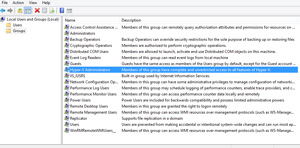
For those of you that were not aware, there is a Hyper-V Administrators group available locally to every Windows 8, Windows 8.1, Windows Server 2012 and Windows Server 2012 R2 which can allow any member to have full Hyper-V administrative control without necessarily belonging to the Local Administrators group on that machine.
 [Click on image for larger view.]
Figure 2. A quick tip for those who tend to ignore role-based access settings in Hyper-V.
Like I said this is a quick tip but one that seems to go overlooked. I highly recommend that you enforce role-based access within your environment if you don't do so already, and leveraging these built-in, pre-defined groups is most definitely the first step in the right direction.
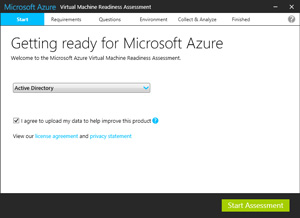
Quick Tip #2: Last week, Microsoft released a new tool to help you assess workloads and guide you through how to migrate these workloads to the cloud. The tool is called Microsoft Azure Virtual Machine Readiness Assessment and you can download it here.
 [Click on image for larger view.]
Figure 2. Microsoft Azure Virtual Machine Readiness Assessment does more than what the name implies.
Don't let the name of the tool mislead you. While it specifically references virtual machine, once installed the tool will crawl your infrastructure -- both physical and virtual -- and search for Active Directory, SQL, and SharePoint servers.
Once identified, it will then give you detailed recommendations and guidance on how to migrate these workloads onto Microsoft Azure.
Posted by Elias Khnaser on 06/16/2014 at 2:43 PM0 comments