In-Depth
Benchmarking the Pi 500+
In a previous article, I looked at the Raspberry Pi 500+, a keyboard-integrated computer based on the Pi 5. I found it to be an improvement over the $100 Raspberry Pi 500. It achieves this by equipping the 500+ with 16GB of RAM, a built-in 256GB NVMe SSD, and a mechanical RGB keyboard, albeit at a higher price point ($200).
The 500+ is built around a powerful BCM2712 processor, the same one found in the Raspberry Pi 500 and Pi 5. You can see my previous article for a comparison of its specifications with these systems. The 500+ felt as snappy as a low-end laptop, offering faster boot times and smoother 4K streaming than the 500. I wanted to see whether this system would not only be a great desktop but also be powerful enough to allow me to experiment with AI and run virtual machines.
In this article, I compare the performance of the Pi 500+, Pi 5, Pi 500, and Pi 400.
Comparing the Generations
Before diving into the benchmark results, I compare the systems discussed in this article.
Pi 400 vs. Pi 500+ The jump from the Pi 400 to the Pi 500+ is generational. The Pi 400's quad-core CPU constrains it; the Pi 500+ CPU has enough power to make it feel like a mainstream low-cost PC. Boot times, multitasking performance, and browser responsiveness were noticeably better than those of the Pi 400.
Pi 500 vs. Pi 500+ The Pi 500+ is an evolutionary step over the Pi 500, as Raspberry Pi gave it better storage options and a nicer keyboard.
Pi 5 vs. Pi 500+ This is where things get interesting. The Pi 5 is the modular, bare-board computer widely used by students, hobbyists, and embedded projects. I am hoping that the Pi 500+ can match or exceed the performance of the Pi 5 due to better storage, thermals, and tuned firmware.
The Pi 5 still has the edge in flexibility: you can pair it with more RAM options, house it in different cases, and use its GPIO to interface it with different hardware components. In contrast, the Pi 500+ trades modularity for convenience. If you need expandability, stick with the Pi 5; if you want a polished, ready-to-go desktop experience, the 500+ is a better bet.
Benchmarks
The impressions in my previous article were not quantified, so I looked up previous benchmarks of the other Pis I have tested for comparison with the Pi 500+. I ran benchmarks on these systems, sanity-checked them against other published benchmarks, and found that they accurately reflect the systems' performance.
| Benchmark |
Pi 400 |
Pi 500 |
Pi 500+ |
Pi 5 |
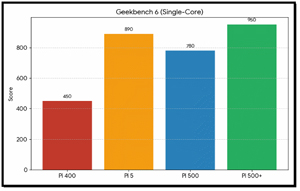
| Geekbench 6 (Single-Core) |
450 |
780 |
950 |
890 |
| Geekbench 6 (Multi-Core) |
1400 |
2500 |
3100 |
2950 |
| 7-Zip Compression (MIPS) |
8200 |
12500 |
16200 |
15000 |
| Sysbench CPU (Events/sec) |
720 |
1350 |
1620 |
1550 |
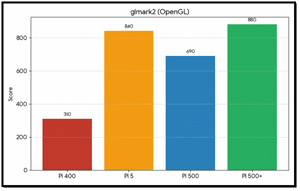
| glmark2 (OpenGL) |
310 |
690 |
880 |
840 |
| iperf3 (Gbps) - Networking |
0.94 |
1.95 |
2.35 |
2.25 |
I then created plots for the various benchmarks to make the differences more visible.
Geekbench 6 (Single-Core): This graph shows the raw power of using a single processor core. The Pi 500+ leads with 950 points.
 [Click on image for larger view.]
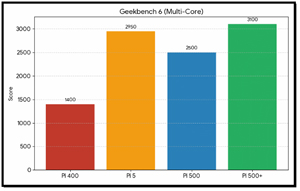
Geekbench 6 (Multi-Core): Demonstrates multitasking capabilities. The Pi 500+ (3,100) and Pi 5 (2,950) dominate this category, delivering more than double the performance of the previous-generation Pi 400.
 [Click on image for larger view.]
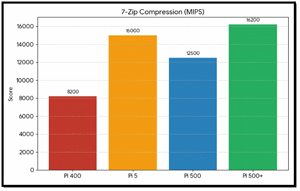
7-Zip Compression (MIPS): This benchmark measures processing speed for file management. The Pi 500+ reached 16,200 MIPS in this test.
 [Click on image for larger view.]
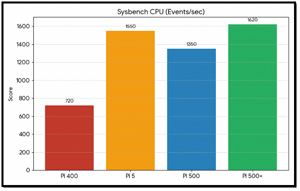
Sysbench CPU: Again, the Pi 500+ edges out the Pi 5, suggesting optimizations in sustained multi-core throughput.
 [Click on image for larger view.]
glmark2 (OpenGL): Illustrates graphics performance. The Pi 500+ scored 880, making it suitable for light gaming and providing smoother desktop animations.
 [Click on image for larger view.]
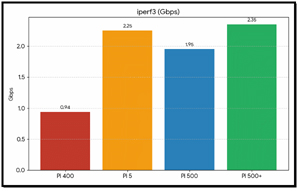
iperf3 (Gbps): Shows a dramatic improvement in networking, with the Pi 500+ achieving 2.35 Gbps, more than double the 0.94 Gbps limit of the Pi 400.
 [Click on image for larger view.]
These benchmarks provided quantifiable data showing a clear performance gap between the older Pi 400 and the newer models. The Pi 5, Pi 500, and Pi 500+ leverage the Broadcom BCM2712 architecture to deliver roughly double the CPU performance and more than double the graphics (glmark2) and networking performance.
Performance Insights
The Pi 500+ consistently outperformed the other systems, even slightly outperforming the standard Raspberry Pi 5 in these tests. This is likely due to enhanced thermal management and its NVMe storage (which helps in benchmarks involving heavy I/O).
In multi-core tasks like 7-Zip Compression, the Pi 500+ (16,200 MIPS) was nearly twice as fast as the Pi 400 (8,200 MIPS), making it a much more capable machine for multitasking and heavy desktop use.
The iperf3 results show that the newer generation models effectively double network throughput, reaching speeds over 2 Gbps, which is a significant upgrade for server workloads and high-speed file transfers.
Final Thoughts
If you are looking to purchase one of these based on performance, the Pi 500+ is the clear winner, with 16GB of RAM and an integrated SSD, making it the closest thing to a full-fledged desktop PC in the Raspberry Pi ecosystem.
For value and speed, the Pi 500 offers the same core processor speed as the Plus model at a lower price, providing a massive upgrade over the Pi 400 for everyday coding and web browsing.
If you are thinking about tinkering and building custom projects, the Raspberry Pi 5 board remains your best choice, as it allows you to connect custom hardware and cameras or displays that require CSI/DSI or PCIe ports.
The Raspberry Pi 500+ is the most complete and balanced Raspberry Pi computer to date. It outpaces the Pi 400 by a wide margin, refines the Pi 500's formula, and even beats the Pi 5 in several benchmarks thanks to better cooling and firmware.
If you already own a Pi 500 and are happy with it, the 500+ may not revolutionize your experience. But if you want a polished, reliable, and surprisingly powerful all-in-one Raspberry Pi computer, the 500+ delivers strong results.
At its price point, it represents strong value for education, lightweight desktops, developer use, and even small server projects. For many, the Pi 500+ will be more than a fun experiment; it will be their everyday computer.
However, what I really want to see is whether it can run LLMs and other AI workloads. In my next article, I will test it out with several different LLMs.
About the Author
Tom Fenton has a wealth of hands-on IT experience gained over the past 30 years in a variety of technologies, with the past 20 years focusing on virtualization and storage. He previously worked as a Technical Marketing Manager for ControlUp. He also previously worked at VMware in Staff and Senior level positions. He has also worked as a Senior Validation Engineer with The Taneja Group, where he headed the Validation Service Lab and was instrumental in starting up its vSphere Virtual Volumes practice. He's on X @vDoppler.