In-Depth
An AI-Enabled Business Laptop: The Lenovo ThinkPad T1g Gen 8
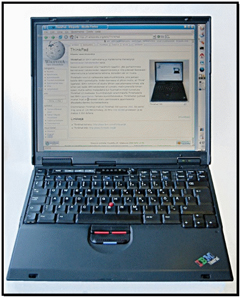
When I got my first T-Series ThinkPad, a T-30, back in 2002, I knew I had made it to the big leagues. As then, and still now, the Lenovo T-series is a workhorse laptop made for professionals.
 [Click on image for larger view.]
Over the years, it has evolved to meet the needs of mobile business users. Still, as local AI development, virtualization, and visualization have become the new norm for mobile professionals, the laptop has evolved to meet their needs.
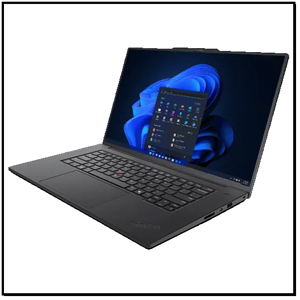
With that said, I was excited when Lenovo loaned me a Lenovo ThinkPad T1g Gen 8 (Model 21TE) for my series of articles on running AI locally.
 [Click on image for larger view.]
I wanted to see not only how well it could handle running AI workloads but also how well it could meet the needs of today's workers, so I spent several weeks with this machine, putting it through the paces of my daily workflow, which includes office applications, virtualization, and local AI model testing.
The laptop
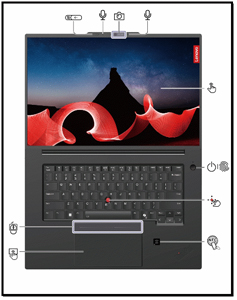
The laptop, as expected, does not lack features. Laying it out flat shows that at the top of the screen is an infrared-capable camera with a privacy shutter and dual microphones. It has a touchscreen, a power button with a fingerprint reader, an NFC (near field communication) pad, a Haptic Touchpad with three buttons, a TrackPoint above it, and, of course, its iconic red-tipped TrackPoint pointing stick.
 [Click on image for larger view.]
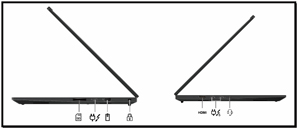
For connectivity, the laptop has two Thunderbolt 5 ports, one Thunderbolt 4 port, HDMI 2.1, USB-A 10Gbps, SD Express 7.0, 3.5mm audio, and a Kensington Nano slot. Internally, it has a Wi-Fi 7 module for connectivity. Interestingly enough, it does not have a wired Ethernet port.
 [Click on image for larger view.]
Under the Hood
In the past, I've found ThinkPads' build quality to be the standard for durability. I found that the T1g Gen 8 is no exception. It just feels well-built in part due to its aluminum chassis, which feels firm in my hands. This is one indicator of a laptop's quality, but I wasn't interested in its outward appearance; I was more interested in what was driving its performance, and Lenovo didn't skimp on the internals.
Lenovo has various models in the T1 series, and the model I reviewed (21TE) is powered by the Intel Core Ultra 7 265H. This is one of the new Arrow Lake processors that has a dedicated Neural Processing Unit (NPU). The processor has 16 CPU cores (6 Performance cores, 8 Efficient cores, and 2 Low-power E cores) with a max turbo frequency of 5.3 GHz.
The laptop has 32 GB of LPCAMM2 LPDDR5X-7467 RAM (operating at 7467 MT/s). In my testing, I have found that for virtualization and AI, memory bandwidth is just as important as RAM size, and this high-speed RAM prevents data-intensive operations from bottlenecking the CPU.
Another thing that I like about the T1 is that it was designed for serviceability. Since it is a loaner unit, I didn't want to take it apart to inspect it, but I did find a great exploded view of its internals in its hardware maintenance manual.
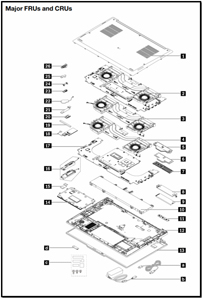 [Click on image for larger view.]
The GPUs
Traditionally, the T-series has relied on integrated graphics or low-power, entry-level mobile GPUs, as very little actual GPU-intensive work was done on the laptop itself. This is where the "g" in T1g comes from -- its graphics ability. GPUs aren't just for video editing or gaming anymore; they are the workhorse of local AI. The T1g addresses these needs by packing not one but two GPUs in the laptop. The one that will get the most attention is the NVIDIA GeForce RTX 5060 Laptop GPU, but it also has an Intel Arc 140T.
The NVIDIA GeForce RTX 5060 Laptop GPU in it has 8 GB of dedicated GDDR7 memory. This GPU was introduced in 2025 for gaming and creator laptops as a mid- to high-end mobile graphics processor. It is based on NVIDIA's Blackwell architecture. It features 3,328 CUDA cores, 5th-generation Tensor cores for AI acceleration, and 4th-generation ray-tracing cores. The GPU has AI-enhanced graphics technologies, including DLSS 4. The GPU's 8 GB of GDDR7 memory has a 128-bit bus, which allows it to deliver around 384 GB/s of memory bandwidth.
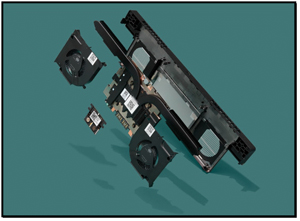 [Click on image for larger view.]
As mentioned above, the T1g system has two GPUs, using a hybrid graphics design that combines Intel's integrated GPU with NVIDIA's discrete GPU. The Intel GPU handles everyday tasks like desktop rendering, web browsing, and video playback, as it uses far less power and generates less heat, helping extend battery life. The discrete GPU delivers much higher performance and is used for demanding workloads such as gaming, 3D rendering, AI inference, and other GPU-accelerated applications.
The Intel Arc 140T is an integrated GPU designed for Intel's Core Ultra (Arrow Lake-H/HX) mobile processors. It has many features that were previously found only in discrete GPUs. It is built on Intel's Xe+ graphics architecture. The Arc 140T includes 8 Xe cores with 128 vector engines, 8 hardware ray-tracing units, and support for modern graphics technologies such as DirectX 12.2, AV1 media acceleration, and Intel XeSS AI upscaling. The GPU can reach around 2.3 GHz and shares the system's memory rather than using dedicated VRAM.
Despite being integrated into the CPU, the Arc 140T is a significant leap in mobile graphics for Intel. It has 1,024 shaders and supports hardware ray tracing and AI acceleration via Intel's XMX instructions. This enables it to handle 1080p gaming, GPU-accelerated content creation, and, more importantly, AI workloads without using the system's discrete NVIDIA GPU. This allows it to deliver graphics performance while maintaining battery life.
The magic that allows the system to decide which GPU to use is NVIDIA Optimus. Using this technology, the integrated GPU is the default and drives the display. When an application that needs more GPU power is detected, the NVIDIA driver automatically offloads rendering to the discrete GPU. If it's for a graphic application, rather than AI work, the rendered frames are then passed back through the integrated GPU to the display.
If needed, users can manually control this behavior in the NVIDIA Control Panel, where they can assign specific applications to always use the high-performance GPU or the power-saving integrated GPU. This approach gives laptops the best of both worlds: long battery life during normal use and desktop-class graphics performance when needed.
Besides the two GPUs, the Intel Core Ultra 7 265H has a dedicated NPU (Neural Processing Unit) called Intel AI Boost, designed to accelerate AI workloads while using less power than the CPU or either GPU.
The NPU can deliver roughly 13 TOPS (trillion operations per second). This is used for local AI inference tasks such as image processing, voice recognition, background video effects, and other on-device AI features. It works alongside the processor's CPU cores and the Intel Arc 140T GPU to create a heterogeneous AI engine. The NPU handles continuous low-power AI tasks, while heavier workloads are offloaded to the GPU or CPU. This design allows the laptop to run AI-accelerated applications locally while maintaining good battery life and responsiveness.
The GPUs and NPU are visible in Task Manager.
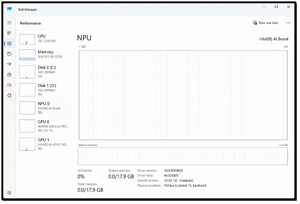 [Click on image for larger view.]
But for the most part, I monitor these resources using Aipex, which allows me to monitor the system remotely. You can read my review of Aipex here.
Initial Setup and Power-Up
Upon first boot, I configured Windows 11 without any issues.
Tom's tip: You can create a local user account instead of using a Windows account during setup when you are asked to connect to the network. As the exact steps may change, you should do a quick Google search to find the correct process for creating a local user.
The first thing that impressed me was the laptop's 16-inch 1920 x 1200 IPS display. It uses factory-calibrated X-Rite color and Eyesafe technology. While the resolution isn't 4K, I found that the 16:10 aspect ratio provided enough real estate for me to work on all of my applications without any issues.
 [Click on image for larger view.]
My daily work includes things like Office applications, video conferencing, and creating and viewing videos on the device. The T1g performed all of these tasks with aplomb, and I was impressed with its responsiveness. What really impressed me was how well it worked with graphic files. For example, when I export Camtasia files to MP4 format, the rendering time drops from 5 minutes to 35 seconds compared to using my old, non-GPU-equipped laptop.
First Impressions
When I got my first ThinkPad T-Series laptop back in 2002, I felt like I had finally joined the ranks of serious IT professionals. Over the years, I've watched the platform evolve, but the Lenovo ThinkPad T1g Gen 8 feels like one of the biggest leaps forward yet.
Lenovo loaned me the system as part of my ongoing work testing local AI, and I spent several weeks using it as my primary machine for office productivity, virtualization, content creation, and AI model experimentation. The laptop maintains the build quality and business-focused design I've always associated with ThinkPads, while adding modern features such as a high-quality display, Wi-Fi 7, high-speed LPDDR5x memory, and an Intel Core Ultra 7 processor with an integrated NPU designed specifically for AI workloads.
What really sets the T1g apart is its approach to AI and graphics processing. The system combines an Intel Arc 140T integrated GPU, an NVIDIA GeForce RTX 5060 Laptop GPU, and Intel's AI Boost NPU, enabling it to intelligently balance performance and power consumption based on the workload.
For everyday tasks, the integrated graphics handle the load efficiently, while demanding jobs such as AI inference, rendering, and GPU-accelerated applications automatically leverage the RTX 5060 through NVIDIA Optimus. In my day-to-day testing, the machine felt exceptionally responsive, whether I was running multiple applications, connecting external displays, or exporting video projects. The most dramatic example was video rendering, where a Camtasia export that previously took about five minutes on my older laptop completed in roughly 35 seconds on the T1g, demonstrating just how modern GPU acceleration can improve real-world productivity.
My testing so far has been qualitative; that is how I feel it is performing. In my next article, I will run benchmarks on the laptop to see whether the quantitative data supports my initial feelings about the device.
About the Author
Tom Fenton has a wealth of hands-on IT experience gained over the past 30 years in a variety of technologies, with the past 20 years focusing on virtualization and storage. He previously worked as a Technical Marketing Manager for ControlUp. He also previously worked at VMware in Staff and Senior level positions. He has also worked as a Senior Validation Engineer with The Taneja Group, where he headed the Validation Service Lab and was instrumental in starting up its vSphere Virtual Volumes practice. He's on X @vDoppler.