In-Depth
Benchmarking an AI-Enabled Business Laptop: The Lenovo ThinkPad T1g Gen 8
In my previous article, I examined the Lenovo ThinkPad T1g Gen 8 as a business laptop. I explored the hardware that makes it well-suited for modern workloads, particularly graphics-intensive applications and AI. This is due to its Intel Core Ultra processor, integrated Intel AI Boost NPU, Intel Arc integrated graphics, and NVIDIA GeForce RTX 5060 Laptop GPU. The system appears to have all the ingredients needed for modern, graphics- and AI-intensive applications.
Specifications only tell part of the story. In this article, I move beyond my initial impressions and focus on real-world performance, putting the T1g through a series of benchmark tests to see how effectively it can run large language models and other AI workloads, and whether it delivers on the promise of bringing practical AI capabilities to a laptop.
SPECworkstation 4
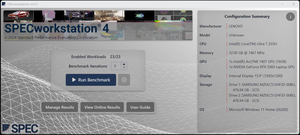
To quantify the laptop's general performance, I ran SPECworkstation 4 on it.
 [Click on image for larger view.]
I have found that for enterprise IT professionals and systems architects, SPECworkstation 4 serves as a neutral arbiter for evaluating hardware using real, demanding enterprise workloads. I like that, rather than relying on arbitrary synthetic scores, it simulates real-world pipeline stress across key verticals -- such as AI/data science, product development (CAD/CAM), financial modeling, and media rendering. It taxes the CPU, GPU, storage, and memory subsystems of a device.
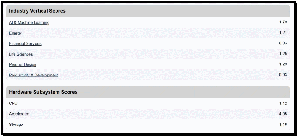
Workstation 4 numbers confirmed it could handle any office workload I could throw at it.
 [Click on image for larger view.]
The Lenovo ThinkPad T1g Gen 8 delivered well-balanced SPECworkstation 4.0 results. Its strongest showing came, unsurprisingly, in the AI & Machine Learning category, where it scored 1.79. This tells me that the system is particularly well positioned for emerging AI-assisted workflows, data science tasks, and inference workloads, which are now included in the SPECworkstation 4 benchmark suite.
Other industry vertical scores were respectable and remained solid across the board, with Product Design scoring 1.29, Life Sciences 1.25, Energy 1.21, and both Financial Services and Productivity & Development posting 0.93. Since a score of approximately 1.0 represents the benchmark's reference workstation, the T1g Gen 8 generally performed at or above workstation-class baseline levels in most professional workloads.
The results reveal the source of the system's strengths. The standout score was the Accelerator result of 4.05, demonstrating the contribution of the laptop's dedicated AI and graphics acceleration hardware to demanding AI-related workloads. By comparison, the CPU score of 1.12 and Storage score of 1.16 indicate competent performance from those subsystems, suggesting that the platform derives much of its advantage from its accelerator resources rather than raw CPU or storage throughput alone.
Overall, these results paint a picture of what a modern laptop optimized for AI-enhanced applications and accelerated computing tasks looks like.
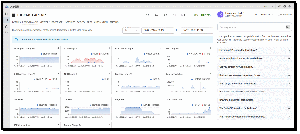
The resource graphs showed that Workstation 4, although a great tool for measuring a system's overall performance, did not fully stress the AI accelerators (GPUs and NPUs) in the system.
 [Click on image for larger view.]
What I wanted to concentrate on was how it would handle emerging workloads that use local AI. To do this, I would need another set of benchmarking tools.
AI Benchmarking
To get a sense of its AI power, I ran Geekbench AI and Ollama.
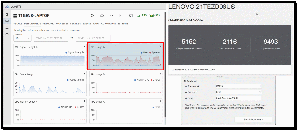
Using Geekbench AI, I tested AI workloads on the CPU using the ONNX framework.
 [Click on image for larger view.]
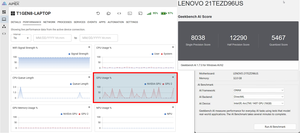
Then, I tested the Intel Arc 140T GPU.
 [Click on image for larger view.]
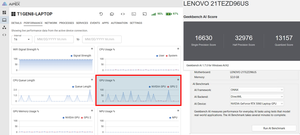
Then, the NVIDIA GeForce RTX 5060 Laptop GPU.
 [Click on image for larger view.]
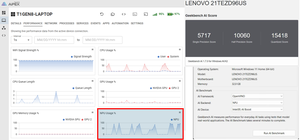
And finally, the Intel NPU.
 [Click on image for larger view.]
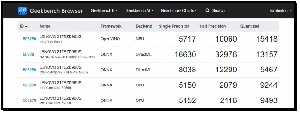
This data provided a useful comparison of how the different AI accelerators performed.
 [Click on image for larger view.]
Unsurprisingly, the standout results were from the NVIDIA GeForce RTX 5060 Laptop GPU, which delivers the highest overall AI performance by a wide margin. Its scores of 16,630 (Single Precision) and 32,976 (Half Precision) were significantly higher than those of the Intel NPU, Intel integrated GPU, and CPU. This shows that for demanding local AI workloads such as LLM inference, image generation, and AI-assisted content creation, the discrete NVIDIA GPU makes this device comparable to desktop systems and some low-end workstations.
I was surprised by how well the Intel NPU performs. While it cannot match the RTX 5060, its scores of 5,717, 10,060, and 15,418 show that it outperformed the CPU in AI-specific tasks while consuming far less power than the NVIDIA GPU. This is what it is designed to do, making it ideal for background AI features such as transcription, meeting assistants, and Windows AI workloads, with the added benefit of conserving battery power.
The Intel Arc 140T GPU sits in the middle. It delivers roughly 50% of the RTX 5060's performance in Single Precision but falls further behind in Half Precision and Quantized tests. This means that Intel's integrated graphics can accelerate many AI workloads effectively, but it is not a replacement for a dedicated NVIDIA GPU when maximum performance is required.
Running AI workloads on the CPU (Intel Core Ultra 7 255H CPU) ranked last overall. Although its Quantized score of 9,244 is respectable, its Single Precision score was 5,150, and its Half Precision score was only 2,079. This demonstrates why modern AI frameworks increasingly offload work to GPUs and NPUs whenever possible, and it is important to have different ways to process AI workloads.
The most interesting takeaway for me was that the NPU's quantized score (15,418) outperformed the RTX 5060's (13,157) in the quantized test. This suggests that certain low-precision AI models optimized for NPUs can run very efficiently on Intel AI Boost, which aligns with Microsoft's Copilot+ and Intel's strategy of pushing lightweight AI inference onto NPUs rather than the GPU or CPUs.
Which LLM?
Since the laptop was equipped with an NVIDIA GeForce RTX 5060 Laptop GPU, I had many options for local LLMs. Like most things in IT, the best local LLMs depend on what I plan to do with them: general chat, coding, research, or RAG. As the RTX 5060 has 8 GB of VRAM (the most common configuration), the sweet spot is currently in the 7B--14B parameter range when using quantized models.
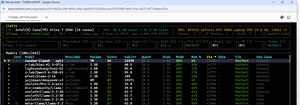
To get an idea of which LLM to use, I ran LLMfit, which lists suitable LLMs for a device's hardware.
 [Click on image for larger view.]
For general-purpose AI, I looked at Qwen3 8B as it offers excellent reasoning, strong writing quality, good coding ability, and efficient memory usage. A 4-bit quantized version fits comfortably with 8 GB of VRAM. I think that this model will generate tokens quickly on the laptop's RTX 5060.
For technical writing and research, the type of writing I often do around VMware, Kubernetes, EUC, and storage, I will be trying the Qwen3 14B. It is quantized to Q4, allowing it to run largely in GPU memory while delivering noticeably better reasoning and domain knowledge than smaller counterparts. For article drafting and summarization, it is considered one of the strongest open models available today.
I hope to start exploring AI-assisted coding with DeepSeek-Coder V2 Lite, which has been getting a lot of buzz. It handles PowerShell, Python, HTML, and scripting tasks particularly well.
Another aspect that I have been meaning to explore is creating a local RAG system. The RAG will contain much of my unpublished work and notes. For embedding models, I will be using BGE-M3 and Qwen3 8B or 14B.
My Geekbench AI results suggest it has more than enough performance to make these models feel responsive. Compared to the HP Firefly systems I tested previously with the Quadro P2200 eGPU (see my article here), I should see higher token-generation rates and much quicker response times, especially for 7B--14B models, as they can run entirely in GPU memory.
Running Local LLMs
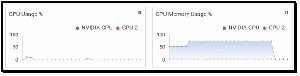
I first ran the qwen:14b LLM to get a feel for how well it would perform with a very large model. The AIPEX GPU memory usage graph showed that it used about 75% of the GPU's memory.
 [Click on image for larger view.]
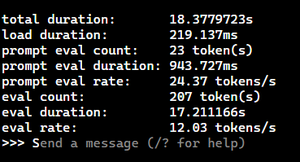
It ran and was responsive but did seem to drag a bit. It was able to generate a prompt eval rate of 24 tokens/s and an eval rate of 12 tokens/s.
 [Click on image for larger view.]
I then asked the same question, "Write a concise yet exhaustive four-page summary of quantum computing. Give references where applicable," on the qwen:1.8b model. It generated a prompt eval rate of 215.89 tokens/s and an eval rate of 51.3 tokens/s. However, although its answer was detailed, it was not as detailed as my previous results.
I ran an Ollama test on the T1g that I have run on other systems. These tests use three prompts: a factual question, a simple coding task, and a request to generate historical population data. The results showed that Gemma2:2b delivered the best overall balance of accuracy and performance. It correctly identified Salem as the capital of Oregon and generated functional HTML code, although it declined to create the population table. While not the fastest model, it consistently produced the most useful responses.
TinyLlama was by far the fastest model, generating over 1,000 tokens per second in some tests, but at the cost of lower quality. It failed the Oregon capital question, generated HTML that did not fully meet the requirements, and produced a population table that appeared to contain fabricated data.
DeepSeek-R1:1.5b was slower than TinyLlama and generated lengthy reasoning traces, but it struggled with all three prompts and failed to provide accurate or useful answers.
The most important takeaway is that raw token generation speed does not correlate with answer quality. For practical local AI workloads such as research, writing, and coding assistance, Gemma2:2b provided the best user experience despite being slower than TinyLlama. These tests also highlighted the impact of model load times, which often accounted for more time than the actual response generation, suggesting that future testing should distinguish between cold-start and warm-cache performance.
| Model | Best Eval Rate (tokens/sec) | Accuracy (3 Tests) | Notes |
|---|
| Gemma2:2b | 118.24 | 2/3 | Correct capital, good HTML, and did not create a population table |
| TinyLlama | ~1069 | 1/3 | Fastest model but poor factual accuracy |
| DeepSeek-R1:1.5b | ~312 | 0/3 | Reasoning-heavy output but inaccurate results |
Final Thoughts
The Lenovo ThinkPad T1g Gen 8 is a fascinating evolution. It successfully bridges the gap between a portable business laptop and a full-blown workstation.
For the graphics enthusiast or the AI developer who needs to work on the go, this machine can handle just about any workload or small-scale AI application you can throw at it. With its Core Ultra 7 processor, 32 GB of high-speed memory, and a formidable RTX 5060 GPU, it's much more than a laptop; it's a modern laptop designed for the next generation of AI-intensive computing or even running and communicating with a local LLM.
If you're looking for a machine that can handle today's applications while being ready for AI-assisted workloads, the T1g Gen 8 should be on your shortlist.
I would like to thank Lenovo for loaning me this powerhouse of a laptop, Ollama and Geekbench for the tools I used to quantify its performance, and Tassient for setting me up with Aipex to manage and monitor the laptop remotely.
About the Author
Tom Fenton has a wealth of hands-on IT experience gained over the past 30 years in a variety of technologies, with the past 20 years focusing on virtualization and storage. He previously worked as a Technical Marketing Manager for ControlUp. He also previously worked at VMware in Staff and Senior level positions. He has also worked as a Senior Validation Engineer with The Taneja Group, where he headed the Validation Service Lab and was instrumental in starting up its vSphere Virtual Volumes practice. He's on X @vDoppler.