For a good part of this year, I have been part of a tremendous opportunity to see a virtualized storage platform come to existence. This week, Hitachi Data Systems released the Hitachi
Virtual Storage Platform
. The VSP platform is an enterprise storage platform of extreme scale, with a maximum configuration offering 255 PB in six racks.
More
Posted by Rick Vanover on 09/30/20101 comments
I'm still digesting the material I got at VMworld 2010 . The show had two over-arching themes: cloud and VDI. It's not entirely surprising, as these are new segments for VMware and the larger virtualization market. While those are good things to focus on, I and others still need to focus on the virtual machines we have in use.
Virtual machine memory management is still one of the most tactical areas of virtualization administration. Something I'm watching closely is how new operating systems will impact my daily practice. My practice mainly revolves around Windows-based virtual machines, and Windows Server 2008 R2 is the server operating system of choice. Too many times applications give a generic list of requirements, and infrastructure administrators are left making decisions that may impact the overall success of the installation. One strategy is to identify what the memory would look like on a new virtual machine in terms of slices that represent each requirement. Fig. 1 shows a sample virtual machine with two core applications.
More
Posted by Rick Vanover on 09/28/20107 comments
One benefit of vCenter is the plug-in framework, which allows a rich ecosystem of partner software to be installed in the vSphere Client and work with vSphere. While most installations will automatically install a vSphere plug-in, you may be pondering on how to remove them. This is important as many software programs are used on an evaluation basis or any carryover plug-ins from a vCenter 2.5 to 4.0 upgrade. It's easy to find a stale plug-in by viewing the Plug-In Manager .
More
Posted by Rick Vanover on 09/24/20106 comments
In my post, "
Religious Issue #6: Thin Provisioning
," a number of people piped up with comments, as I expected. I'm a fan of thin provisioning and use it in almost every situation for my virtualization practice. But, there is one side of thin provisioning that is more of an art than a science: managing oversubscription.
More
Posted by Rick Vanover on 09/23/20102 comments
Within virtualization circles, there is debate about whether or not to use thin provisioning on the hypervisor. Thin provisioning is available on all major hypervisors, including VMware's vSphere 4. For vSphere, thin provisioning of a virtual machine disk file (VMDK) incrementally grows the disk as the guest operating system increases its storage requirement.
Thin provisioning with vSphere has a number of caveats. First, there is no incremental shrink. This means if that the guest operating system incurs a growth of 1 GB, and then that space is removed from the guest; the 1 GB is still consumed within the VMDK. The solution is a Storage vMotion activity which will resize the destination VMDK to the actual consumption on disk. Storage consumption usually only goes up; so this behavior isn't exactly too much of an inconvenience in the everyday administrator's storage management practice.
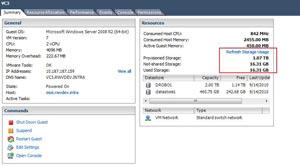
The good news is that if the guest virtual machine consumes an additional 1 GB of storage in the above example and then is removed and subsequently replaced by another 1 GB of growth on the guest operating system's file system, the net growth is only 1 GB. Guest virtual machine behavior may dictate otherwise, but this is a generalization. You can check the used vs. provisioned storage amounts for a vSphere virtual machine in the summary section of the vSphere Client (see Fig. 1).
 |
|
Figure 1. The provisioned amount compared to consumed amount for a thin provisioned disk on a virtual machine will show the usage at that moment. (Click image to view larger version.) |
The potential downside to a thin provisioned VMDK is the behavior associated with the guest virtual machine and the frequency of metadata updates. On a VMFS volume, a metadata update is a coordinated transaction across all hosts and paths connected to the datastore. This is probably the one downside of the VMFS architecture as there is not software coordinator node or management layer as other clustered file systems have in place. When the VMDK file grows in its thin provisioned state, a metadata update occurs for each growth operation. Aside from growing a virtual machine, the following activities constitute metadata updates, according to VMware KB 1005009:
- Creating a VMFS datastore
- Expanding a VMFS datastore onto additional extents
- Powering on a virtual machine
- Acquiring a lock on a file
- Creating or deleting a file
- Creating a template
- Deploying a virtual machine from a template
- Creating a new virtual machine
- Migrating a virtual machine with VMotion
- Growing a file, for example, a Snapshot file or a thin provisioned Virtual Disk
Generally speaking, metadata updates are something that you want to avoid and are probably the biggest ding against thin provisioned VMDKs. If you have good insight into the application's growth behavior, you may not want to thin provision those frequently growing virtual machines. Of course, you could rely on the storage system to do the thin provisioning and avoid the metadata updates.
How do you approach thin provisioning for vSphere virtual machines? Share your comments here.
Posted by Rick Vanover on 09/21/20107 comments
While VMware users a slew of new features in vSphere 4.1, I still mourn the loss of the vSphere Host Update Utility. This nice Windows-based tool made it very easy to upgrade an ESXi host from one version to the next, as we did when we went from ESXi 3.5 to 4.0. It also made updating ESXi hosts with hotfixes a breeze as well.
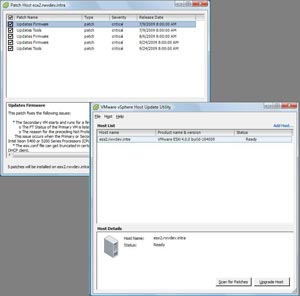
With vSphere 4.1, the free installation of ESXi now dubbed vSphere Hypervisor does not have the Host Update Utility (see Fig. 1). It was part of the vSphere Client Install package as an option that would allow administrators to apply ESXi updates to the host as well as deploy an upgrade .ZIP file.
I have not received official confirmation why the tool wasn't included, but my suspicion is that it is to drive customers to purchase some form of vCenter Server and use Update Manager to keep the hosts up to date. Another reason might be that ESXi's command-line interface is no longer labeled "unsupported." Within the command-line interface, administrators can now use the esxupdate or vihostupdate utilities, but tThese are far less intuitive than the smooth operations of the Host Update Utility. For the free ESXi installations, it isn't exactly "supported" but at least it is not "unsupported." I expect it to be confusing, yet I guess this twisted mind of mine can make sense of this change of heart by VMware.
 |
|
Figure 1. The Host Update Utility is nifty, but it's not in the new vSphere update. (Click image to view larger version.) |
At VMworld 2010 I attended a session on ESXi. I asked the presenter, a VMware employee, what the technical reason was for removing the tool. I didn't get a clear answer, but he asked us if we would like to see it back. Of course I would, but I won't hold my breath. This is yet another setback in a series of cuts or dead-ends to free products from VMware, and I don't expect the trend to stop soon.
Do you miss the Host Update Utility? Share your comments here.
Posted by Rick Vanover on 09/16/20109 comments
If you are like me, it may seem that there is simply too much e-mail to keep track of. Here's one that caught my eye: an important product bulletin about a potentially urgent driver issue for ESX and ESXi installations that utilize a Broadcom interface with the BCM57711 chipset. This issue posted on
HP’s Web site
More
Posted by Rick Vanover on 09/14/20103 comments
Now that VMworld is over, I can start the very long process of digesting all of the information from the show. One of the most important things I have been investigating is the vStorage APIs for Array Integration or VAAI (see
my earlier post
on VAAI). With vSphere 4.1, administrators can send a tremendous amount of work usually handled by the ESXi host to the storage processor.
More
Posted by Rick Vanover on 09/09/20102 comments
Few things are more frustrating than surprise software maintenance costs, much less trying to get a handle on what these costs will be. The VMware Support and Subscription (SnS) offering is no exception, and many would say it's a clumsy experience compared to other software management offerings.
Did you know that on the VMware Website for your account, there is a tool that can give you an estimate of the costs of renewing the SnS offering? The estimator tool will calculate the SnS extension cost for a particular serial number, start date, service level and even specify the currency. It's located in the VMware customer account portal.
The SnS estimator tool can be critical for administrators to provide a good estimate for budgeting process, and more importantly can be a more direct process. Too many times, administrators are bogged down with working with resellers and VARs who have to access VMware for some assistance. I'm sure each of us had some sort of issue with any serial numbers that were upgraded from VI3 as well, which can complicate SnS renewals.
The estimator is focused on base vSphere product licenses, and doesn't appear to have options for the newly announced pay-per-VM options for certain workloads.
Managing the SnS process is unfortunately one of the not-so-glorious aspects of virtualization administration, but it needs to be done. This will ensure the environment is correctly licensed, supported and ready for upgrades from VMware. I can't say if SnS management is easier through the reseller channel or directly with VMware, as I've heard complaints on both ends from big and small organizations.
What are some of the tricks you employ for managing your VMware SnS account? Share your comments here.
Posted by Rick Vanover on 09/07/20100 comments
One of the things that I try to do at VMworld is catch a piece of news or an announcement that really makes me stop and ponder. Today, Novell and VMware
announced
that an installation of Novell's SUSE Linux Enterprise Server (SLES) is now included with each vSphere purchase at the Standard level or higher. Essentials and Essentials Plus are not part of this program. If you have made a vSphere purchase between June 9, 2010, and now, any
More
Posted by Rick Vanover on 09/02/20102 comments
I'm trying to focus on the core virtualization and supporting technologies here in San Francisco. Generally speaking, Mondays and Thursdays are days where you can try to squeeze in other things. Tuesdays and Wednesdays are very content-heavy days. There were a few sessions that I took in today outside from the base set of virtualization.
One of the events I attended was about the new Nimbula Director. As it exists today, Nimbula is based on the KVM hypervisor and is a hybrid cloud solution. This is ironic, at face value, as the founders worked on the team that developed the Amazon EC2 cloud. The hypervisor base will expand, but that isn't really too important. Nimbula Director is a hybrid cloud solution that presents a management dashboard that can manage an internal cloud and public clouds such as Amazon EC2 servers running as Amazon Machine Images (AMIs). Hybrid cloud architecture is an emerging science, of sorts, but what stood out to me is Nimbula's approach to permissions and policies. Frequently, many off-the-shelf solutions have products that don't allow the security policy to supersede the permissions model. In the VMware world, there are solutions like HyTrust that can allow this to happen. Nimbula is on the right course in taking the totally fresh perspective to the permission model and infrastructure policies.
More
Posted by Rick Vanover on 08/31/20104 comments
Two days ago, I threw out my five favorite things about the VMworld conference. As promised, here is my snarky collection of five things I dislike. Anyone who has attended will likely agree with one of more of them. A big event like this can never make everyone entirely happy, but it sure is fun to complain every now and then:
- Buzz. There is so much buzz leading up to VMworld, and this is not just VMware buzz. The entire partner ecosystem feels the collective obligation to make some form of announcement during the event. Now, I am even seeing companies making announcements before the event. I am bombarded with information about upcoming product announcements and briefing requests that it is simply unmanageable. The unfortunate consequence is that I have to try to prioritize what events, briefings or announcements are going on this time of year.
- Location. I've critiqued this before, but I would really love to see a VMworld event somewhere other than in the western U.S. Previous events have been in San Diego, Los Angeles and Las Vegas. My suspicion is that San Francisco will reign as the host city for some time for the U.S. event due to logistical support from Palo Alto. I don't have a problem with San Francisco, I just would prefer variety. Heck, maybe I'll start going to the Europe event instead!
- Scheduling. My issue isn't so much scheduling with the sessions, but trying to squeeze it all in! There is so much to do beyond the sessions, and there are great opportunities to meet amazing people. It isn't uncommon to be double or triple booked and have to decide whether to go to an event to meet Steve Herrod or another one with Paul Maritz. This pressure is somewhat relieved this year, as Monday is now a full conference day.
- Connectivity. I suppose that anytime you put over 10,000 nerds in a confined space, it will be difficult to deliver Internet access via any mechanism. The wireless access has historically been less than reliable and mobile phone users report the same. In 2008, my Sprint wireless broadband device was rock solid. We'll see how my Droid X phone does at the show.
- Venue. I'll admit that I am effectively insatiable here. Partly because I generally prefer to avoid crowds in very tight spaces, but also because I feel that there can be more facilities with more natural transitions from one event type to another, such as the general session to breakouts. This based on events at other facilities (again with point #2) that seem to do this better. The 2008 event in Las Vegas at the Venetian was okay by my scrappy scorecard, even in spite of the smoke from the casinos. The 2009 event at the Moscone Center was a little less than okay, but I do prefer San Francisco over Las Vegas.
This gripe list is not meant to discredit the hard work that scores of VMware employees, partner companies, event planners and facility personnel put forth on the event. If I really had issues with VMworld, I wouldn't go. What rubs you wrong about VMworld? Share your comments below.
Posted by Rick Vanover on 08/24/20103 comments