In-Depth
Hands-on with a Pi 500+
When the Raspberry Pi 400 launched in 2020, I was excited because it reimagined what a small computer could be by placing a computer (Raspberry Pi 4) into a keyboard chassis. The concept wasn't new, as the Commodore 64 and ZX Spectrum did decades earlier, but the Pi 400 revitalized this concept.
Raspberry refined that idea in 2025 with the release of the Pi 500, modernizing it with more powerful internals, better connectivity, and other improvements. I bought one and wrote a review of it. I was impressed by it, as for around a hundred bucks, you get a system that can be used to create documents, surf the web, and watch videos. Furthermore, I hoped it would encourage young users to experiment with programming and other IT-related tasks. However, it was not without faults, well, not really faults, more like trade-offs that had to be made to keep it at this price point.
Now, just months later, we have the Raspberry Pi 500+, a device that addresses many of the Pi 500's limitations while keeping the same "computer-in-a-keyboard" form factor.
I plan to use the Raspberry Pi 500+ over the next few weeks in various scenarios -- as a desktop replacement, a virtual-machine host, and a platform for AI work.
I will run it through its paces using various benchmarks and comparing it with the Pi 400, Pi 500, and the standalone Pi 5 board.
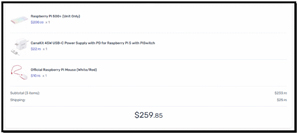
The kit that I bought and will be using is from canakit.com and costs $260.
 [Click on image for larger view.]
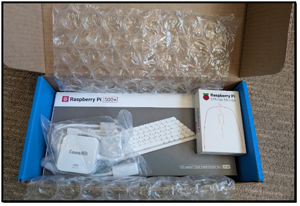
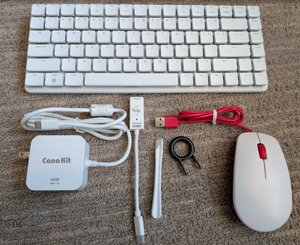
The kit included the Pi 500+, a power supply, and a mouse, which was everything I needed to get started except the mini-HDMI to full-size HDMI adapter, which I already had.
 [Click on image for larger view.]
Unboxing the 500+
After unboxing the device, I found the keyboard a bit heavier than I expected.
 [Click on image for larger view.]
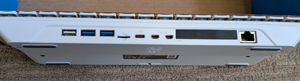
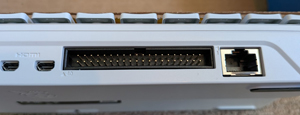
Looking at the back of the 500+, I found the ports. There are dual micro-HDMI outputs (capable of driving two 4K monitors at 60 Hz), four USB ports (two USB 3.0, two USB 2.0), Gigabit Ethernet, and a USB-C port for power.
 [Click on image for larger view.]
The Pi 500+ also has native PCIe 2.0 x1 expansion via a breakout connector, something hobbyists and developers had been requesting for years.
 [Click on image for larger view.]
Wireless connectivity is via Wi-Fi 6 and Bluetooth 5.2.
Tom's Tip: Make sure you use a high-quality USB-C 45-watt power supply. I have used cheap USB-C power supplies and experienced unpredictable results.
Hands-On with the Raspberry Pi 500+
After examining the 500+, I plugged it in and powered it up. I found the Pi 500+ experience familiar, but it seemed faster than the 500.
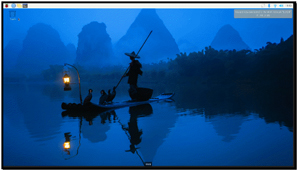
The Pi OS desktop comes preinstalled on the system and required me to answer just a few setup questions (time zone, username, Wi-Fi info, etc.) after powering it on. After downloading the latest updates, it rebooted and displayed a desktop.
 [Click on image for larger view.]
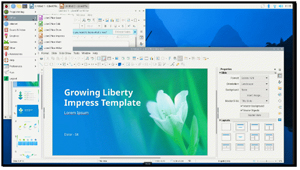
I was able to use it for writing, email, and browsing the web without any issues.
 [Click on image for larger view.]
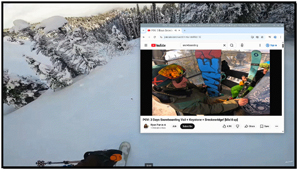
Media playback, thanks to hardware-accelerated decoding, handled the 1080p and 4K streaming video better than the Pi 5. But I still found it occasionally stuttered when I played 1080p streaming videos or multiple videos at the same time.
 [Click on image for larger view.]
While the system was booting and running, it consumed 3 to 8 watts.
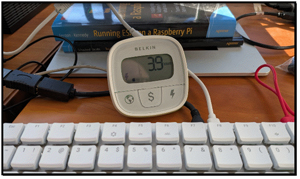 [Click on image for larger view.]
Design, Build, and Specs
The Pi 500+ is based on the Pi 5 and, like the Pi 400 and 500 before it, comes in a keyboard chassis. At first glance, it looks like a slightly larger version of the Pi 500, but if you look closely, you can see that the 500+ has a mechanical keyboard, and when it is powered on, its RGB backlighting is apparent.
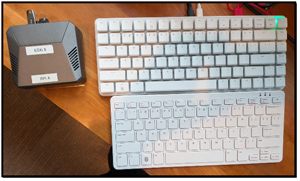 [Click on image for larger view.]
The Raspberry Pi 400 is based on the older Pi 4 architecture, while the newer Pi 500 and Pi 500+ utilize the significantly faster Broadcom BCM2712 processor found in the Pi 5.
|
Raspberry Pi 5 |
Raspberry Pi 400 |
Raspberry Pi 500 |
Raspberry Pi 500+ |
| Form Factor |
Standalone |
All-in-one Keyboard |
All-in-one Keyboard |
Mechanical All-in-one Keyboard |
| Processor |
BCM2712 (2.4GHz A76) |
BCM2711 (1.8GHz A72) |
BCM2712 (2.4GHz A76) |
BCM2712 (2.4GHz A76) |
| RAM Options |
2GB, 4GB, 8GB, 16GB |
4GB |
8GB |
16GB |
| Storage |
MicroSD / PCIe M.2 (via HAT) |
MicroSD |
MicroSD |
256GB NVMe SSD + MicroSD |
| Keyboard |
N/A |
Membrane (Chiclet) |
Membrane (Chiclet) |
Mechanical (RGB Backlit) |
| Display |
2x Micro-HDMI (4Kp60) |
2x Micro-HDMI (4Kp60) |
2x Micro-HDMI (4Kp60) |
2x Micro-HDMI (4Kp60) |
| Expansion |
PCIe 2.0, 40-pin GPIO |
40-pin GPIO |
40-pin GPIO |
Internal M.2, 40-pin GPIO |
Key Differentiators
The Pi 5, 500, and 500+ have a significantly more powerful CPU than the Pi 400, thanks to their newer Cortex-A76 CPU.
The Pi 500+ stands out from the others with its mechanical keyboard equipped with RGB lighting, while the Pi 400 and Pi 500 use membrane keys.
Storage speed should be notably improved on the Pi 500+, as it comes with a built-in 256GB NVMe SSD. This should allow for faster boot times and file transfers compared to the MicroSD-only options on the Pi 400 and Pi 500.
Tom's Tip: The keyboard-based models (400, 500, and 500+) do not have a dedicated camera and display (CSI/DSI) port like those found on the standard Raspberry Pi 5, making them less suitable for specific projects.
Final Thoughts
I've always been a fan of the "computer-in-a-keyboard" concept, and the Raspberry Pi 400 successfully revived that retro form factor in 2020. Last year, I reviewed the Raspberry Pi 500, which I found to be a great value at $100 despite its limitations. I wanted to look at 500+ to see if it addresses some of those limitations. Although it shares the same Broadcom BCM2712 processor as the Raspberry Pi 5 and 500, it comes with 16GB of RAM, a built-in 256GB NVMe SSD, and a mechanical keyboard.
In my initial hands-on testing, the difference in speed was noticeable; its boot times seemed faster, everyday tasks like browsing feel snappier, and it even handles 4K video streaming more smoothly than the Pi 500.
In my next article, I will use various benchmark tests to quantify its performance.
About the Author
Tom Fenton has a wealth of hands-on IT experience gained over the past 30 years in a variety of technologies, with the past 20 years focusing on virtualization and storage. He previously worked as a Technical Marketing Manager for ControlUp. He also previously worked at VMware in Staff and Senior level positions. He has also worked as a Senior Validation Engineer with The Taneja Group, where he headed the Validation Service Lab and was instrumental in starting up its vSphere Virtual Volumes practice. He's on X @vDoppler.