In-Depth
Sovereign Cloud: Microsoft's Answer to Geopolitical Uncertainty
There's an interesting shift taking place in enterprise IT, nearly everywhere except the United States towards sovereign clouds. Political instability and a war impacting the global economy have forced organizations to rethink that "no brainer" choice of hosting their workloads in those cost-effective public cloud regions.
In this article I'll look at the overall signs of the sovereign cloud movement, and what choices are available to businesses. We'll then look at the offerings from Microsoft, all the way on the spectrum from "just in an Azure region in your country" to "disconnected hardware in our own datacenter."
The impetus for writing this article came a few weeks ago as I was part of a team of MCTs delivering a three-day course to European Microsoft partners on Sovereign Cloud options, and the QA team got many, many questions on the nuance of the different offerings, and strong concerns around what laws applied, and what would happen in the case of US government overreach.
The Sovereign Cloud Market
This is how Fortune Business Insights assesses the current market in Europe, and their projection to 2034.
 [Click on image for larger view.] Figure 1: Europe Sovereign Cloud Market Size 2021-2034. (source: Fortune Business Insights).
Whereas Grand View Research provides this graph and report for the overall market:
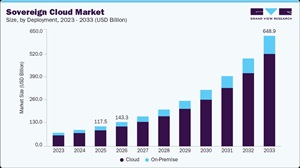 [Click on image for larger view.] Figure 2: Sovereign Cloud Market. (source: Grand View Research).
While the actual USD Billion figures don't necessarily line up, and the devil is in the details of how you define sovereign cloud computing, bottom line is -- organizations outside of the US want options for how and where to host their workloads. Additional data points are France ditching Teams and Zoom and rolling out their own video conferencing platform called Visio for all government departments by 2027, the Dutch military building their own sovereign cloud and the Austrian Army replacing Microsoft Office with LibreOffice.
Predictably, there have been two reactions: Microsoft, AWS and others are bending over backwards to provide options by "embracing digital sovereignty", followed by the US State Department telling its diplomats to lobby against laws designed to prevent US tech companies from handling foreigners' data, arguing that data sovereignty and data localization laws will hinder the US AI sector.
This isn't a political site or article, but suffice to say, the saying "the cloud is just someone else's computer" is taking on a new meaning in the current climate.
Which Type of Sovereign Cloud Do You Want?
Politics aside, what's an organization or a Microsoft partner outside of the US to do? There are many questions to look at here, so as a tech advisor (whether part of the internal IT team, or an external partner), understanding the options is crucial. In a way, advising and designing solutions in this space is no different than any other IT consulting -- investigate business needs, understand the technological options available, then pick the solution that most matches the need.
At one end of the spectrum of choices (I'm focusing on Microsoft's offerings here, but other tech providers have similar options on the menu) is Sovereign Public Cloud. These are public Azure regions that provide technical, operational and contractual controls built in to meet certain requirements. Examples include the Azure German regions, staffed by German nationals and managed by a German subsidiary, similar to how 21Vianet in China runs all of Azure's regions in that country. These are still under the control of Microsoft though, and depending on the risk appetite of an organization, this might not be acceptable for certain workloads.
Following on from there, there are at least two (more coming) National Partner Clouds that provide Microsoft 365 and Azure services, one run by Delos in Germany that meets BSI cloud requirements, and Bleu in France, aiming to meet SecNumCloud 3.2 requirements. For some organizations this might be just what the doctor ordered, "public" Azure and Microsoft 365 services that are "on tap" just like in the normal public cloud, but run by an independent vendor, in country. Businesses that have already invested in the Microsoft 365 and Azure platforms, where the users are already trained and familiar with them, can just do a straightforward migration.
The second most extreme option is a Sovereign Private Cloud, where you move the workloads back on premises. Much to the glee of the cloud naysayers of the last 15 years or so, you gain control by running your workloads on your own tin, in your own datacenters. Microsoft offers two flavors here, hybrid or disconnected.
At the extreme end of the spectrum, you can ditch Microsoft 365 and Azure and pick domestic alternatives instead. This option brings some serious downsides to factor in, for Microsoft 365 there aren't many realistic options that aren't also US (looking at you Google Workspace) or from other countries that again might not tick the compliance regulation boxes (looking at you Zoho). Retraining all users on a completely new system is likely to impact productivity for some time, and if it's a newer or less established service, you've also got to factor in undiscovered cyber security flaws, not to mention lack of matching features.
On the Azure (or AWS/GCP) side, migrating to a non-US cloud might bring less impact, depending on the workloads you're hosting. If it's mostly Virtual Machines, they can be moved to a domestic cloud provider relatively easily, ditto for Kubernetes clusters and containers. But if you're taking advantage of many of the integrated and powerful PaaS services offered by all the large public cloud providers, migrating to a completely different platform can be a major undertaking. Don't forget in-house skills -- IT admins aren't generally experts in multiple cloud platforms, so retraining them and getting them onboard will be necessary.
Microsoft Options
As part of Microsoft's umbrella of Sovereign Cloud offerings, let's look at what's available for Microsoft 365 first. There's Advanced Data Residency, which gives you control over country and region data locations and prioritized tenant migration services. Then there's Data Guardian, which ensures that only European-resident personnel can authorize access to systems, and that all access is stored in a tamper-evident ledger, helping businesses to fulfill regulatory requirements. There's a new portal called Regulated Environment Management (REM) that helps you manage these features in a central location and also comes with pre-configured policies for EU countries.
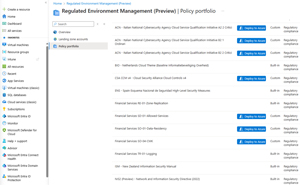 [Click on image for larger view.] Figure 3: Regulated Environment Management. (source: Microsoft).
Part of the story for large organizations is that they must inventory and label their data, to ensure that they can track data flows inside and outside and identify sensitive data to ensure that it's stored where they need it to be. To manage all of this you need to understand the shared responsibility model that all cloud providers use:
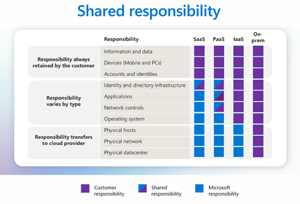 [Click on image for larger view.] Figure 4: Shared Responsibility Model. (source: Microsoft).
Key management for encryption keys is another part of the overall sovereignty approach -- "normal" Microsoft 365 tenants use a platform key that's handled by Microsoft, but you can opt for an Azure Key Vault Managed HSM (Hardware Security Module) or even External Key management where you store keys in a HSM outside of Azure. Make sure to understand the business and regulatory needs and pick the best key management option to match.
On the Azure side there's the Sovereign Landing Zone (SLZ), where you pre-prepare an environment with all the services that your workloads will need, paired with policies to enforce the settings you need.
Both Azure and Microsoft 365 offer customer lockbox; if you open a support case with Microsoft and the engineer needs to touch "your" infrastructure, they'll request this access, which first has to be approved internally (for a limited time and with a limited scope), and then you'll need to approve it as well, all of which is stored in the audit log.
Finally, in Azure you can deploy workloads into Azure Confidential Computing (ACC) where the VM (or containers if you're running them on ACC) is encrypted to protect against access from a rogue administrator inside of Azure.
Private Cloud with Azure Local
This is possibly the most exciting area of investment, with a lot of different new features and scale expansion. Quick recap -- Azure Local is an integrated storage, networking and compute platform that you can run on your own servers (if they meet the requirements), or purchase as ready-made clusters, with one to 16 nodes. The Azure Local OS is essentially a version of Windows Server, so virtualization is based on Hyper-V, storage uses Storage Spaces Direct (S2D), etc. The prior name was Azure Stack HCI (Hyper-Converged Infrastructure). It's all tied together using Azure Arc so everything is managed from Azure, using familiar Azure tools. You can run Azure Kubernetes Services (AKS), Azure Virtual Desktop (AVD) and many other services on these clusters.
New features include the ability to connect Azure Local clusters to Fibre Channel SANs (only for new clusters at this point), using Azure Migrate to move VMs from other platforms (including VMware -- I wonder why 😊) onto Azure Local and rack-aware clusters. The latter lets you split a larger cluster into two smaller ones in two different buildings on your campus with separate power and cooling, enabling very high availability.
AI power is also covered -- if you need to run inferencing or training on-premises, NVIDIA RTX Pro 6000 Blackwell Server Edition GPU is supported on Azure Local, and you can also run Microsoft Foundry Local. Foundry is Microsoft's developer-focused AI platform in Azure.
If you need to, you can now run Azure Local completely disconnected and never connect to an Azure region -- identity is managed by Active Directory and patching is handled by downloading updates from a connected machine, then carrying it across to the cluster.
Microsoft 365 Local is now generally available, so where you need to, you can run Exchange, SharePoint and Skype for Business Server locally.
The 16-node cluster limit has been a challenge for large enterprises and the most interesting evolution here is Azure Local multi-rack. Here you have one rack for SAN storage and the control plane, and a minimum of 3 compute racks. This isn't your granddad's cluster, though -- the physical servers run Azure Linux, NOT Windows Server / Azure Local OS. That's right, Microsoft is selling Linux clusters. The management interface is based on Kubernetes. They're also replacing Active Directory with Azure Key Vault running locally for secrets and identity storage.
Conclusion
In times of uncertainty and change, there are also opportunities. Microsoft is providing a range of options for organizations that are looking for alternatives to public cloud for their workloads. And Microsoft choosing Linux over Windows Server for their bare metal servers in Azure Local must be their biggest reveal for 2026.
About the Author
Paul Schnackenburg has been working in IT for nearly 30 years and has been teaching for over 20 years. He runs Expert IT Solutions, an IT consultancy in Australia. Paul focuses on cloud technologies such as Azure and Microsoft 365 and how to secure IT, whether in the cloud or on-premises. He's a frequent speaker at conferences and writes for several sites, including virtualizationreview.com. Find him at @paulschnack on Twitter or on his blog at TellITasITis.com.au.