In-Depth
Running AI on VMware Workstation
In a previous article, I ran LLMs on a Raspberry Pi 5, and although I was able to get it working in less than 5 minutes, it took around 17 minutes to run even the most basic task, thereby making it useless for real-time work. I hoped the limitation of running AI locally was due to the Pi's underlying hardware, not to running AI locally. To test this, I will run LLMs on my laptop in a virtual machine to test their performance.
Laptop Specifications
The laptop that I will be running it on is an older HP Firefly with an Intel Core i7-8665U. The CPU is an 8th-generation Whiskey Lake mobile processor launched in 2019, designed for laptops and other mobile devices. It has 4 cores, 8 threads, a 1.9 GHz base frequency, and 4.8 GHz in turbo mode. It has 8 MB Intel Smart Cache and integrated UHD Graphics 620, with a 15W TDP. It was designed to be a power-efficient CPU for business, multitasking, and office productivity. The system has 16 GB of RAM and a 477 GB SSD drive.
Testing Framework
For these tests, I will be using VMware Workstation Pro 25H2, a totally free Type 2 hypervisor that runs on Windows or Linux. You can read more about why I like it so much.
The VM I created to run my tests runs Ubuntu 24.04. I gave the VM 3 CPU cores and 12GB of RAM.
As with my Pi testing, I will be testing the same small LLMs: gemma2:2b, tinyllama, deepseek-r1:1.5b, and qwen2.5:3B.
I will run the same three tests on all the LLMs above using the same script that I used for my Pi testing.
You can read more about these models and my testing script in my previous article.
Testing the LLMs
I powered down all other applications on the Windows laptop while the tests were running.
While the tests were running, I monitored the laptop using Task Manager and the VM using htop.
The tests ran without a hitch. On the Windows machine, Task Manager showed that three cores were at 100% and that all 12GB of RAM was in use. On the Linux VM, htop showed that all three assigned cores were in use during the tests.
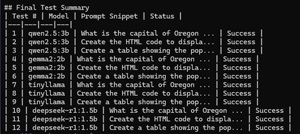
Below is an example of the summary that it produced.
 [Click on image for larger view.]
Test Results and Analysis
To get an accurate result, I ran my testing script 4 times. The test results were consistent across runs.
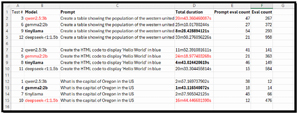
I parsed the results for the Model, Prompt, total duration, prompt eval count, and eval count in the output and put them in a spreadsheet for further analysis.
 [Click on image for larger view.]
Digging into the data, I found that these results revealed performance patterns across LLMs. This highlights the importance of matching the model to the workload type.
I found that TinyLlama consistently delivered the fastest response times. This would make it my choice for real-time inference, edge deployments, and latency-sensitive applications, particularly for factual queries and lightweight code generation.
Qwen2.5:3B provided a balance of speed and output quality. It performed reliably across all tasks with moderate token usage and predictable runtimes. It would be well-suited for general-purpose workloads and RAG pipelines, which I hope to work with in the future.
Gemma2:2B showed mixed behavior, excelling at simple factual queries but slowing significantly on structured tasks such as my HTML generation and tabular data creation prompts.
I found it interesting that DeepSeek-R1:1.5B exhibited extreme variability. It was relatively fast on simple code generation but slowed down on reasoning tasks, with token counts and runtimes increasing by an order of magnitude. This reflected its chain-of-thought reasoning architecture, which prioritized analytical depth over speed.
Overall, these benchmarks demonstrated to me that no single model is optimal for all workloads. Significant performance and cost efficiencies can be achieved through intelligent model choice: using lightweight models for routine tasks and reserving reasoning-focused models for complex analytical tasks, running them on hardware that supports them.
Charting the Data
To help me visualize my data, I aggregated it and created a few charts.
Average Token Output by Model
This chart compares the average number of tokens generated by each LLM.
I found that DeepSeek-R1 produced far more tokens than the other LLMs, confirming its heavy chain-of-thought reasoning style. The smaller LLMs were far more concise, improving speed and efficiency.
 [Click on image for larger view.]
Compute Efficiency (Seconds per Token)
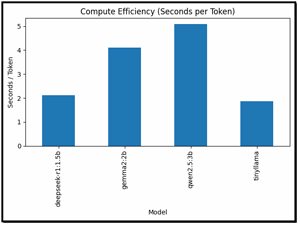
This was a very revealing chart as it shows how much time each model spends per generated token.
Looking at this data, I found that TinyLlama was the most efficient model. Qwen2.5:3B provided a strong balance of speed and output quality, while DeepSeek-R1 was extremely inefficient for throughput, as expected given its focus on reasoning.
 [Click on image for larger view.]
VMware Workstation vs. Pi
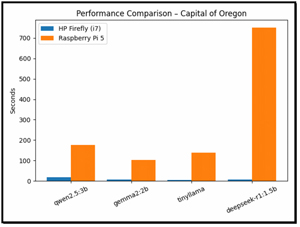
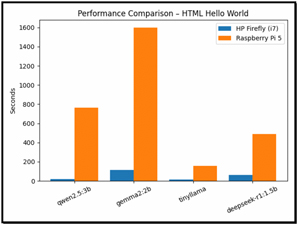
I then pulled up the results from my Pi testing and compared them with those from my x64 VM. I found that my Pi was significantly slower than x86 systems.
Among the models tested, TinyLlama demonstrated the most efficient scaling when run on Raspberry Pi devices. In contrast, DeepSeek-R1 proved unsuitable for reasoning tasks on ARM platforms due to the time it took to complete them.
 [Click on image for larger view.]
 [Click on image for larger view.]
[Click on image for larger view.]
The performance gap between the HP Firefly (Intel i7-8665U) and Raspberry Pi 5 (ARM BCM2712) is driven by a combination of architectural, microarchitectural, software, and memory-system factors.
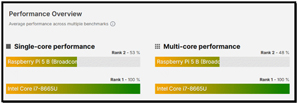
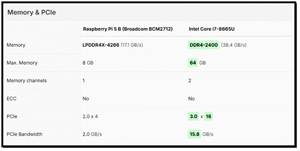
To get an idea of why there is such a wide disparity in performance between the systems, I went to cpu-monkey.com and compared the CPUs in each system.
 [Click on image for larger view.]
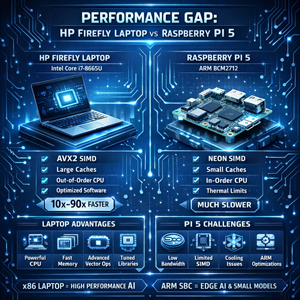
The performance gap between the HP Firefly laptop with its Intel Core i7-8665U and the Raspberry Pi 5 with its ARM BCM2712 processor is driven by differences in CPU architecture, vector processing capabilities, memory hierarchies, and software optimization.
The Intel processor benefits from a wide, out-of-order execution pipeline, large caches, aggressive branch prediction, and advanced SIMD vector instructions (AVX2), all of which are heavily leveraged during LLM inference. These capabilities allow modern Intel CPUs to process matrix operations and token generation far more efficiently than the
Pi's ARM cores, which rely on smaller caches, lower memory bandwidth, and more limited vector units. As a result, even my smaller LLMs ran dramatically faster on my x64 laptop, with speed differences ranging from roughly 10× to more than 90×!
 [Click on image for larger view.]
Hardware is not the only constraint; the disparity is exacerbated by the maturity of AI software on x64 processors and by power constraints. Most LLM inference engines and numerical libraries are extensively optimized for x64 platforms, whereas ARM implementations are less well-tuned, particularly for quantized and vectorized workloads. In addition, the Pi 5 has thermal and power constraints, limiting sustained clock speeds and causing throttling during long inference runs.
 [Click on image for larger view.]
Together, these factors make complex reasoning models slower on ARM, while lightweight models such as TinyLlama scale better. Overall, the results demonstrate that current ARM SBC platforms are best suited for small, efficiency-focused models and edge inference use cases, whereas x86 laptops and workstations remain far better equipped to run more capable, compute-intensive LLM workloads.
Final Thoughts
In this article, I set out to determine whether the slow performance I experienced when running LLMs on a Raspberry Pi 5 was due to limitations in the local AI itself or simply to the Pi's hardware constraints. To test this, I ran four small LLMs inside an Ubuntu 24.04 virtual machine on an HP Firefly laptop using VMware Workstation Pro. The VM was allocated three CPU cores and 12GB of RAM, and I executed the same scripted tests I had previously used on the Pi.
The data I collected revealed clear performance differences among the models and between hardware platforms. TinyLlama delivered the fastest and most efficient results, making it ideal for real-time and edge workloads, while Qwen2.5:3B provided a strong balance between speed and output quality. DeepSeek-R1, designed for reasoning-heavy tasks, generated far more tokens and showed significant slowdowns on complex prompts.
When compared to my Raspberry Pi 5, my Intel-based laptop was orders of magnitude faster, largely due to architectural advantages such as AVX2 vector instructions, larger caches, higher memory bandwidth, and better software optimization for x86 platforms. Overall, the results demonstrate that lightweight models can run acceptably on ARM-based SBCs, but x86 systems remain far better suited for demanding LLM workloads and reasoning-focused tasks.
So far, I have tested all my LLMs on Linux systems, but since Ollama also supports Windows, I will run them natively on my Windows 11 laptop. This will also, hopefully, allow me to leverage the laptop's GPU in my next article.
About the Author
Tom Fenton has a wealth of hands-on IT experience gained over the past 30 years in a variety of technologies, with the past 20 years focusing on virtualization and storage. He previously worked as a Technical Marketing Manager for ControlUp. He also previously worked at VMware in Staff and Senior level positions. He has also worked as a Senior Validation Engineer with The Taneja Group, where he headed the Validation Service Lab and was instrumental in starting up its vSphere Virtual Volumes practice. He's on X @vDoppler.