In-Depth
Review of Lenovo ThinkPad P16 Gen 3: A Powerful AI Laptop Workstation
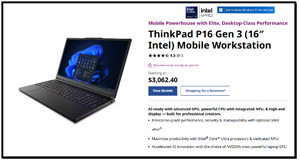
In this article, I will review the Lenovo ThinkPad P16 Gen 3, which is proving to be a highly capable laptop for personal AI development and use. Lenovo lent me this system after I first requested a mid-priced (~$2,000) AI-compatible laptop. However, after discussing what I was doing with the laptop, they suggested and sent me their latest P series model. This thing is a beast, as it is basically a workstation in laptop clothing.
For the past 10 years, the P-series, Lenovo's most technologically advanced and powerful line of laptops, has been the go-to device for engineers, data scientists, and others who need workstation-level power in a laptop form factor. But, with the recent explosion in generative AI and local Large Language Models (LLMs), the requirements for computers have shifted. It's no longer about raw CPU power; it's about TOPS (Tera operations per second) and VRAM. The ThinkPad P16 Gen 3 is a major shift for Lenovo, as it was designed from the ground up to handle AI workloads.
As someone who spends significant time testing high-performance endpoints, virtualization stacks, and AI workloads, I was eager to get my hands on this workstation-class laptop.
 [Click on image for larger view.]
The Laptop
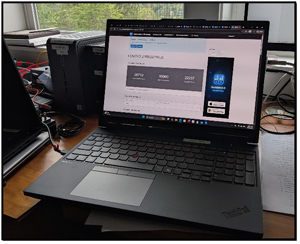
The P16 has the tank-like build quality that I have come to expect from ThinkPads. It is a laptop, but it is not a lightweight system in either performance or weight. It has a 16-inch screen and weighs in at a hefty 5.6 lb. That weight is a trade-off for the power and ruggedness of the device. The laptop is constructed from a mix of aluminum and magnesium, and its durability and ruggedness have been tested and passed the MIL-STD-810H durability tests.
 [Click on image for larger view.]
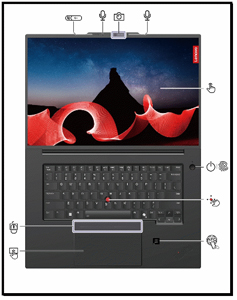
The laptop, as expected, has many professional features. Laid out on my desk, the top of the screen shows an infrared-capable camera with a privacy shutter and dual microphones. It has a touchscreen, a power button with a fingerprint reader, an NFC (near field communication) label, a Haptic Touchpad with three buttons, a TrackPoint above it, and, of course, its iconic red-tipped TrackPoint pointing stick.
For me, the Lenovo keyboards have been and remain the gold standard. The P16 has a full-sized keyboard with a number pad, 1.5mm of travel, and that familiar tactile snap, which I love. There is a new addition: a dedicated Copilot key. While I miss the right-hand Ctrl key it replaced, it's a signal of where the industry is heading. I also like that, in addition to the trackpad, there are three mouse buttons, which make navigating very easy.
 [Click on image for larger view.]
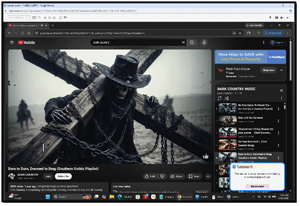
I do need to give a shout-out to the system's user-facing stereo speakers (2W x 2). They use Dolby Atmos and Dolby Voice for high-quality audio. The speakers provided loud, clear sound with excellent bass response. They are different and an improvement over those found in typical business laptops. I found that they became my go-to sound, that I used during the day to play music in my office, and that they could be easily heard even over the fan noise when the system was under heavy load. I also found that the videos it played were of excellent quality.
 [Click on image for larger view.]
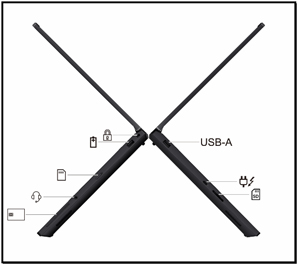
For connectivity, the left side of the laptop has a Security lock slot, a USB-A connector (USB 10 Gbps, Always On USB), a Nano-SIM card tray, a 3.5 mm audio connector, and a Smart card slot. The right side features a USB-A connector (10 Gbps), a USB-C power connector (Thunderbolt 4), and an SD card reader. Internally, it has a Wi-Fi 7 module for connectivity.
 [Click on image for larger view.]
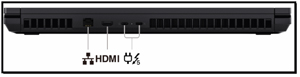
On the back of the laptop, it has Ethernet, HDMI, and USB-C power connectors (Thunderbolt 5).
 [Click on image for larger view.]
Under the Hood
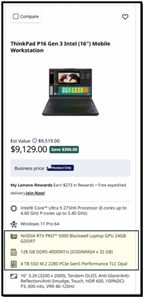
The P16 Gen 3 laptop comes in various hardware configurations. The unit I tested (21RR-zd7wus) was equipped with the most powerful hardware I've seen in a mainstream laptop.
 [Click on image for larger view.]
At the heart of the machine is the Intel Core Ultra 9 285HX (Series 2). This is a 24-core CPU (8 Performance cores and 16 Efficient cores) with a max turbo frequency of 5.5 GHz. What makes this "Ultra" chip different from previous generations is the inclusion of a dedicated NPU (Neural Processing Unit) and Intel AI Boost. While the CPU handles heavy lifting for traditional multi-threaded applications like rendering or compilation, the NPU is designed to offload sustained, low-power AI tasks, such as background blur in video calls or real-time text-to-speech, thereby reducing the load on the main CPU.
The P16 Gen 3 can be configured with 16 to 192GB of memory. My review unit came with 192GB of RAM spread across four SODIMM slots. For virtualization enthusiasts, some users have reported running their home labs with multiple Windows and Linux VMs on this laptop using type-1 and type-2 hypervisors.
Tom's Tip: I have experienced issues with virtualization on the CPUs with P and E cores.
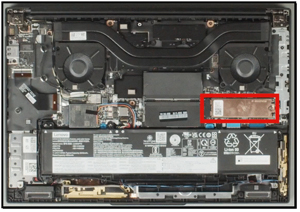
Another cool workstation feature of this system is its support for three M.2 solid-state drive slots. One is under the base cover, while the other two, which are under the keyboard, are RAID-capable for disk performance or capacity. Although they are not easy to access, they are accessible.
 [Click on image for larger view.]
Display
The model I reviewed had the 16-inch WQUXGA (3840 x 2400) Tandem OLED touch display. With 600 nits of brightness (peaking at 1500 nits for HDR content) and a 120Hz variable refresh rate, it's one of the best screens I've ever used on a laptop. The color accuracy (100% DCI-P3) is factory-calibrated by X-Rite, making it suitable for professionals who need to ensure their visuals are color correct.
Connectivity: Wi-Fi 7
One area often overlooked is networking, but for a workstation user, it's critical. The inclusion of the Intel Wi-Fi 7 BE200 with a maximum theoretical speed of 5.8 Gbps means it is ready for the next generation of wireless speeds. In my testing on a Wi-Fi 6E network, I reached my ISP's limits before the card's. Moving a 50GB VMDK file was noticeably faster over my Wi-Fi 6 network than on my wired 1 GbE systems.
The AI Edge: Local LLMs and TOPS
The "AI PC" branding isn't marketing fluff on this machine. This machine has four ways to handle AI workloads: the CPU delivers up to 36 TOPS, the NPU delivers up to 13 TOPS, the iGPU delivers up to 8 TOPS, and the GPU (NVIDIA RTX PRO 5000) delivers up to 1824 TOPS. This machine would be an absolute monster for local AI development.
I will write a separate article about my performance testing of this laptop, but I did some ad hoc testing of its AI performance using Ollama. On an older high-end laptop, you might see 15-20 tokens per second. On this system with its Blackwell GPU, my testing showed that my AI chats using a local LLM were in real time and on par with, or better than, my ChatGPT sessions, and that AI processing on the laptop reached over 390 tokens per second.
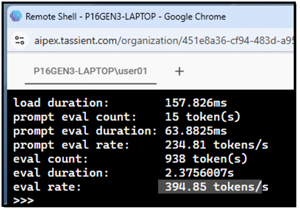 [Click on image for larger view.]
While the NPU doesn't have the raw horsepower of a dedicated GPU, it was used by a local OCR (Optical Character Recognition) tool to scan a 100-page PDF. It completed the task while consuming significantly less power than the GPU, keeping the laptop cool enough that I didn't hear the fan kick on, unlike during my ollama tests, which used the CPU and GPU.
The GPU
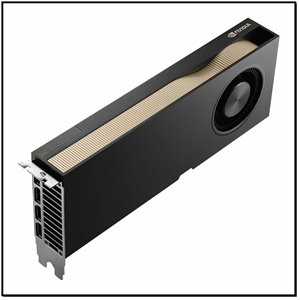
Putting an NVIDIA RTX PRO 5000 into the P16 is a game-changer, as it's built on NVIDIA's new Blackwell architecture. The jump to 24GB of GDDR7 memory with its 896GB/s bandwidth means that we can process massive 3D datasets and complex AI models right on the laptop without hitting memory bottlenecks. Whether it's local LLM inference or complex rendering, the fifth-generation Tensor Cores, which support FP4 precision, can deliver up to 3x the AI performance of the previous generation.
Lenovo crafted the laptop to maximize synergy between the Blackwell GPU and the P16 Gen 3's hardware, where the efficiency really shines. Because the laptop uses PCIe 5.0, data transfer between the Intel Core Ultra 9 processor and the GPU is extremely fast, effectively doubling the bandwidth of older systems. I've noticed that even under heavy thermal loads, Lenovo's cooling system effectively manages the GPU's 95W TDP, allowing the device to maintain high CPU clock speeds.
The device supports ninth-generation NVENC and sixth-generation NVDEC, which support 4:2:2 encoding, which can significantly streamline a video production pipeline. This means you can encode high-resolution video faster than ever, while the fourth-generation RT Cores render photorealistic images in the background.
Being able to carry a laptop with 1,860 TOPS into a meeting or an event is incredible.
 [Click on image for larger view.]
To get a feel for the power of the NVIDIA GPU, I used ollama to run qwen3.6:27b and queried it. This model runs on 18GB RAM. I was able to use it for real-time chats, but I noticed the fan would come on during extensive prompts. I was impressed, and in my next article, I will extensively test its AI performance.
 [Click on image for larger view.]
After working with the system, this GPU is more than capable of running a 7B, 13B, or even 27B parameter model locally, as it has enough space for the weights and the KV cache.
Battery Life
In reality, no one buys a 24-core workstation with an NVIDIA RTX PRO 5000 and expects all-day battery life. Lenovo equipped the laptop with a 99.9Wh battery, the maximum allowed on airplanes, and it lasted about 5 hours while doing routine office work (web browsing, document editing, and Slack). However, when I engaged the GPU for AI tasks, it dropped to under 45 minutes. For AI work, it will need to be plugged in, as it simply won't last long on things like a long-distance flight without being plugged into a power outlet.
Monitoring the System
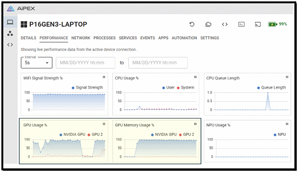
One of the issues I initially had was figuring out how to remotely monitor the system for this review and my benchmarking article. Fortunately, I came across a product called Aipex by Tassient that allowed me to monitor and graph the two GPUs and the NPU in this system, remotely connect to the system, and that even has a pretty cool AI assistant built into it.
Final Thoughts
To paraphrase Liam Neeson's character, Bryan Mills in Taken, "this Lenovo ThinkPad P-series laptop has a very particular set of skills, skills it acquired over a very long career." It is a specialized tool for a specialized audience. If your daily work involves heavy virtualization, data science, or local AI development, there are very few laptops that can match the P16's performance.
The combination of its powerful 24-core Intel CPU, NVIDIA Blackwell-based GPU, and 192GB of RAM makes it a future-proof investment for the next 3 to 5 years. While it's heavy, expensive, and power-hungry, it delivers on the promise of bringing workstation performance to a laptop. If you need a machine that can train a model in the morning, host multiple VMs in the afternoon, and create AI-generated videos and render them overnight, this is the laptop for you.
For those who need to stay at the cutting edge of the AI landscape, the P16 Gen 3 isn't just a safe bet; it's the system to benchmark against. With the P16, it's no longer just about "thin and light," but about having an uncompromising, workstation-grade compute wherever you go.
In my next article, I will run this system through some tests to quantify its AI performance.
About the Author
Tom Fenton has a wealth of hands-on IT experience gained over the past 30 years in a variety of technologies, with the past 20 years focusing on virtualization and storage. He previously worked as a Technical Marketing Manager for ControlUp. He also previously worked at VMware in Staff and Senior level positions. He has also worked as a Senior Validation Engineer with The Taneja Group, where he headed the Validation Service Lab and was instrumental in starting up its vSphere Virtual Volumes practice. He's on X @vDoppler.