Recently, I attended the HP StorageWorks Tech Day in Houston. The event was a way for bloggers to see HP's storage products, from big to small. HP also showcased new products and the corresponding features that go into deciding on storage products for virtualized and non-virtualized infrastructures.
More
Posted by Rick Vanover on 04/20/20107 comments
I'm always on the prowl for small tweaks that can individually make a small difference in the overall experience of a system. In the case of virtualization, this can allow me to squeeze a little more out of my systems.
For performance tweaks, of course the de facto vSphere resource is the Performance Management Best Practices document. But, while I chew through the document when it is updated, it doesn't have as many very specific configurations as I would like. There is logic in that, as you can get in trouble by over-configuring virtual machines, host servers or the storage.
More
Posted by Rick Vanover on 04/20/20100 comments
You think you know all of the hypervisors? How about this one: I recently took a tour of the
ScaleMP Versatile SMP
(vSMP) hypervisor, which is interesting in that it's targeted to very high-performance workloads. The basic idea here is that commodity server equipment is aggregated together via a high-speed InfiniBand connection, either a switch or via a series of point-to-point connections. The vSMP hypervisor is targeted as a replacement for high-end compute environments in favor of replacing them with less expensive yet very powerful commodity servers. ScaleMP touts 60 to 80 percent cost savings over the supercomputer model with their vSMP hypervisor solution.
More
Posted by Rick Vanover on 04/15/20103 comments
As virtualization grows beyond the primary datacenters, opportunities arise to smaller IT footprints. Recently, I've started mentoring a few people in selecting a virtualization technology that is right for their needs. Some of these people read
my open-ended invitation
to provide advice on how to get started with virtualization.
More
Posted by Rick Vanover on 04/08/20107 comments
For VMware vSphere environments, there is more to provisioning a disk than simply choosing thick or thin. Within the vSphere Client we are not given all of the information on how the disks are provisioned when they are created.
The distinguishing factor among virtual disk formats is how data is zeroed out for the boundary of the virtual disk file. Zeroing out can be done either at run time (when the write happens to that area of the disk) or at the disk's creation time.
The VMDK format, VMware's virtual disk format, is used in three primary ways:
- Thin Provisioned Disk: The thin virtual disk format is perhaps the easier option to understand. This is simply an as-used consumption model. This disk format is not pre-written to disk and is not zeroed out until run time.
- Thick Provisioned Disk (Zeroed Thick): The Zeroed Thick option is the pre-allocation of the entire boundary of the VMDK disk when it is created. This is the traditional fully provisioned disk format that we would use in the VI Client in previous versions. In the vSphere Client, this is the default option.
- Thick Provisioned Disk (Eager Zeroed Thick): This pre-allocates the disk space as well as each block of the file being pre-zeroed within the VMDK. Because of the increased I/O requirement, this requires additional time to write out the VMDK. This is also the required format for the FT virtual machine feature with vSphere.
Within the vSphere Client, the thin provisioned VMDK and eager zeroed thick options are displayed by checking the appropriate box. If the default option is selected (no boxes chosen), the VMDK format will be Zeroed Thick (see Fig. 1).
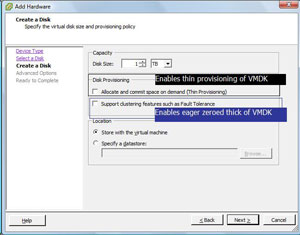 |
| Figure 1. Each VMDK option can be selected within the vSphere Client, including Zeroed Thick as the default format. (Click image to view larger version.) |
So, why is this important? For one, there may be a perceived performance implication of having the disks thin provisioned. The thin provisioning white paper by VMware explains with more detail how each of these formats are used, as well as a quantification of the performance differences of eager zeroed thick and other formats. The white paper states that the performance impact is negligible for thin provisioning, and in all situations the results are nearly indistinguishable.
Posted by Rick Vanover on 04/06/20100 comments
In a few circles in the virtualization community, some experts recommend stepping down the number of ports for virtual switches (vSwitch) in VMware vSphere, as well as VI3 installations. This was also evident in
a post
last year where higher consolidation ratios may drive vSphere administrators to up the amount of ports on a vSwitch.
More
Posted by Rick Vanover on 04/01/20102 comments
Virtualization is a technology that can apply to almost any organization in a number of ways. The strategy that the small and medium business may use for virtualization would differ greatly from that of a large enterprise. Regardless of size, scope and virtualization technologies in use, there are over-arching principles that guide how the technology is to be implemented.
It is easy to get hooked on the cool factor of virtualization, but we also must not forget the business side. In my experience, it is very important to be able to communicate a cost model and a return on investment analysis for your technology direction. Delivering these end products to management, a technology steering committee or your external clients will be a critical gauge to the success of current and future technologies. Virtualization was among the first technologies that made these tasks quite easy.
More
Posted by Rick Vanover on 03/29/20100 comments
Storage and related administration practices are among the most critical factors to a successful virtualization implementation. One of the vSphere features that you may be overlook is the paravirtual SCSI (PVSCSI) adapter. The PVSCI adapter allows for higher-performing disk access as well as relieving load on the hypervisor CPU. PVSCI also works best for virtual workloads that will require high amounts of I/O.
Configuring the PVSCI adapter is slightly less than intuitive, primarily because it is not a default option when creating a virtual machine. This is for good reason, as the adapter is not supported as a boot volume within a virtual machine. PVSCSI is supported on Red Hat Linux 5, Windows Server 2008 and Windows Server 2003 for use for non-booting virtual disk files.
More
Posted by Rick Vanover on 03/25/20103 comments
Last week, Microsoft announced a number of new virtualization technologies targeted at the desktop space. The additions are primarily focused on virtualized desktops, VDI and application virtualization. Somewhat of a footnote to all of this is that a new addition, dynamic memory, will apply to all Hyper-V virtualization, not just the desktop technologies.
More
Posted by Rick Vanover on 03/23/20101 comments
I have mentioned before that in my home lab, I use a DroboPro device that functions as an iSCSI target. It's a great, cost-friendly piece of shared storage that can be used with VMware systems. Recently, my DroboPro device failed, entering a series of reboots of the controller. I'll spare you the support experience, but the end result is that the company sent me a new chassis.
More
Posted by Rick Vanover on 03/17/20100 comments
Last week, I had the honor of presenting at the
TechMentor Conference
in Orlando. If you aren't familiar with TechMentor, you should be. Simply speaking, it is a track-driven series of training sessions brought to you by real-world experts on topics that everyone can use. Presenters this year included Greg Shields, Don Jones, Mark Minasi, Rhonda Layfield, and others.
More
Posted by Rick Vanover on 03/16/20109 comments
Last week, I had the honor of being one of the guests on the inaugural
Virtumania
podcast. On the show we had
Rich Brambley
,
Sean Clark
(the guy with the hat) and
Mark Farley
. Our topic was the VirtualBox hypervisor and what Oracle has in store with that and virtualization in general. Rich and I are avid users of VirtualBox in the Type 2 hypervisor space, and it was a good place to discuss how we use VirtualBox and where it fits in the marketplace. Here is a quick rundown of version 3.1.4 that have rolled into the product recently:
More
Posted by Rick Vanover on 03/11/20100 comments