In-Depth
A Laptop for Everyday AI Work -- The Lenovo ThinkPad P16 Gen 3 21RRZD7UUS
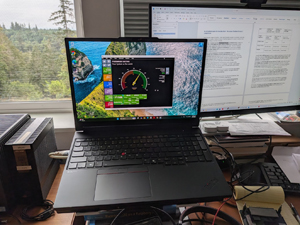
Over the past couple of months, I have been fortunate enough to be loaned a couple of different Lenovo ThinkPad laptops, work with them, and review them for a series of articles that I have been writing on running AI locally.
The first one I reviewed was the ThinkPad P16 Gen 3 (21RR-ZD7WUS), a beast of a machine with its RTX PRO 5000 GPU and 192 GB of RAM, which is basically a mobile workstation-class system that comes in at around 10 grand. The next ThinkPad I reviewed was the ThinkPad T16g Gen 3 (21TEZD96US), which handled modern AI-enabled applications without any issues, in part thanks to its NVIDIA GeForce RTX 5060 Laptop GPU.
The system I will be reviewing for this article is a ThinkPad P16 Gen 3 (21RRZD7UUS), with an NVIDIA RTX PRO 3000 Blackwell GPU. This system is positioned between these two systems in terms of price and performance. The kicker was that this system only had 16 GB of RAM. Having been spoiled over the years with cheap, readily available RAM, I thought that it would be interesting to see if this system's powerful CPU and GPU could make up for the lack of RAM.
I wanted to see not only how well this P16 meets the needs of modern office applications, but also how well it could run AI workloads. To do this, I spent several weeks with the laptop putting it through the paces of my daily work, which includes office applications, and using local AI models.
 [Click on image for larger view.]
In this article, I will focus on this ThinkPad but will compare it to the two other laptops I recently reviewed. They do have different CPUs and other hardware; however, the biggest difference between them is their GPUs, so I will start with that.
Three Distinct Systems, Three Distinct GPUs
Even though the GPUs in these three systems share the Blackwell architecture, they represent completely different segments of NVIDIA's mobile lineup.
The RTX PRO 3000 and RTX PRO 5000 Blackwell are designed for commercial engineering, data science, local LLM evaluation, and heavy rendering workloads. They rely on highly optimized, enterprise-grade drivers and hardware, and use ECC (Error-Correcting Code) memory. The NVIDIA GeForce RTX 5060 Laptop GPU is designed for mainstream gaming, video editing, and everyday productivity. It has consumer-focused Game Ready drivers and standard memory.
The best way to see the differences in the GPUs is via the chart below.
| GPU Specs | NVIDIA RTX PRO 3000 Blackwell | NVIDIA RTX PRO 5000 Blackwell | NVIDIA GeForce RTX 5060 |
| Target Segment | Mid-to-High Mobile Workstation | Ultra High-End Mobile Workstation | Mainstream Mobile Gaming |
| CUDA Cores | 5,888 | 10,496 | 3,328 |
| Tensor Cores | 184 (5th Gen) | 328 (5th Gen) | 104 (5th Gen) |
| Dedicated VRAM | 12 GB GDDR7 | 24 GB GDDR7 | 8 GB GDDR7 |
| Drivers | Enterprise-grade | Enterprise-grade | Game Ready |
The RTX PRO 5000 Blackwell operates in a different performance tier from the other two GPUs. It has far more CUDA cores and Tensor cores than the other two. This allows it to handle massive rendering tasks, parallel compute workloads, and complex datasets.
The RTX PRO 3000 and the GeForce RTX 5060 Laptop utilize different architectures under the hood. While the consumer 5060 uses GB206 silicon, the professional PRO 3000 uses GB205 silicon. The PRO 3000 is clocked and optimized to push higher raw theoretical compute metrics (~28.6 TFLOPS FP32 vs. ~9.7 TFLOPS FP32), making it highly efficient for non-gaming mathematics.
For localized AI execution (running models via Ollama and other local AI runtimes), GPU memory capacity is the primary limiting factor. The RTX PRO 5000 stands head and shoulders above the others with its 24 GB of ultra-fast GDDR7 memory. This allows it to load significantly larger foundational models (such as medium-sized Llama or Qwen variants) completely into VRAM without offloading layers to the much slower system memory.
The RTX PRO 3000 strikes a middle ground with 12 GB of VRAM, giving it a key advantage over the GeForce RTX 5060's 8 GB VRAM. While an 8 GB limit restricts it to highly quantized, smaller 7B models, the 12 GB frame buffer on the PRO 3000 enables better performance and larger context windows for local model execution without immediate spillover into system RAM.
Interestingly, for gaming, the GeForce RTX 5060 is a better choice than the other two, thanks to its specialized Game Ready drivers, DLSS 4 frame generation optimizations, and lower-latency game hooks. Conversely, the PRO GPUs shine in professional ISV-certified applications (such as AutoCAD, SolidWorks, Premiere Pro, and data frameworks).
The ThinkPad Lineup
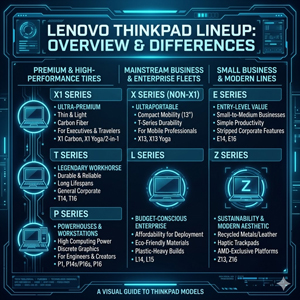
Before delving further into this system, I want to discuss the Lenovo ThinkPad lineup, which is divided into distinct series tailored for different needs:
 [Click on image for larger view.]
- X1 Series: Ultra-premium, thin, and lightweight laptops built with a carbon fiber case, engineered for executives and frequent travelers.
- T Series: Renowned as the durable and reliable "workhorse" of the corporate world, focusing on long lifespans and excellent port selections.
- P Series: Mobile workstations equipped with high-end processors, designed for powerhouses, architects, creators, and data scientists running heavy hardware-accelerated workloads.
- X Series (Non-X1): Ultraportable systems focusing on compact mobility (13-inch chassis) for mobile professionals on the go.
- L Series: Budget-conscious enterprise fleets utilizing eco-friendly components and plastic-heavy builds rather than premium alloys to balance performance with affordability.
- E Series: Focuses on entry-level value for small businesses and students, delivering the core essentials and iconic ThinkPad keyboard with stripped-down enterprise management features.
- Z Series: Built with a modern generation aesthetic, incorporating recycled aluminum and flax materials paired with haptic trackpads, powered exclusively by AMD platforms.
| Line | Target Audience | Primary Focus | Build Quality |
| X1 | Executives / Frequent Travelers | Ultra-premium, thin & light | Carbon fiber / Titanium |
| T | General Corporate / Power Users | Durability, reliability, balance | Magnesium alloy / Plastics |
| P | Engineers / Creators / Analysts | High-performance workstation | Robust, thermal-focused |
| X | Mobile Professionals | Compact 13" portability | Premium blend |
| L | IT Fleets / Budget Enterprise | Value, eco-friendly, security | Mostly plastics |
| E | Small Businesses / Students | Maximum affordability, essentials | Budget aluminum / Plastic |
| Z | Modern Professionals | Generation-Z aesthetic, AMD-exclusive | Recycled Aluminum / Flax |
This Laptop
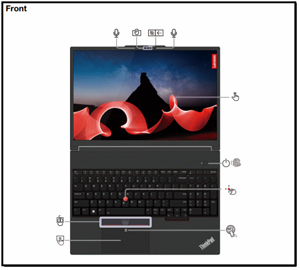
Laying the P16 out flat shows that at the top of the screen is a 5-megapixel infrared-capable camera with a privacy shutter and dual microphones.
On the keyboard, the system has a power button with an integrated fingerprint reader, an optional NFC pad, a TrackPad, and, of course, its iconic, red-tipped TrackPoint pointing stick.
 [Click on image for larger view.]
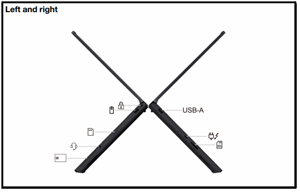
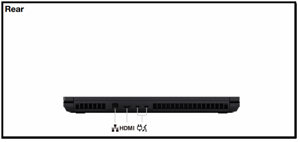
For connectivity, this mobile workstation is well-equipped. It features two Thunderbolt 5 ports, one Thunderbolt 4 port, HDMI 2.1, 2x USB-A (10 Gbps), an SD Express 8.0 card reader, a 3.5 mm audio jack, and a Kensington Nano slot. Internally, it relies on an Intel Wi-Fi 7 BE200 module for wireless connectivity.
 [Click on image for larger view.]
 [Click on image for larger view.]
Crucially, it has a 2.5 GbE RJ-45 wired Ethernet port, making it ready for high-bandwidth wired networks.
Unboxing
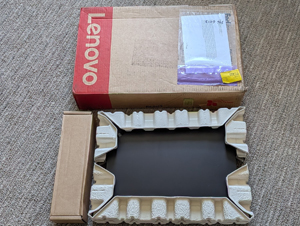
It is a minor thing, but I appreciated the minimal package this ThinkPad laptop, like the other Lenovo laptops I reviewed, came in.
 [Click on image for larger view.]
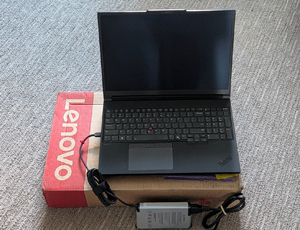
It was a sturdy cardboard box, with the laptop nestled in two cardboard sleeves, and another cardboard box containing a 180W power supply.
 [Click on image for larger view.]
The laptop's packaging, like the laptop itself, was unpretentious and functional.
Under the Hood
In the past, I've found ThinkPads' build quality to be outstanding. I found that this P16 Gen 3 is no exception; it feels incredibly sturdy and well-built, and to back up that feeling, it passes rigorous MIL-STD-810H durability tests. But I wasn't just interested in its outward chassis ruggedness; I was more interested in what was driving its performance, and Lenovo didn't skimp on the internals.
The specific model I reviewed (21RRZD7UUS) is powered by an Intel Core Ultra 7 265HX processor. This is one of the high-performance Arrow Lake-HX series processors, which has a dedicated Neural Processing Unit (NPU) for offloading lower-power AI tasks. The processor has 20 CPU cores (8 Performance cores and 12 Efficient cores) with a max turbo frequency of 5.3 GHz.
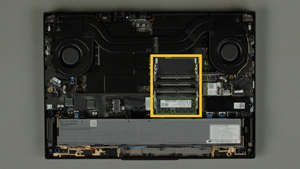
The laptop came with 16 GB of DDR5-5600 RAM in one of the user-serviceable SO-DIMM slots.
 [Click on image for larger view.]
I have found that, for virtualization and AI, memory bandwidth is just as important as RAM size, and the P16's high-speed DDR5 memory architecture ensures that data-intensive operations will not bottleneck the high-core CPU.
The GPUs
Traditionally, standard office laptops have relied on low-power integrated graphics, but modern AI work and modern graphics require dedicated hardware AI accelerators. GPUs are the undeniable workhorse of local AI. The P16 Gen 3 addresses these needs by combining a hybrid graphics design in this system that uses an integrated Intel GPU along with a discrete NVIDIA GPU.
The NVIDIA RTX PRO 3000 Blackwell Laptop GPU in the system features 12 GB of dedicated GDDR7 memory and is based on NVIDIA's latest Blackwell architecture. This professional-tier card features advanced Tensor Cores for AI acceleration, Ray Tracing cores tailored for enterprise software and product design, and is suitable for running small- to medium-sized LLMs.
Lenovo ThinkPad laptops, unlike some other laptop makers, make their systems supportable and easy to work on, and have parts that can be replaced or upgraded if needed. Lenovo provides official documentation showing how to replace the GPU and the Compression Attached Memory Module (CAMM/CAMM2) option if needed or desired.
 [Click on image for larger view.]
The laptop can switch between the discrete NVIDIA GPU and the integrated Intel GPU. The iGPU handles everyday tasks such as desktop rendering, web browsing, and video playback. When an application demands heavier GPU resources, the system automatically offloads rendering to the discrete RTX PRO 3000 GPU. If needed, users can manually override this behavior in the NVIDIA Control Panel to always assign specific applications to the high-performance discrete card.
The Intel Core Ultra 7 265HX has an integrated Intel AI Boost NPU capable of handling up to 13 TOPS (trillion operations per second) for continuous, low-power AI tasks such as background video effects or text summarization. This creates a heterogeneous AI architecture where the NPU handles low-power, continuous processing, leaving the Blackwell discrete GPU free for heavier local LLM inference.
Initial Setup and Powerup
Upon first boot, I configured Windows 11 Pro without any issues.
The specific model I tested (21RRZD7UUS) came equipped with a 16-inch WUXGA (1920 x 1200) IPS anti-glare display. While the resolution isn't 4K or OLED on this specific system, the 16:10 aspect ratio provided plenty of vertical real estate for me to work without issues. It also includes X-Rite factory color calibration and Eyesafe technology to minimize eye strain during long benchmarking sessions.
My daily work includes a mix of productivity applications and testing local AI models. The P16 Gen 3 performed all these tasks with aplomb, showing great responsiveness. What really impressed me was how well it worked for editing videos and audio.
Model Comparison: 21RRZD7UUS vs. 21RR-ZD7WUS vs. 21TEZD96US
While the ThinkPad P16 Gen 3 reviewed here (model 21RRZD7UUS) can handle most common office applications, it represents a more mainstream, efficiency-balanced configuration compared to the flagship version of the same chassis that I reviewed earlier (the 21RR-ZD7WUS).
Under the hood, the flagship ZD7WUS swaps this system's 20-core Core Ultra 7 265HX for the top-tier Intel Core Ultra 9 275HX processor, boosting clock speeds to 5.5 GHz across 24 processing cores. Furthermore, the flagship ZD7WUS was factory-fitted with an astounding 192 GB of DDR5 memory across all four SODIMM slots and has 4 TB of high-speed PCIe 5.0 storage. In contrast, the 21RRZD7UUS model keeps things grounded and considerably less expensive with a modest yet capable 16 GB of RAM and a 1 TB SSD.
The biggest difference is that the flagship 21RR-ZD7WUS replaces this system's mid-to-high tier NVIDIA RTX PRO 3000 card with the ultra-workstation NVIDIA RTX PRO 5000 Blackwell GPU, loaded with its massive 24 GB of dedicated GDDR7 memory.
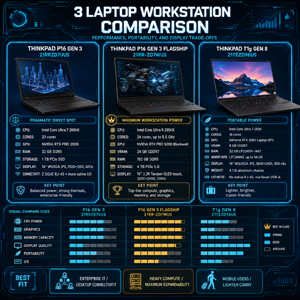 [Click on image for larger view.]
Stepping into a different class entirely, the ThinkPad T16g Gen 3 (model 21TEZD96US) was designed and priced to be a lighter, less expensive alternative without completely abandoning application performance. Instead of the powerful, power-hungry processors found in the P16 variants, the T16g uses a highly efficient 16-core Intel Core Ultra 7 255H processor and swaps out professional-class dGPUs for a consumer-focused NVIDIA GeForce RTX 5060 Laptop GPU with 8 GB of VRAM. Memory configuration changes significantly here; the T16g drops the P16's four expansive SO-DIMM slots in favor of a single LPCAMM2 slot populated with 32 GB of ultra-fast LPDDR5X-7467 RAM, which maximizes memory bandwidth while capping total system expansion to 64 GB.
Displays
The displays on these three ThinkPads offer trade-offs among resolution, panel technology, and device mobility. While all three leverage generous 16-inch 16:10 display real estate, the flagship ThinkPad P16 Gen 3 configuration (21RR-ZD7WUS) takes a completely different path, trading pixel density for fluid motion and rich interactivity using a 3.2K (3200 x 2000) Tandem OLED touchscreen running at an ultra-fast, smooth 120Hz variable refresh rate.
If your workflow demands absolute text sharpness and static color consistency over long hours, the IPS panels on the 21RRZD7UUS (WUXGA 1920x1200) and the T16g 21TEZD96US (WQUXGA 3840x2400) are highly optimized for continuous outdoor or bright-room productivity. However, if your work needs deep blacks, fast-motion tracking, and hands-on touch control, the dual-layer Tandem OLED panel on the flagship 21RR-ZD7WUS is the way to go.
Key Specifications Comparison
| Specification | ThinkPad P16 Gen 3 (21RRZD7UUS) [Reviewed] | ThinkPad P16 Gen 3 (21RR-ZD7WUS) [Flagship] | ThinkPad T16g Gen 3 (21TEZD96US) |
| Target User Profile | Enterprise IT Workers / General Devs | Top-Tier AI Researchers / Creators | On-the-Go Mobile Professionals |
| Processor (CPU) | Intel Core Ultra 7 265HX | Intel Core Ultra 9 275HX | Intel Core Ultra 7 255H |
| Core Count | 20 Cores (8P + 12E) | 24 Cores (8P + 16E) | 16 Cores (6P + 8E + 2LP) |
| System Memory (RAM) | 16 GB DDR5-5600 (4x SO-DIMM, up to 192 GB) | 192 GB DDR5-5600 (4x SO-DIMM, maxed out) | 32 GB LPDDR5X-7467 (1x LPCAMM2, up to 64 GB) |
| Discrete GPU (VRAM) | NVIDIA RTX PRO 3000 Blackwell (12 GB GDDR7) | NVIDIA RTX PRO 5000 Blackwell (24 GB GDDR7) | NVIDIA GeForce RTX 5060 Laptop (8 GB GDDR7) |
| NPU (AI Boost) | Integrated, up to 13 TOPS | Integrated, up to 13 TOPS | Integrated, up to 13 TOPS |
| Storage (Installed) | 1 TB NVMe PCIe SSD | 4 TB NVMe PCIe 5.0 SSD | 1 TB NVMe PCIe SSD |
| Display Panel | 16" WUXGA (1920x1200) IPS Anti-Glare, 60Hz | 16" 3.2K (3200x2000) Tandem OLED Touch, 120Hz | 16" WQUXGA (3840x2400) IPS Anti-Glare, 60Hz |
| Chassis Ports | Native 2.5GbE RJ-45, 2x USB-A, 2x TB5, 1x TB4, HDMI 2.1 | Native 2.5GbE RJ-45, 2x USB-A, 2x TB5, 1x TB4, HDMI 2.1 | Adapter req. for RJ-45, 1x USB-A, 2x TB5, 1x TB4, HDMI 2.1 |
| Weight / Material | ~5.6 lbs / Aluminum & Magnesium | ~5.6 lbs / Aluminum & Magnesium | ~4.1 lbs / Full Aluminum |
Three Systems, Three Use Cases
To understand where this system fits between the other two ThinkPads that I reviewed, we need to compare and contrast them.
The ThinkPad T16g Gen 3 is tailored for mobile business professionals who want local AI capabilities in a more portable, travel-friendly design. In contrast, this ThinkPad P16 Gen 3 (21RRZD7UUS) is intended for enterprise IT professionals and data scientists who require higher processing power, expandable components, and the ability to run small-to-medium LLMs locally.
For absolute peak computing, I found that Lenovo's flagship ThinkPad P16 Gen 3 (21RR-ZD7WUS) was engineered as a no-compromise laptop for top-tier AI researchers and 3D simulation engineers who need massive VRAM, massive system RAM, and a peak-performing CPU. Still, it does come at a hefty price.
For most high-power users, the configuration in the 21RRZD7UUS delivers the needed efficiency by combining the Core Ultra 7 processor, an integrated NPU, and the professional NVIDIA RTX PRO 3000 Blackwell GPU at a reasonable price for what you get.
You should choose the Blackwell RTX PRO 5000 laptop if your budget allows it and your workflow requires uncompromised workstation performance, heavy video editing, 3D rendering, or running large, localized AI models that require a massive VRAM buffer. However, you need to be aware that I found it can run for only 30 minutes on its battery when fully utilizing the high-power GPU.
On the other hand, this system with its RTX PRO 3000 Blackwell GPU is your best bet if you need a more balanced mobile workstation for running certified enterprise software, code compilation, and executing small-to-medium LLMs locally, thanks to its 12 GB VRAM. The T16g laptop with its GeForce RTX 5060 GPU is the best choice if your primary focus is mainstream gaming, content creation, and general office work, offering a better price-to-performance ratio and gaming-specific drivers.
As I mentioned, this system performed extremely well in my day-to-day activities and I loved its 16-inch monitor; however, I did find that its 16 GB of RAM limited how many browser sessions I could keep open, and I was often using all of the system's RAM, so in my next article, I will use various benchmarking tools to quantify the effect the RAM has on the system.
About the Author
Tom Fenton has a wealth of hands-on IT experience gained over the past 30 years in a variety of technologies, with the past 20 years focusing on virtualization and storage. He previously worked as a Technical Marketing Manager for ControlUp. He also previously worked at VMware in Staff and Senior level positions. He has also worked as a Senior Validation Engineer with The Taneja Group, where he headed the Validation Service Lab and was instrumental in starting up its vSphere Virtual Volumes practice. He's on X @vDoppler.