In-Depth
Seven New Rules to Keep One Hypervisor Hack from Taking Down Everything
Securing every virtual machine won't save an organization whose attackers take control of the hypervisor underneath them.
That was the central message from Joey D'Antoni, Principal Consultant, DCAC, during "Securing Today's Virtual Infrastructure: Best Practices, Modern Strategies, New Threats," the opening session of the Oct. 27 The New Rules of Virtualization Security Summit. It's being made available for on-demand replay thanks to the sponsor, Rubrik, which also presented at the event..
Before outlining seven rules, D'Antoni described three pressures reshaping virtualization security: migrations driven by VMware licensing changes, attackers targeting the hypervisor and management plane, and hybrid environments with more consoles, identities and patching requirements. Running two platforms during a migration also means maintaining two sets of security controls, sometimes with limited expertise in the replacement platform.
He illustrated the danger with an attack sequence that begins with a help desk credential reset, moves through Active Directory into vCenter, and ends with stolen domain-controller data and encrypted VM files. The point: legitimate administration features can become an attacker's route around defenses inside the guest operating system.
"What we used to do is protect the VMs. Today we've kind of evolved to protecting the layer underneath them," he said.
 "Whoever controls your virtualization management plane controls every workload."
Joey D'Antoni, Principal Consultant, DCAC
1. Guard the Management Plane
Treat vCenter, Nutanix Prism, Hyper-V management and their identity sources as tier-zero assets -- the infrastructure whose compromise can expose everything else. D'Antoni's priority was separating virtualization administration from everyday production Active Directory (AD).
"The single biggest change you can make is stop letting your everyday Active Directory grant virtualization admin rights," he said.
He recommended a dedicated identity source or isolated administrative forest, phishing-resistant multifactor authentication (MFA), and just-in-time elevation instead of permanent administrator privileges. The human access path matters, too: help desk staff should require out-of-band verification before resetting privileged credentials. His slide also called for removing ESXi hosts from the AD domain.
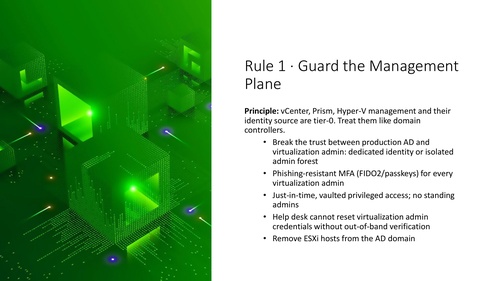 [Click on image for larger view.] Guard the Management Plane (source: Joey D'Antoni).
2. Harden the Hypervisor Itself
Identity controls are only one layer. Assume an attacker eventually reaches a host, D'Antoni said, and restrict what can happen next. Enable lockdown mode, keep Secure Shell (SSH) and ESXi Shell disabled outside maintenance windows, and set timeouts so those services shut down automatically.
His recommendations included pairing execInstalledOnly with Secure Boot and a Trusted Platform Module, restricting management-appliance console and boot-loader access, encrypting sensitive VMs, and removing unused VMs, templates and orphaned disks. Teams should choose a vendor or Center for Internet Security baseline and continually check for configuration drift.
"if you have standards around security or configuration, if you're not programmatically checking those standards, nobody's going to follow them," D'Antoni said.
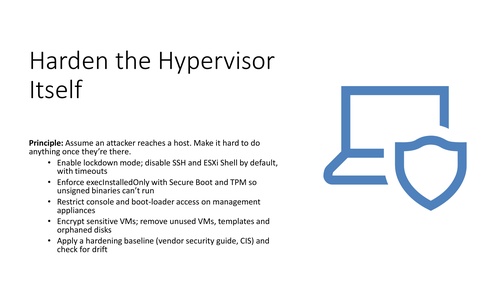 [Click on image for larger view.] Harden the Hypervisor (source: Joey D'Antoni).
3. See the Layer EDR Can't
Do not assume endpoint detection and response (EDR) inside VMs provides visibility into the hypervisor. D'Antoni urged teams to send host and vCenter logs off the machines to a security information and event management (SIEM) system, preserving evidence an attacker with root access might otherwise erase.
Useful alerts include SSH being enabled, lockdown mode being disabled, root passwords changing, domain-controller disks being attached elsewhere and mass VM shutdowns. Establish what normal administration looks like so legitimate maintenance does not drown out suspicious activity.
"It's important to have those baselines. You don't want to alert on everything," he said.
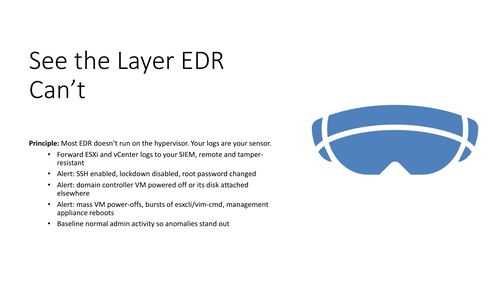 [Click on image for larger view.] Close the Hypervisor Visibility Gap (source: Joey D'Antoni).
4. Patch on a Hypervisor Clock
Quarterly patching is too slow for exploited hypervisor vulnerabilities, D'Antoni argued. He recommended tracking vendor advisories and the Cybersecurity and Infrastructure Security Agency's Known Exploited Vulnerabilities catalog, with a target measured in days for exploited flaws.
"You should be able to patch your hypervisors in the middle of the day, and nobody should notice," he said.
That requires enough spare cluster capacity to move workloads, place a host into maintenance and patch without disrupting service. The patching scope also includes management appliances, VPN devices, backup servers and physical-server management controllers. An accurate inventory of hosts, versions and builds is essential; ideally, collect it directly from systems.
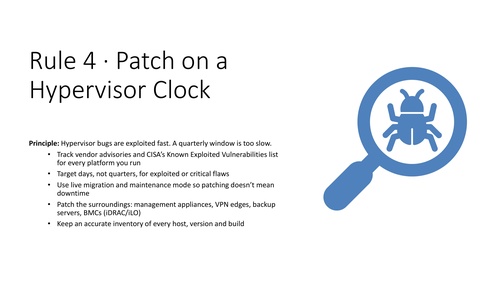 [Click on image for larger view.] Patch on a Hypervisor Clock (source: Joey D'Antoni).
5. Shrink and Segment Exposure
Keep hypervisor and management consoles off the public internet. Put administration on a dedicated network reachable through hardened jump hosts or privileged access workstations, rather than ordinary user laptops or general server networks.
"So no management interfaces ever hit the internet ever," D'Antoni said.
He also recommended separating live-migration, storage and backup traffic, using microsegmentation to limit VM-to-VM communication, and disabling unused services. The goal is to prevent an initial foothold in one workload from becoming an easy route to storage, backups or the management plane.
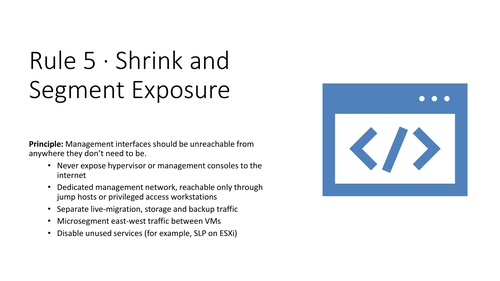 [Click on image for larger view.] Shrink and Segment Exposure (source: Joey D'Antoni).
6. Recover Without the Admin
Plan for an attacker who already holds virtualization administrator credentials. Backups must remain recoverable even if that account is compromised, requiring immutable, isolated copies and backup authentication separate from production AD and vCenter.
Recovery planning must also cover host configurations, management-appliance backups, network settings, golden images and the certificates needed for encrypted VMs. D'Antoni recommended practicing a complete rebuild -- hosts first, then core identity services and business applications -- and timing the result.
"You don't test backups; you test restores first of all," he said during the Q&A.
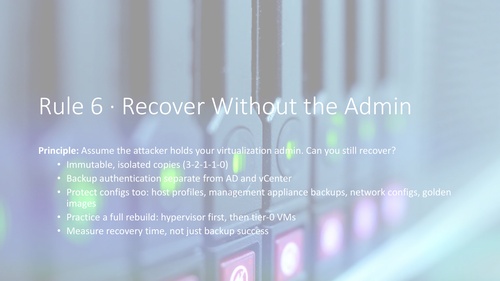 [Click on image for larger view.] Recover Without the Admin (source: Joey D'Antoni).
7. Treat Migration as Security Work
A new virtualization platform does not inherit the old platform's hardening, alerts or recovery procedures. Before moving production workloads, map identity, logging, patching, backup and configuration controls to the destination, and confirm existing tools actually support it.
Phased migrations may avoid a disruptive cutover, but they leave teams responsible for two environments.
"While that's sensible, it does mean you're running two platforms for a long time," he said. "So you have to have staff that understands and can monitor both."
Each destination has its own administrative surface, from Windows hosts and Prism to Proxmox's web interface or Kubernetes role-based access control. Retiring the old environment is also security work: forgotten, unpatched hosts remain targets.
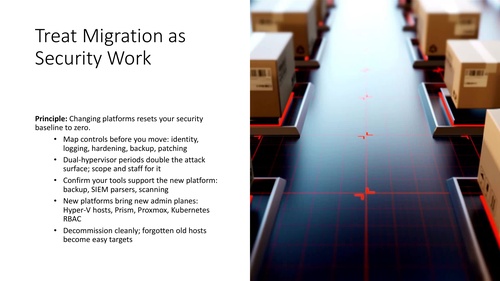 [Click on image for larger view.] Treat Migration as Security Work (source: Joey D'Antoni).
The Rest of the Session
D'Antoni closed with a 30/60/90-day plan: start with inventory, remote logging, MFA and host lockdown; then separate identity, address exploited vulnerabilities and isolate management and backups; finally, run a tabletop exercise and timed restore, and report the recovery target to leadership.
"Most of the stuff is configuration and not purchasing anything," he said of the early work.
The on-demand replay provides the full presentation and Q&A, including discussion of mixed-platform migrations, evaluating hypervisor monitoring coverage, smaller-team identity options and securing budget for improvements.
And More
While replays are convenient and informative --- especially timely ones like the one held today -- attending live events offers the opportunity to ask implementation questions and receive guidance in real time. And that's not to mention the chance to win prizes, in this case $10 Starbucks gift cards to first 150 attendees who attended the majority of the summit. With all that in mind, here are selected upcoming online events from Virtualization & Cloud Review, Redmond and AWSInsider:
About the Author
David Ramel is an editor and writer at Converge 360.