In-Depth
Microsoft 365 Security Expert: Standardization Is the Key to MSP Profits and Protection
For managed service providers (MSPs), the key to making Microsoft 365 security both more effective and more profitable isn't necessarily another security product. It's establishing a repeatable process for protecting customers, then applying it consistently across every tenant.
That was the central message from channel veteran Howard M. Cohen during today's (Oct. 21) Tech Spotlight | How To Operationalize Microsoft 365 Protection Across Customers, a free online event sponsored by Proofpoint 365 Total Protection and presented by Redmond Channel Partner, a sister site. Cohen, a longtime IT channel executive and technology writer, focused on the operational mechanics of delivering Microsoft 365 security services at scale. The event is being made available for on-demand viewing.
"Repeatability breeds increasing profit," Cohen said, explaining that MSPs can become more efficient with each deployment rather than designing and documenting a new security environment for every customer.
 "Repeatability breeds increasing profit."
Howard M. Cohen, Technologist, Sr. "Resultant," Speaker/Author
Cohen illustrated the financial implications with a hypothetical $100,000 project initially requiring $75,000 in delivery costs. By repeating the same deployment and improving efficiency, the provider might eventually reduce those costs to $50,000 without reducing the value delivered to the customer.
The alternative, he warned, is a different implementation for every customer, with important knowledge residing in individual technicians' heads instead of written procedures. That approach makes each new deployment another custom project and complicates ongoing management.
One Security Baseline, Three Tiers
Cohen recommended building a written baseline that can be applied consistently across customer environments, using established security guidance rather than starting from scratch. He pointed to the Center for Internet Security's Microsoft 365 Foundations Benchmark, the National Institute of Standards and Technology's Cybersecurity Framework 2.0 and Microsoft's Secure Score as useful starting points.
He proposed dividing the baseline into three service tiers, allowing providers to standardize deployment while accommodating different security and compliance requirements.
- Core: Multifactor authentication (MFA), blocked legacy authentication, properly configured Microsoft Defender policies, restrictions on external sharing and enabled backups.
- Copilot-Ready: All core protections, plus permission cleanup, sensitivity labels, data loss prevention (DLP) policies and reviews for overshared information.
- Regulated: All Copilot-Ready protections, plus archiving and retention policies, audit evidence and documented exceptions to standard configurations.
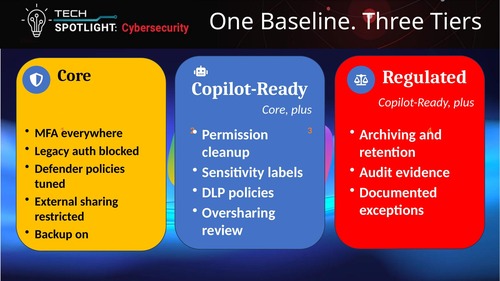 [Click on image for larger view.] Three Tiers of Microsoft 365 Protection (source: Howard M. Cohen).
The framework is meant to be cumulative. Customers requiring Copilot readiness receive the core protections first, while regulated organizations receive the additional controls needed to support retention, auditing and compliance requirements.
Cohen also emphasized that security products depend on how they are configured. Microsoft Defender, for example, requires policies appropriate to the customer's environment, while sensitivity labels and DLP controls must be applied and maintained to be useful.
The written baseline becomes the reference against which new tenants, subsequent changes and recurring security reviews can be measured.
Turn Customer Onboarding into a Runbook
Once the security baseline is established, Cohen recommended a five-step onboarding process that technicians can follow for every new customer.
- Connect: Establish access through Microsoft Partner Center and granular delegated admin privileges (GDAP), limiting administrative permissions to what is necessary.
- Assess: Examine the customer's existing configuration against the baseline before making changes.
- Apply: Deploy the appropriate security template for the customer's service tier.
- Record: Document deviations from the baseline, including who approved each exception.
- Prove: Capture the resulting security posture, including Secure Score information, for reporting and customer reviews.
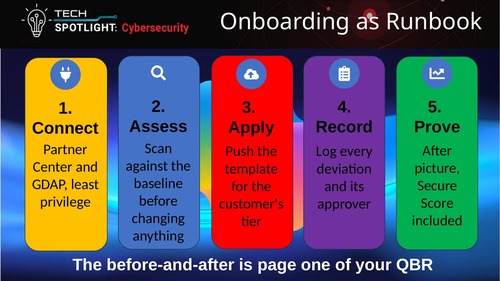 [Click on image for larger view.] Five Steps to Standardized Customer Onboarding (source: Howard M. Cohen).
"Templates are wonderful standardization tools," Cohen said.
He acknowledged that templates sometimes require changes, but argued that providers should still use them consistently rather than reinventing their deployment procedures for each customer.
Just as important is documenting exceptions. A customer may have a legitimate business reason to depart from a standard policy, but the deviation should be recorded and approved rather than becoming an undocumented configuration difference.
The resulting before-and-after assessment can also support quarterly business reviews (QBRs), giving MSPs concrete information about the security work performed and the customer's resulting posture.
Copilot Readiness Becomes a Managed Service
Cohen identified Microsoft 365 Copilot as another opportunity to package security work into a repeatable offering, particularly because of the risks associated with overshared information.
Organizations routinely accumulate guest accounts that are never removed, document links available to anyone who possesses them and collaboration sites that remain accessible long after their original projects have ended.
Copilot makes existing access permissions especially important because it can help authorized users discover information that might otherwise have remained difficult to find. Cohen argued that MSPs should review those permissions before customers expand their use of AI assistants.
He suggested a Copilot-readiness service built around identifying anonymous sharing links, overshared sites and unlabeled content, followed by removing unnecessary links, tightening permissions and applying appropriate labels and DLP policies.
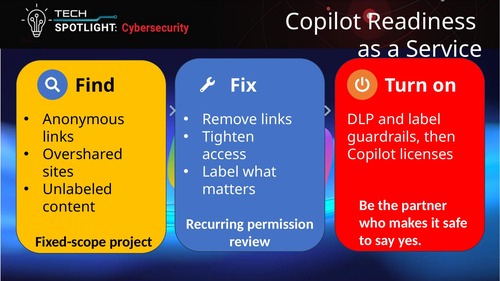 [Click on image for larger view.] Packaging Copilot Readiness as a Service (source: Howard M. Cohen).
That initial cleanup can become a fixed-scope project, followed by recurring permission reviews that help maintain the customer's security posture.
Cohen also discussed using Copilot to assist with finding and summarizing potential oversharing problems, although the effectiveness of such reviews depends on the tools, permissions and capabilities available in the customer's environment.
The broader opportunity, he suggested, is to turn Copilot readiness into a continuing security service rather than treating it as a one-time prerequisite for deploying licenses.
Keeping Configuration Drift Under Control
Standardization doesn't end when a tenant goes live. Cohen warned that configuration drift can gradually undermine a carefully established security baseline as users, administrators, applications and updates introduce changes.
Regular checks against documented configurations are therefore part of maintaining the service, along with continuing security awareness training and backup testing.
On the backup issue, Cohen offered another memorable warning: "A backup you've never restored from is a rumor."
Simply confirming that a backup job ran successfully is not the same as proving that the organization can recover its data. He urged providers to test restoration regularly instead of discovering problems during an actual recovery emergency.
The same ongoing discipline applies to user awareness. Cohen recommended making security training part of customer onboarding rather than introducing it after the environment has already been deployed.
He concluded with three questions MSPs should be able to answer: How many customer tenants currently match their written baseline? Which Copilot customers received an oversharing assessment? And when were backups last tested and configurations last checked for drift?
The Rest of the Session
Cohen also discussed the evolving effectiveness of Microsoft's built-in security protections, the use of Safe Links and Safe Attachments, the Microsoft 365 shared responsibility model and the role of third-party products in filling protection gaps.
The second session, featuring Proofpoint 365 Total Protection presales consultant Amir Afiri, addressed Microsoft 365 security with Copilot and how attackers are using AI. The accompanying presentation materials covered AI-generated phishing, malicious instructions targeting AI assistants, Microsoft 365 permission exposure and additional email security protections.
The full webcast is being made available for on-demand viewing courtesy of Proofpoint 365 Total Protection.
And More
While replays are convenient and informative -- especially up-to-date sessions that just concluded -- attending live events offers advantages, including the ability to ask specific implementation questions and receive guidance in real time. With that in mind, here are some upcoming online events from Virtualization & Cloud Review, Redmond Channel Partner and Redmond:
About the Author
David Ramel is an editor and writer at Converge 360.