I've been working with ESXi for a while in both private lab and non-production workloads. For VI3 installations, ESXi 3 was relegated to toy and science experiment levels. With vSphere, I'm putting ESXi as the single product going forward in my virtualization practice.
Before the hecklers roll in, let me first clarify a few things about ESXi.
First of all, ESXi is fully capable of all of the vCenter features that are available to ESX. This includes vMotion, HA, Fault Tolerance and DRS. These features come alive when the host is configured to use the licensing allocated from the vCenter Server. While it's true that the free edition of ESXi doesn't support the management features, it's just a licensing difference to the same product.
More
Posted by Rick Vanover on 12/14/20090 comments
Last week, VMware released Update 5 for VMware Infrastructure 3. This is an important update as many organizations have not yet migrated to vSphere (version 4). There are a number of new features with this release, among them:
- Support for Intel Xeon 3400 series processors with Enhanced vMotion support.
- Driver updates for network and host bus adapter controllers as well as some new controllers are now supported.
- Increased guest operating system support to include Windows 7, Windows Server 2008 R2 and Ubuntu 9.04 (Desktop and server).
This is on the heels of the vSphere Update 1 release that included the Windows operating system support for the recently released Microsoft products. When going about the upgrade, be sure to get vCenter upgraded first, then apply to the hosts.
I was a little surprised to see that ESX 3.5 Update 5 did not include the version 3.33 driver for vStorage VMFS when formatting VMFS volumes. VMFS versions are generally something that no one pays attention to, but it is important to know what versions are in play. ESX 3.5 Update 5 and ESXi 3.5 Update 1 still format new VMFS at version 3.31. When vSphere was released, we see the 3.33 version of the VMFS file system available on newly created VMFS volumes. VMFS is backwards and forwards compatible, so this difference is academic.
Many organizations are still on VI3 for their VMware platforms, so having continued development on the prior platform is important. VMware wants everyone to migrate to vSphere, if you haven’t noticed.
Did Update 1 seal the deal to start planning your migration to vSphere? Or is VI3 still your platform of choice? Share your comments here.
Posted by Rick Vanover on 12/10/20093 comments
As a blogger, I have a particular challenge to work with a lot of technologies that extend beyond my primary responsibility. To me, this is an opportunity to extend my skill set to many other segments of the larger IT space. To do this, I need to provide an infrastructure to support this effort in my private lab.
Currently my private lab has two servers, a handful of workstations, an ioSafe fireproof hard drive for select backups, a few networks and power protection. One is a newer HP ProLiant server and the other is an older generic server. Both are capable of running all of the virtualization platforms that make a great environment to evaluate a number of products.
Since the blogging activity has matured for me, I've made it a point to make my primary holiday gift something to boost the infrastructure in the private lab. Last year it was the newer ProLiant server. Neither of the servers have a Nehalem series processor, so one option is to get an additional server to take advantage of this new processor. The other candidate for my private lab is storage-related. I have frequently used the Openfiler as a virtual machine for much of the shared storage activities in the private lab. For most of my VMware blogging research, I take advantage of the ESX on ESX practice. But, I can not yet do that practice for Microsoft Hyper-V or Citrix XenServer.
With that, I've decided that I will be purchasing a shared storage device. Luckily, I know just what to buy. During Tech Field Day last month, I had an opportunity to see a Drobo Pro unit from Data Robotics. Select Drobo models offer iSCSI connectivity, allowing me to utilize my beloved VMFS file system.
I mentioned in an earlier blog how the Drobo would be a great device for test storage, which is where I will be doing my holiday shopping this year. That's the easy decision; now, which model should I purchase? There are two new Drobo models, one which would work for my application. The new DroboElite unit continues all of the exciting features of the product line, including BeyondRAID which allows mixed drive sizes and makes, automatic resizing of arrays and file content awareness. The DroboPro is also an option as well.
I've got some decisions to make, but am very excited to be purchasing the unit later this month. It may sound a little much for the private lab, but I take my virtualization pursuit seriously.
Are you purchasing any fun items this year to help advance your virtualization journey? Share your wish list here.
Posted by Rick Vanover on 12/08/20096 comments
For ESXi installations, command-line options are available for virtualization administrators. For licensed installations with vCenter, the VI Toolkit is a very powerful interface to manage the hosts. For unmanaged (or free ESXi), there are options to manage virtual machines, the hosts and other aspects of virtualization as well.
One common task is to add an additional disk file (VMDK) to a virtual machine. While this can be done in the vSphere client, things like this can be done via the command line as well. The command we will need to perform this task is the vim-cmd series of commands for ESXi. Let's go through a common scenario of adding an additional virtual disk that is thick-provisioned to a running virtual machine:
- Get to a command line on ESXi. You can find how to do this by reading my May 2009 How-To post.
- Determine the vmid of the virtual machine you want to add the disk to:
vim-cmd vmsvc/getallvms
The result is Fig. 1.
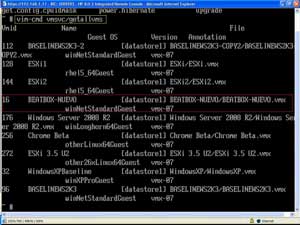 |
| Figure 1. In my example, the virtual machine "BEATBOX-NUEVO" will be receiving the additional VMDK and is vmid #16. (Click image to view larger version.) |
More
Posted by Rick Vanover on 12/03/20094 comments
Don't get me wrong. I am really excited for the recent updates to VMware and Microsoft recently. With Windows Server 2008 R2 and VMware's vSphere Update 1 being released, this is a good time for a facelift to the modern data center.
vSphere Update 1 brings a lot of new features to the table, but Windows Server 2008 R2 and Windows 7 support are where I am focused now. What concerns me is now that Windows Server is 64-bit only (x64), we may run into higher memory provisioning scenarios. For 32-bit (x86) Windows OSes, the memory limits were a softer 4 GB for Windows Server 2003 x86 Standard Edition and select editions of the x86 Windows Server 2008 base release.
More
Posted by Rick Vanover on 12/01/20095 comments
It amazes me how many people are interested in virtualization, yet feel that they can't get started with it. I believe that anyone can get started with virtualization, with or without a lot of tools. Read Scott Lowe's recent vWord column online or in the recent print issue of Virtualization Review; it's a good resource to get started.
More
Posted by Rick Vanover on 12/01/20091 comments
During this week's
VMware Communities Podcast
, nested ESX came up with a lot of feedback. The user community seems to demand more from VMware than what is available for this practice. The concept is simple: VMware's current products technically allow ESX to run as a virtual machine. This is a great tool for testing, but is officially unsupported by VMware and is a performance no-no for production-class virtualization workloads.
More
Posted by Rick Vanover on 11/19/20095 comments
At last week's
Gestalt IT Field Day
, I saw a series of
3PAR
demonstrations using storage connected to a vSphere installation.
Architecturally, 3PAR storage maintains good access between each controller and set of disks. The key technology to deliver the individual paths between disk and controller is 3PAR's mesh-active technology. This is where each volume is active on every controller on the array with its own connection (fibre channel, iSCSI, etc.). For VMware installations, this is a fully supported configuration on the hardware compatibility list.
Redundancy and data protection is also a critical point of the 3PAR storage offering. In that day's discussion, a description of why storage protection is important is made very simple by comparing networks and storage. Loosely quoting the presenter at 3PAR, if the network drops one packet in a million, nobody cares. If the storage network drops a single packet in a billion, it can be data destructive to storage resources. This is especially important in virtualized environments, where entire LUNs or virtual machines can be affected.
During the demonstration, a controller failure was evoked. We quickly saw a dip in the I/O, but a seamless recovery quickly followed. This unplanned event is transparent to the operating systems, which is an important distinction. From a behavior observation, it may feel like when a virtual machine is paused. What you don't see is hard disk errors in the event log. Applications may report timeouts, but won't report a loss of access to the storage.
3PAR storage systems also use an on-disk chunklet. This allows many disks to be accessed simultaneously to increase disk access speed. All physical disks are broken into chunklets at 256 MB. Each of these 256 MB chunklets is viewed as an individual disk. Logical drives contain the chunklets and are organized by a number of ways. One of these practices is to not allow chunklets in the same logical drive to exist on both SAS and SATA storage, and this is common on many storage platforms.
3PAR goes further with the chunklets to prevent hotspots on disks of busy chunklets with tools such as dynamic optimization that will spread the hot chunklets around to protect disk performance. Without the dynamic optimization feature, the alternative is a random I/O of the chunklets, which works for most environments. Fig. 1 shows how chunklets exist on disk.
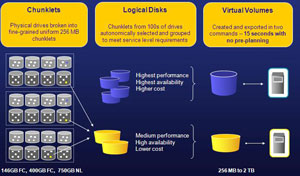 |
| Figure 1. The 3PAR chunklets are shown across a large collection of disks and how they are represented in logical disks and virtual volumes. (Click image to view larger version.) |
I am a fan of built-in efficiencies for storage environments, especially in virtualized environments. This is similar to the VMware's vStorage VMFS file system. I really like the VMFS sub-blocks to eliminate waste on the disk.
Disclosure: I am attending this event and have been provided airfare, meals and accommodations by the event organizer. The opinions mentioned above are a result of an in-person demonstration of the technologies discussed.
Posted by Rick Vanover on 11/17/20091 comments
Another stop at
Gestalt IT Field Day
was to Data Robotics, Inc., makers of the Drobo storage devices. The Drobo currently has two models, the Drobo and the DroboPro. During our visit, we had a demo of the popular storage devices and it was clear that I walked away with Drobo-envy. I want one for my home lab instead of using a device like an OpenFiler for my test shared storage configuration, and I can format it with my beloved VMFS file sytem.
More
Posted by Rick Vanover on 11/17/20092 comments
VMware Server 2.0.2 was released on October 26, 2009 as a maintenance release to the Type II hypervisor. As with all VMware product, the best resource to see what is new for this version is to read the release notes. For 2.0.2, there are really no corrected issues of interest. More importantly, there is no support for two newly released operating systems: Windows Server 2008 R2 and Windows 7. The base release of Windows Server 2008 is available on VMware Server 2.0.2 for both x86 and x64 editions, however. Even so, it is somewhat disturbing that there is a long list of known issues for the 2.0.2 release.
More
Posted by Rick Vanover on 11/12/200910 comments
This week, I am at Gestalt IT Field Day in Northern California. One of the presenters here was Xsigo. During Xsigo's presentation, it is clear that I/O virtualization is the next chapter for many datacenters to consolidate.
During the presentation, a lot of thoughts come to mind for infrastructures as we know it today. In most situations, it doesn't make sense to rip everything out. But, what about new implementations where you have a lot of I/O requirements? Like many in the current technology landscape, I have to battle challenges about new technologies and infrastructure that is already in place.
More
Posted by Rick Vanover on 11/12/20090 comments
For the last few posts, I've featured my experiences and observations of the
iland workforce cloud
. This offers a hosted virtual desktop as well as hosted server infrastructure. One of the major experience points about anything in the cloud is latency, the hosted virtual desktops can access hosted virtual servers on a local (Gigabit) network. There are other considerations as well for a cloud installation. Chances are, any cloud implementation will involve some segment of an IT footprint instead of the whole inventory. Like other cloud providers, the iland workforce cloud offers networking options.
More
Posted by Rick Vanover on 11/10/20090 comments