Direct Attached Storage: Good for Small Hyper-V Installations
Making virtualization work for small organizations is always tough. Recently, I've been upping my Hyper-V exposure, and in the meantime I've been using direct attached storage for the virtual machines. Here are some positive factors for using DAS for virtualization:
- DAS is among the least expensive ways to add large amounts of storage to a server
- There is no storage networking to administer
- Local array controllers on modern servers are relatively powerful
- Storage direct attached will be accessed quite fast over SAS or a direct fibre channel connection
Before I go on about DAS, I must make it clear that every configuration has a use case in virtualization. DAS in this configuration can be a great way to make a small virtualization requirement fit into ever-shrinking budgets.
DAS can be anything from a local array controller in drive slots on a Hyper-V server or it can be a drive shelf attached via a SAS interface or direct fibre channel (no switching). Figure 1 shows a Hyper-V server with DAS configured in Hyper-V Manager:
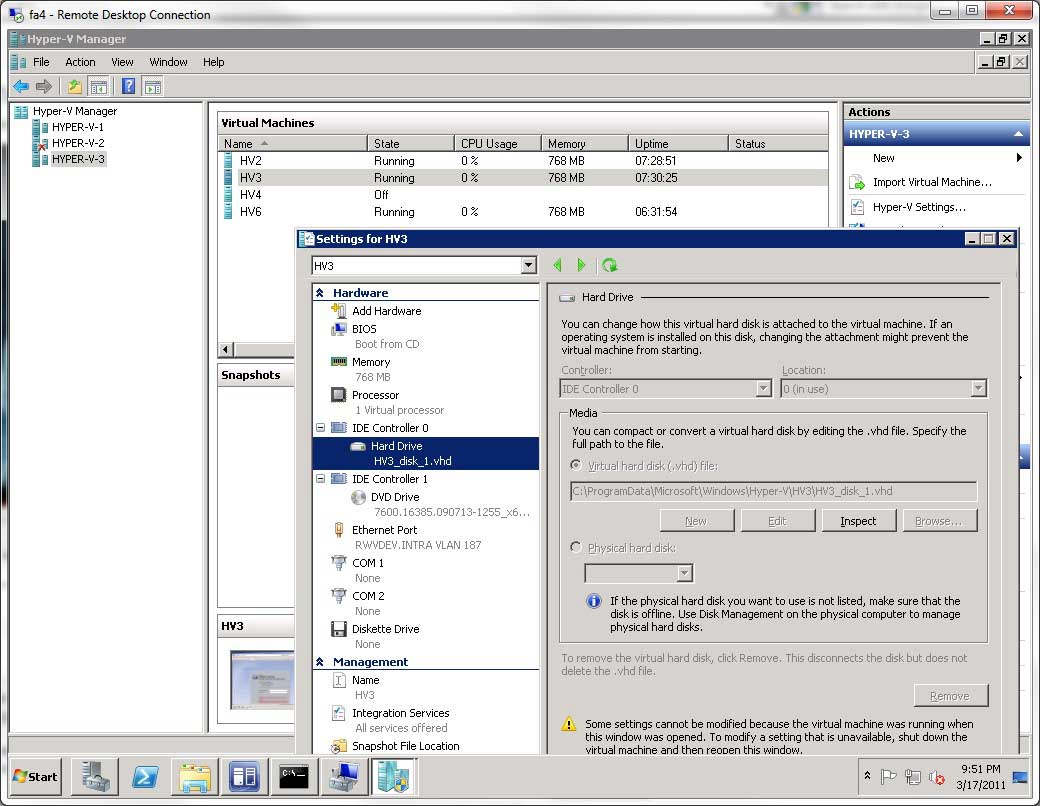 |
Figure 1. Configuring virtual machines in Hyper-V to use DAS can save costs and increase performance for small environments. (Click image to view larger version.) |
Of course there are plenty of concerns with using DAS for Hyper-V, or any virtualization platform for that matter. Failover, backups and other workload continuity issues come to mind. But for the small virtualization environment, many of those solutions come easy. Just as using DAS has the above mentioned benefits, there are downsides:
- Host maintenance made very complicated and migration not available
- Data protection complicated
- Expansion opportunities limited
Again with any situation, there are a number of solutions. This idea came to me in a discussion I had with someone from my offer to help get started with virtualization. For really small virtualization environments; a single host with DAS may be the right solution.
Have you utilized DAS for Hyper-V? Share your comments here.
Posted by Rick Vanover on 04/28/2011 at 12:48 PM