Last week
I outlined how I go about provisioning my own lab for testing virtualization and supporting blogging efforts. One of the key points of my ability to have a functional lab is a shared storage device. I use the
DroboPro iSCSI storage device
More
Posted by Rick Vanover on 03/09/20101 comments
There was quite a buzz in the blogosphere about what people do for their virtualization test environments. The theme of the VMware Communities Podcast #79, white boxes and home labs, spurred quite a discussion around the blogosphere, as many bloggers and people learning about virtualization go about this differently. Surprisingly, many utilize of physical systems to test and learn about virtualization.
More
Posted by Rick Vanover on 03/04/20106 comments
I am not sure when the typical server consolidation with virtualization officially became known as an on-premise private cloud, but it is. We will see more products start to blur the lines between on-premise and start to use the major cloud providers such as Amazon Web Services, Microsoft Azure and others.
One category that many internal infrastructure teams may want to consider sending to the cloud is the lab management segment. Lab management is a difficult beast. For organizations with a large amount of developers, the request for test systems can be immense. Putting development (lab-class) virtual servers, even if temporarily, in the primary server infrastructure may not be the best use of resources.
That is the approach that VMLogix has with the Lab Manager Cloud Edition product. Simply speaking, the lab management technology that VMLogix has become very popular in the virtualization landscape is extended to the cloud. A lot of history with VMLogix technology is manifested in current provisioning offerings with Citrix Xen technologies as well as a broad set of offerings for VMware environments. The Lab Manager Cloud Edition allows administrators to create a robust portal in the Amazon EC2 and S3 clouds to allow internal administrators to give developers server resources on demand without allocating the expense of internal storage and server resources.
The primary issue when moving anything to the cloud is security. For a lab management function, I believe security can be addressed with a few practice points. The first is to use sample data in the cloud if a database is involved. You could make a case for intellectual property with the developer's code and configuration that may be used and their transfers between the cloud and your private network. This can be somewhat mitigated by the network traffic rules that can be set for an Amazon Machine Image (AMI).
VMLogix is working on integrating with the upcoming Amazon Virtual Private Cloud for Lab Management to bridge a big gap. In most private address spaces, this will allow your IP address space to be extended to the cloud over a site-to-site VPN to the cloud. This can also include Windows domain membership which would allow centralized management of encryption, firewall policies and other security configuration.
Just like transitioning from development to production in on-premise clouds, application teams need to be good at transporting code and configuration between the two environments. If this is in the datacenter or in the cloud, this requirement doesn't change.
The VMLogix approach is to build on Amazon's clearly defined allocation and cost model for resources to allow organizations to provision their lab management functions in the cloud. This covers everything from who can make a virtual machine to how long the AMI will be valid. Lab Manager Cloud Edition also allows AMIs to be provisioned with a series of installable packages; such as an Apache web engine, the .NET Framework, and other almost anything you can support an automated installation or configuration. Fig. 1 is a snapshot of the Lab Manager Cloud Edition portal:
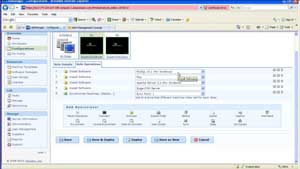 |
| Figure 1. The Lab Manager Cloud Edition allows administrators to deploy virtual servers in the Amazon cloud with a robust provisioning scheme. (Click image to view larger version.) |
Does cloud-based lab management seem appropriate at this time? Do we need something like Amazon VPC in place first? Share your comments here and let me know if you want to see this area explored more.
Posted by Rick Vanover on 03/01/20106 comments
Intel, pushing 10 Gigabit Ethernet (10 Gig-E) for a number of reasons, just published a
recent report
outlining over one million I/O operations per second (IOPS). One of the comments from the report's associated Webcast mentions the practice of assigning the iSCSI Initiator in the guest virtual machine. This is a fundamental, reverse perspective for all virtualization platforms that should be really considered.
More
Posted by Rick Vanover on 02/25/20103 comments
The more you look into server virtualization, the more you find yourself looking back at the storage for arrangement, optimization, troubleshooting and expansion capabilities.
In my current virtualization practice, I'm preparing for a big jump upward in regards to smart storage. To help me do this, I'm reading the NetApp and VMware vSphere Storage Best Practices book. This book is written by five top-notch people, including Vaughn Stewart from NetApp.
More
Posted by Rick Vanover on 02/23/20102 comments
Last week,
I told you five things to know about VMware certification
. Now, I want to flip that around and offer five things you need to know about putting virtualization as one of your core competencies:
1. So you know virtualization, but what about storage and networking? I mentioned how these are important before, but I can't stress this enough. When it comes to architecting a robust virtualized architecture, you'll have to be a passable network and storage engineer.
2. You will have to be a licensing expert. Licensing historically has not been one of my strong points. But, virtualization has changed how I go about general infrastructure practices, from per-processor licenses with SQL server, Windows Datacenter's unlimited virtualization rights, and even USB license dongles. You'll have to deal with it, and make it work.
3. You will have to be a data protection expert. Architecting backups, providing off-site disaster recover, replication, mirroring, RPO/RTO and other core competencies will have to be part of the virtualization professional's repertoire.
4. You will have to be a database expert. I pick on databases in particular because so many topics come into play with database servers. The good news is that now there are plenty of resources that the virtualization administrator has to prepare a strong case to support databases in this environment. Here are the best resources for supporting databases in virtualization:
5. You will have to evangelize. Unfortunately, people generally don't want to change. In order to realize new IT architectures with superior benefits, mindsets have to shift to a new way of thinking. This takes patience to explain the technology to people who may have a vague understanding of a non-virtualized environment. But should you be successful at this mode and deliver a superior virtualized infrastructure, you will build political capital in your organization.
Posted by Rick Vanover on 02/18/20103 comments
A new vSphere feature is the VMXNET3 network interface that is available to assign to a guest VM. This is one of four options available to virtual machines at version 7 (the other three being E1000, flexible and VMXNET2 enhanced).
There are a couple of key notes to using the VMXNET3 driver. The most obvious is that the guest will appear to be using a 10 Gb/s interface. While the underlying media may not actually be 10 Gb/s, the operating system will perceive it to be. This can assist in VM-to-VM traffic on the same host and port group, and this uses CPU cycles for the local traffic in lieu of the physical Ethernet media in most situations (as does VMXNET2). What it doesn't mean is that it is 10x faster than a 1 Gb/s connection. The VMware VMXNET3 whitepaper shows the gain in performance for a test situation, available in this PDF from VMware.
It's unfortunate that this driver is not the default one for a new virtual machine. There are a few reasons for this, primarily the fault tolerant (FT) virtual machine is not supported with the VMXNET3 driver, nor is it able to be used with paravirtualized SCSI drivers (PVSCSI). Check Scott Lowe's information on this topic.
Windows Server 2008 and Linux virtual machines will benefit most from using VMXNET3 due to added support of key features such as receive-side scaling (RSS). There new features with IPv6 offloading, should you be using it. There are larger transmit and receive buffer sizes with VMXNET3, which can accommodate burst-frequent and high-throughput guest VMs.
I'm going to configure my VMs for the VMXNET3 virtual network driver. I don't have any FT-required systems, nor do I use the PVSCSI drivers.
Do you see yourself using VMXNET3? Share your comments here.
Posted by Rick Vanover on 02/16/20108 comments
One of the great things about the blogging and other social networking tools such as Twitter is the ability to get something quickly. Last week, I was tweeting with fellow virtualization blogger Jon Owings of 2VCPs and a Truck. It was quite simple, John just said that he didn't know what to blog about. I replied with a topic idea and Jon immediately took it. The result is this post where Jon's views of the VMware certification are spelled out.
More
Posted by Rick Vanover on 02/11/20106 comments
When it comes to administering and designing a virtualized infrastructure, storage is one of the cornerstones of a successful design. Provisioning storage is also a mixed bag of what your best practice is and it can vary greatly by the storage in use.
My private lab has a storage system with a number of iSCSI LUNs available to a number of ESXi hosts. Some of the ESXi hosts are virtual machines themselves utilizing the host as a guest backdoor. I have one LUN for my ESXi host installed on my primary server, and a number of LUNs that are allocated for test purposes. Fig. 1 shows an ESXi host (that is a guest VM) connected to the iSCSI network that shares all of these LUNs.
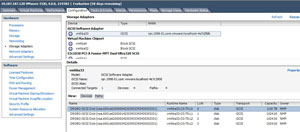 |
| Figure 1. The LUNs visible to this host are shown in the storage configuration panel of a host. (Click image to view larger version.) |
The question is, how do you know which LUN is which? One way is to expand the name column, as I've done in Fig. 1. This shows the name of the LUN as it is presented from the storage system. If you jump to the ESXi command line, you can enter this command to see this across all storage adapters:
esxcfg-mpath -L
This will show additional information, but is a little more cryptic to decipher the entire multipathing configuration. Fig. 2 shows this command run on the ESXi console.
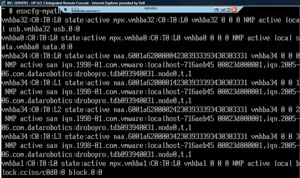 |
| Figure 2. The listing of paths has all of the information about each target. (Click image to view larger version.) |
That's all fine and good, but how do we know which LUN is which? Well, that too depends on the storage system. You can easily tell them apart by size, that is if you make them different size. I'd prefer to make everything a uniform size myself. So, then how do you tell? Well in the examples below the LUN identifier number, or serial number is revealed in each entry.:
naa.6001a620000142303933393430303331
In the string above the bolded “1” indicates it is LUN 1. There is a LUN 0 (the 2 TB LUN) and two other 1024 GB LUNs, identified as LUN 2 and 3 with the same LUN identifier strings:
naa.6001a620000242303933393430303331
naa.6001a620000342303933393430303331
This can be a good spring board to roll the LUN identifier into the VMFS datastore name to avoid confusion down the road.
How do you distinguish LUNs from each other when it comes to naming the datastores? Share your comments below.
Posted by Rick Vanover on 02/09/20104 comments
I've come to really like the distributed virtual switch feature of VMware's vSphere 4. The vNetwork Distributed Switch, as it is officially called, is a great way to standardize how hosts are provisioned for network configuration as well as ensure consistent monitoring of guest VMs in a distributed network.
In a previous post, I showed how you can reset a host if the distributed virtual switch configuration orphans it. Hosts can be orphaned through an incorrect VLAN assignment or the wrong network interface designation for the distributed virtual switch.
More
Posted by Rick Vanover on 02/04/20102 comments
I've come across some systems that for one reason or another can't run VMware Tools. This can be due to support reasons, an operating system that doesn't officially have VMware support from the version of the hypervisor or family of operating systems, an appliance that is designed to run on a physical system but doesn't offer virtualization support, or it simply won't install on that system without something else going awry. (While this does not happen frequently, usually the vendor or application owner's response is "The application isn't supported yet with virtualization" or worse, I have to explain what virtualization is.)
More
Posted by Rick Vanover on 02/02/20104 comments
Thin-provisioning, a great feature for virtual machines, uses the disk space required instead of what is allocated. I frequently refer to the Windows pie graph that displays used and free space as a good way to explain what thin-provisioned virtual disk files “cost” on disk. All major hypervisors support it, and there is somewhat of a debate as to whether or not the storage system or virtualization engine should manage thin-provisioning.
More
Posted by Rick Vanover on 01/27/20107 comments