I mentioned in an earlier post that current versions of VMware Tools now include Perfmon Integration. In a Twitter discussion, I found that this tools integration has disappeared from VMware Tools installations of patched hosts.
The VMware Tools installed with the base release of ESXi, 164009, has the Perfmon integration. In the case of ESXi, a few main categories of updates have been released since the main release. Fig. 1. shows the updates since the base release of the product, including the vSphere Update 1 release in Nov. 2009.
More
Posted by Rick Vanover on 01/25/20107 comments
For organizations that deal with a large amount of connectivity, managing I/O that reins in port and device costs is a complicated task. For virtualization implementations, there are a number of ways to tackle this challenge. Some organizations avert fibre channel by focusing on Ethernet-based storage protocols such as iSCSI and NFS. Another strategy is to use blade servers to consolidate servers to a chassis that can have in-chassis switching and storage I/O delivered via a limited number of ports.
More
Posted by Rick Vanover on 01/21/20104 comments
In "
Fat-Finger Hero
," I mentioned how recovering from a bad configuration can be an admin's saving grace. I mentioned how one of the more common areas to get stuck is host networking, and I mentioned some tools that can help you protect against configuration issues.
A new feature of vSphere, the distributed virtual switch, is one that's a perfect solution until something goes awry. Anything can go wrong, from a VLAN not being mapped to a port you are expecting, or possibly that dreaded fat finger. In one of my lab environments, I was configuring the distributed virtual switch feature and hit a snag.
I had performed the migration functionality for the hosts to go to the distributed virtual switch. This moves the management network and vmkernel communication to the distributed virtual switch from standard vswitch configuration. If the distributed virtual switch is configured with all of your expected VLANs, it may look something like Fig. 1.
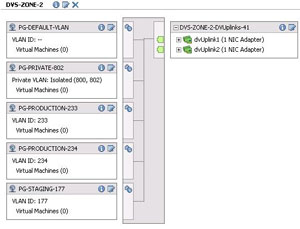 |
| Figure 1. The distributed virtual switch feature is configured in the vSphere Client and deployed to selected hosts. (Click image to view larger version.) |
Should you go 'all in' and migrate the host and its management network to the distributed virtual switch, normal migrations should have minimal interruption in communication. But if anything goes awry in the configuration, the host may become orphaned.
We've all heard of orphaned VMs, but an orphaned host? Yes, it can happen if the VLANs are not correct on the physical switch from which you are migrating. This is especially important if you are changing vmnic assignments in the process.
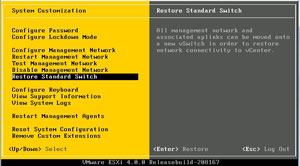 |
| Figure 2. The restore standard switch allows a distributed virtual switch configuration to be undone on a host. (Click image to view larger version.) |
ESXi provides a nice little back-out feature for a distributed virtual switch configuration. From the main ESXi menu, press F2 to enter the customization tool. If a distributed virtual switch is configured, the "Restore Standard Switch" option is enabled. This will let you configure a standard network configuration, select an interface for the vmkernel management interface, and specify a VLAN if necessary (see Fig. 2). Be ware that it will also cause an interruption to guest virtual machines, so it should be done only on an as-needed basis.
Posted by Rick Vanover on 01/19/20100 comments
There is risk when it comes to configuring the various items that make up a virtualized infrastructure. What do you do when things go wrong? Ideally, there are protections in place to prevent configuration errors from causing you extra work or, even worse, a new install of a host. Here are a few things you can do to protect ahead of the curve for VMware environments:
Scripted configuration: For port group and standard virtual switch configuration, the esxcfg-vswitch command will allow you repeat configuration on many hosts.
More
Posted by Rick Vanover on 01/14/20100 comments
This year, I again have the honor of presenting at TechMentor in Orlando. There are six main tracks in the event: Windows Client/Server, Exchange/SharePoint/Unified Communications, remote users, security, Windows PowerShell and virtualization. For the virtualization track, I will be hosting four sessions:
More
Posted by Rick Vanover on 01/12/20104 comments
As a blogger, it is important to give relevant material for what readers need to do their jobs and learn a new technology. That's the objective of the Everyday Virtualization blog, as I provide the topics I deal with on a daily basis for readers.
Eric Siebert is one of my colleagues in the blogosphere. Eric runs the popular VMware vLaunchpad (VLP) site. The VLP is a great aggregate collection of blogs and virtualization links. In fact, the VLP and Twitter are the two resources I use most to keep up to date on virtualization topics.
More
Posted by Rick Vanover on 01/06/20103 comments
Well, not exactly. This holiday season, virtualization saved the day for me in one regard. While virtualization is usually the modus operandi in the workplace and for most of my lab activities, I had an opportunity to use it for my family computing needs. My three-year old daughter received a gift that was an electronic reading device that hovers over a special book to interact with learning games. While the maker of the software is fine enough in the childhood education space, I don't exactly want this software installed on our home computing systems.
More
Posted by Rick Vanover on 01/05/20103 comments
When VMware released ESXi, ESX, and vCenter 4 Update 1; all of the base components received an update to the popular virtualization suite. One of the driving factors of the update was support for both Windows Server 2008 R2 and Windows 7 which were released recently.
For organizations who use VMware Converter Standalone Edition, there may be an issue in certain situations on newer versions of ESX and ESXi. The current version of the standalone converter is 4.0.1 which was released on May 21, 2009. Update 1 for vSphere was released after that, and the new operating systems may not show up correctly when performing certain conversions. In particular, powered-off conversions may fail with the message shown in Fig. 1.
More
Posted by Rick Vanover on 01/05/20103 comments
The
VirtualBox
Type 2 hypervisor has been released with a new feature: teleportation. This is a virtual machine migration technology from one host to another. VirtualBox's implementation of this is quite interesting in a number of ways:
- This is the only Type 2 hypervisor with a live migration functionality.
- This allows live virtual machines to cross host types (Windows, Linux, Solaris, etc.).
- This is the third major virtualization product to offer a free live migration solution.
More
Posted by Rick Vanover on 12/29/20094 comments
Since the inaugural Tech Field Day, I've been focused on getting a Drobo storage device for my personal virtualization lab. When I had my previous post on considering the Drobo devices that offer iSCSI connectivity, I was secretly drooling while mine was on its way to me.
Once it arrived, I quickly set it up and got started with the DroboPro device. I'll admit, I'm a pretty cheap guy; I would have purchased the DroboElite model. For my DroboPro device, the firmware that arrived on the unit was 1.1.3. Just days after my device had shipped, Data Robotics had released the 1.1.4 firmware for the DroboPro unit.
More
Posted by Rick Vanover on 12/23/20090 comments
Earlier this year, I wrote that virtualization has changed my life. I think it is also a good time to look back on how virtualization has come into my life over the years and how it has changed my life as the technologies and my exposures have developed.
2000
In 2000, I was working with a large company providing internal LAN, PC and server support. VMware Workstation came up as a really cool tool. I remember conversations like, "look at this, there is a separate BIOS contained in this file." I really didn't grasp exactly how powerful virtualization was at that point. Mostly, I used it to practice Windows NT-to-2000 migrations. In that era, it was difficult coming up with systems with enough RAM to double the workload.
More
Posted by Rick Vanover on 12/22/20090 comments
ESXi allows you to boot from a very small disk requirement. This is the perfect vehicle to use in test virtualization environments to learn more about virtualization or test configurations before you roll them into production. In my private lab, I've decided to boot ESXi from a USB flash device.
For ESXi 3.5, configuring boot from USB flash was a little more work that most people would like to do. There are a number of resources on how to create the USB flash-bootable image, among the most popular being Remon Lam's post at VMinfo.nl.
More
Posted by Rick Vanover on 12/16/20092 comments