How-To
Can AI Provision Your Storage? Automating iSCSI and NFS Creation
When I started this series, I thought I was reviewing a small, inexpensive all-flash NAS. Then I started letting AI do some of the testing, and the project took an interesting turn.
In the first article, I introduced the Beelink ME Mini and used AI to create and run an initial FIO storage test. That got me wondering: if AI could figure out how to run a benchmark, what else could I get it to do?
 [Click on image for larger view.]
In this article, I will use AI to test the device's NVMe storage and create iSCSI and NFS storage. This raises a couple of questions: How well does this device, with its six NVMe slots and dual 2.5GbE interfaces, perform as a storage and networking system, and can AI handle the administration tasks required to build and manage storage?
The All-Flash Cube
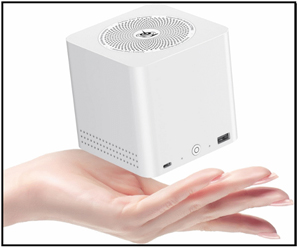
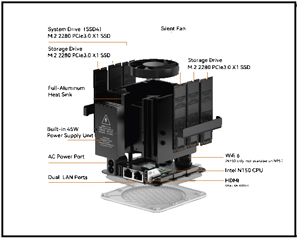
As a recap, I will be using a Beelink ME Mini. It is a small, cube-shaped device with an Intel N150 CPU, dual 2.5 Gb NICs, 12GB LPDDR5 RAM, and, most importantly, support for up to six NVMe drives.
 [Click on image for larger view.]
I installed a Kingston NV3 1TB M.2 2280 NVMe in it and installed Ubuntu on it.
Putting AI in Charge of Local Storage Benchmarks
I initially installed Aipex for monitoring capabilities but later used its AI Assistant to manage and benchmark the device.
I used Aipex's AI Assistant to test the NVMe storage using FIO by issuing the following prompt:
Test disk speed with FIO to see how well it handles large single files (like video processing or large data transfers). Install FIO if needed.
The thing was, I didn't give it hard parameters; I asked it, "How well does it handle large single files (like video processing or large data transfers)?" and let AI figure out what test to run.
It returned not only the results but also an assessment of whether it could handle the workload.
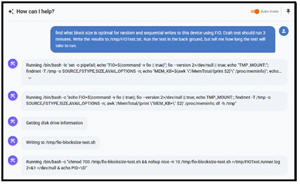
I then used the AI Assistant to find the optimal block size for sequential and random writes to the device. Since I knew the test would take a while, I asked it to run the tests in the background and write the output to a file so I could review it at my leisure.
 [Click on image for larger view.]
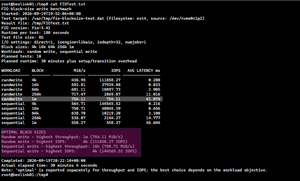
At first, I manually looked at the output file, and it told me that the Random write - highest throughput: 1m (754.11 MiB/s), Random write - highest IOPS: 4k (111858.27 IOPS), Sequential write - highest throughput: 16k (750.71 MiB/s), Sequential write - highest IOPS: 4k (144565.52 IOPS)
 [Click on image for larger view.]
Then it occurred to me that I should use AI to analyze this information, so I entered:
The file /tmp/fio-blocksize-test.dat contains the output from an FIO test. What block size produced the best sequential and random write results?
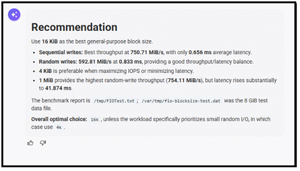 [Click on image for larger view.]
As a good documentarian who hates writing things up (yes, I know, contradiction), I asked AI to create a ticket based on this test, and it did.
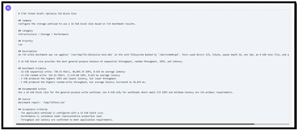 [Click on image for larger view.]
As it was heading out, I entered the following prompt to run a long test:
Stress test the NVMe storage on this system using FIO with a 500GiB file, randomly writing different-size blocks of data for 3 hours. Set the disk queue length to 10. Run the test in the background so it will not time out. Write the output of the test to /tmp/Stress02.txt.
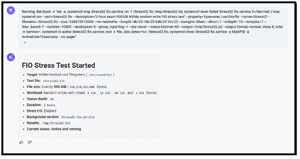 [Click on image for larger view.]
In the morning, I found the test ran without issues, then checked the system's metrics for that time and saw that CPU and memory weren't heavily loaded during the test.
Letting AI Hammer the CPU and Memory
FIO is one of my favorite disk-testing tools, but I also wanted to see whether other tests would exercise more system components, like stress-ng. stress-ng is a workload generator developed primarily to stress-test a machine's physical subsystems (CPU, memory, cache, storage, and I/O) as well as underlying Linux kernel interfaces.
To test whether AI could run the test, I entered the following prompt:
Test the system using stress-ng. Install stress-ng if needed. Run the test in the background. Write the results to /tmp/Stress-ng01.txt
Later, I logged back in to Aipex and found that stress-ng ran without any issues.
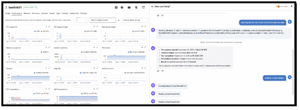 [Click on image for larger view.]
I then issued two more prompts:
How long did this test run for? When did it start and stop?
and
analyze the test results
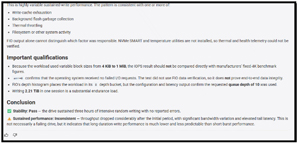
This told me a few things. Aipex understood the context of my prompts even after I logged off the system, and it knew which file to analyze without me reentering the file names.
The analysis was quite detailed and gave me insights I hadn't considered.
 [Click on image for larger view.]
AI-Provisioned Block Storage: Setting Up an iSCSI Target via Prompts
After stress testing the ME Mini, I want to see if AI could create an iSCSI target on it.
I issued the following prompt:
For this lab test, create a 40GiB iSCSI target that can be accessed by systems on the subnet. Do not require authentication. Install any software required. This is a temporary lab configuration, not a production security recommendation.
It created the iSCSI target without any issues.
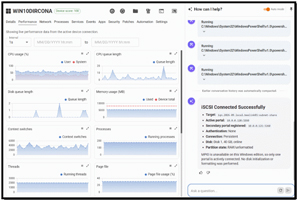
I then went to a Windows 11 machine and asked AI to connect to the iSCSI target.
 [Click on image for larger view.]
The Windows system connected to the target without any issues.
This started to prove my thesis: I could use AI to provision shared storage by issuing AI prompts. But I wanted to see whether the iSCSI connection was a fluke or whether I could use it to create an NFS share.
From Prompt to Mount Point: Standing Up an NFS Share Using AI
I asked Aipex's AI Assistant to create an NFS share by issuing the following prompt.
For this lab test, create a 20GiB NFSv3 share called BLNFS02 that is read/write. Disable root squashing so I can test the share from my lab clients. Treat this as a lab-only configuration.
The share was created via the prompt without any issues.
I then asked what command I would need to mount this share on Linux and Windows machines. It came back with this information:
Linux mount information
mount -t nfs -o vers=3 10.0.0.120:/srv/nfs/BLNFS01 /mnt/BLNFS01
Windows mount information
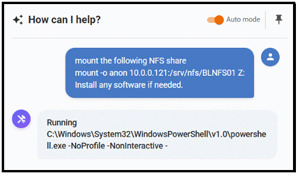
mount -o anon 10.0.0.120:/srv/nfs/BLNFS01 Z:
I issued the AI-generated command to mount the share from a Windows machine:
 [Click on image for larger view.]
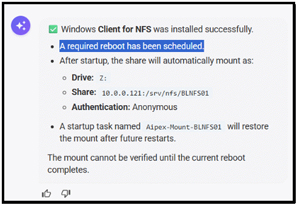
It found that the device did not have the required software, so it installed the NFS client, and I rebooted the machine.
 [Click on image for larger view.]
After the Windows system rebooted, the NFS share appeared on the Windows machine, and I could write files to it without any issues.
Beyond Chatbots: The Feedback Loop That Makes an Agent
After creating iSCSI and NFS shares and running benchmarking tests using AI prompts on Linux and Windows systems, I did a quick search to see whether any other tools could do the same thing. There was some chatter on Reddit about using public AI and agents to do similar things, but I couldn't find a system with the same capabilities. I reached out to Jon Rolls, co-founder of Tassient (the company behind Aipex), to ask how it works.
He said Aipex is unique in the field because it uses a bidirectional AI agent connected live to the actual endpoint device. He went on to say:
"I think of Aipex as a first-class RMM platform coupled with an LLM that has a broad set of agentic tools that it can use to troubleshoot and remediate problems.
"The important part is giving public LLMs access to tools and an execution environment so they can actually do something with the information they generate. I think you found that you can give Aipex a high-level objective in natural language, and it breaks it down into individual tasks, executes commands or interacts with system resources, inspects the results, and uses that information to determine the next step. That creates a feedback loop between the AI and the system rather than having the model generate an answer and stop there. It's also a wildly different approach to most 'AI-powered' RMM tools, which are just a database with a chatbot.
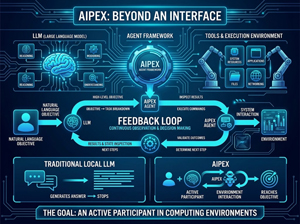 [Click on image for larger view.]
"That's also what separates Aipex from simply running a local LLM with a chat interface. The model provides reasoning and language understanding, while Aipex provides the agent framework and tools that let it interact with the environment. It can execute commands, inspect files and system information, configure resources, and run applications or tests, then feed those results back into the model. For example, when you give it an objective involving storage or networking without specifying every command that needs to run, Aipex works through those individual operations, validates the results, and continues until it reaches the objective. The goal is to make AI an active participant in the computing environment, not just an interface for generating text."
That feedback loop is the key to Aipex: the AI isn't generating a predetermined script; it continuously observes the environment's state and decides what to do next based on what it finds.
I found that this platform can do far more than its creators envisaged! While it was initially built to troubleshoot end-user issues and devices, it can also provision Linux infrastructure. It might not be the deterministic playbook DevOps people are used to, but if you want to experiment with configuration and provisioning with a super-intelligent assistant, it's an amazing capability.
What's Next: Taking Agentic Infrastructure to the Next Level
In the next article in this series, I will see if I can use natural language prompts that can stand up hypervisor components, automate virtual machine provisioning and configure virtual networking.
About the Author
Tom Fenton has a wealth of hands-on IT experience gained over the past 30 years in a variety of technologies, with the past 20 years focusing on virtualization and storage. He previously worked as a Technical Marketing Manager for ControlUp. He also previously worked at VMware in Staff and Senior level positions. He has also worked as a Senior Validation Engineer with The Taneja Group, where he headed the Validation Service Lab and was instrumental in starting up its vSphere Virtual Volumes practice. He's on X @vDoppler.