How-To
AI-Driven Virtualization & VM Provisioning ('What Have I Created?')
What started as a routine hardware review of the Beelink ME Mini, a budget-friendly, cube-style all-flash NAS with an Intel N150 processor, dual 2.5GbE NICs, and support for six NVMe SSDs, quickly grew into something far vaster and more exciting.
In my first two articles in this series (part 1 and part 2), I looked at the ME Mini's hardware, installed Ubuntu Server, and set up Tassient's Aipex (an AI-based RMM product) to monitor the system. That simple monitoring decision took an unexpected turn when I started throwing high-level tasks at Aipex's bidirectional AI assistant. Instead of manually crafting and running scripts to test its performance, I gave Aipex plain-English objectives to do it. It figured out the right parameters to benchmark the device using FIO and stress-ng. I then used it to analyze the results, and then had it create an IT ticket summarizing the findings.
From there, I pushed to see whether AI could provision shared storage. Again, using natural language prompts, without me issuing any CLI syntax, it created an iSCSI target and an NFSv3 share, generated the client-side mount commands, and let me map the storage to my Windows 11 desktop without a hitch. This showed me that an AI agent with an execution loop and feedback mechanism, like Aipex, can accomplish complex IT tasks without issues.
I used shared block (iSCSI) and file (NFS) storage because they are foundational pillars of an SDDC, but virtual machines consume those resources. It got me wondering: can an agentic AI handle hypervisor configuration, download guest OS images, allocate virtual hardware resources, and orchestrate the full VM lifecycle using natural-language prompts? In this article, I'm putting that question to the test: can agentic AI stand up, configure, and manage virtual machines from scratch? This is the second and third leg of my quest to see whether I can create an SDDC using only AI prompts.
AI-Provisioned VM
Getting back to reviewing ME Mini, I wanted to see whether it could run a VM. I knew its N150 processor and 12GB of RAM would limit what I could do with the VM, but I wanted to know whether it could, and more importantly, whether I could issue a single AI prompt to create a VM on it.
The prompt I gave it was:
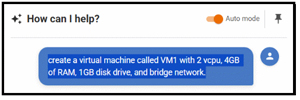
Create a virtual machine called VM1 with 2 vCPUs, 4GB of RAM, a 1GB disk drive, and a bridged network.
 [Click on image for larger view.]
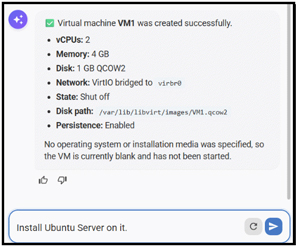
It installed and configured everything needed to run KVM (no reboot was required), then created the VM.
 [Click on image for larger view.]
The AI Assistant told me the VM was set up, but it didn't have an OS.
I asked it to install Linux:
Install Ubuntu Server on it.
To my surprise, it not only installed Ubuntu, but also increased the disk size, created a user/password, and started the VM.
I installed Aipex on the VM and asked AI to test its performance:
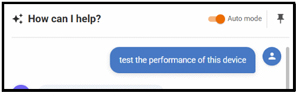
Test the performance of this device
 [Click on image for larger view.]
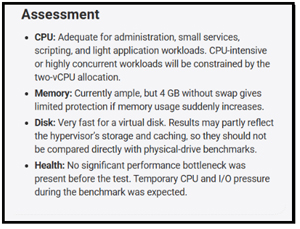
It chose stress-ng for the stress test and reported back on the results. The most interesting part was the assessment, where it told me what the VM could be used for.
 [Click on image for larger view.]
By then, I was convinced I was onto something, so I added a compute node to my AI-provisioned lab and took a more formal approach to configuring the device.
A Compute Node and a Sanity & Stack Check
I chose to use a SimplyNUC Ruby as the compute node. The unit has an 8-core AMD Ryzen 7 4800U processor. It supports Hyper-Threading, meaning up to 16 threads can run at a time. The processor runs at a nominal 1.8 GHz, with a max boost of up to 4.2 GHz. It has a Thermal Design Power (TDP) rating of 24 W. The system has 64GB of dual-channel DDR4-3200 memory.
After a fresh install of Ubuntu Server, I installed the Aipex agent on the Ruby. I needed to confirm the device supports a hypervisor (KVM) and virtual machines (VMs). I issued the following prompt:
"Check if this system supports hardware virtualization. If it does, set up whatever hypervisor packages and tools are needed to run KVM virtual machines headless on Ubuntu Server. Enable any necessary services so they survive a reboot."
AI ran tests to confirm it supports hardware virtualization and installed the packages needed to run VMs.
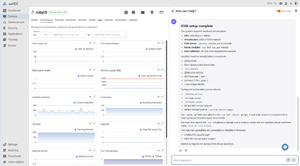 [Click on image for larger view.]
Networking: The Bridge Test
I then used AI to check that the VMs could connect to the internet via a bridge network. I wanted to do this over the physical 2.5GbE NIC without dropping SSH or breaking Aipex's own outbound connectivity.
I issued the following prompt:
"Set up a Linux network bridge called br0 on one of the 2.5GbE interfaces so that future virtual machines get IP addresses directly from my home lab's local DHCP server. Make sure the host keeps its network connection and doesn't get disconnected during the process."
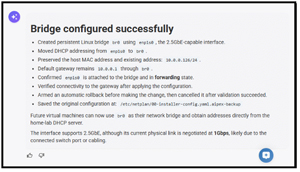 [Click on image for larger view.]
Not only did it create the bridge, but AI also found that the device was connected to a 1GbE network and couldn't fully utilize the 2.5GbE link.
The Cloud-Init / Automated VM Spin-Up
Now for the good part: creating a VM with a single prompt.
I issued the following prompt:
"Download the latest Ubuntu 24.04 LTS cloud image and spin up a new virtual machine named test-vm-01. Give it 2 vCPUs, 4GB of RAM, and a 20GB disk stored on the local NVMe drive. Attach it to br0 and configure cloud-init so I can SSH into it as user labadmin with the password blah1,blah2. Store the cloud image so it can be reused."
This worked without any issues.
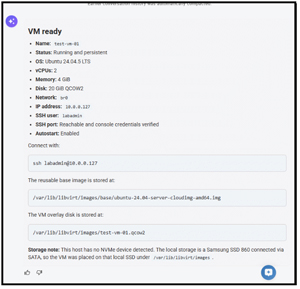 [Click on image for larger view.]
Again, AI caught something that I wasn't aware of. I had installed a SATA-attached SSD, not an NVMe drive.
I was able to SSH into the VM without any issues.
Automated Application Spin-Up
No one buys a computer to run an OS; we buy them to run applications. Can the AI agent create a VM and install an application in it?
I issued the following prompt:
Create an Ubuntu VM call ngnxvm00A and install nginx on it. Attach it to br0 and configure it so I can SSH into it as user labadmin with the password [lab password redacted]. Create a web page that says "AI Created ME" with a link to virtualizationreview.com and https://fentontom.github.io/TomsPastContent/TJF_Art.html. Optimize the VM size for this workload.
One small detail amused me: I used "call" rather than "called" or "named" in the prompt, and the AI Assistant had no trouble interpreting what I meant.
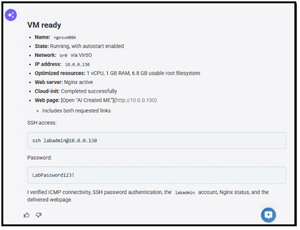 [Click on image for larger view.]
When I went to the link, the web page was there.
This was the moment that really got my attention. One prompt created the VM, installed Nginx, created the web page, and correctly sized the VM at 1 vCPU and 1GB of RAM. I had done all of those things manually many times, but this time I only had to describe what I wanted, and a few minutes later it was done.
Management, Verification & Inspection
Creating a VM is only part of its life. It needs monitoring and management until its life ends.
To test this, I issued the following prompt to check the VM's health:
Is ngnxvmB running? What IP address did it get from the DHCP server, and can you verify that its virtual disk and networking are actively healthy?
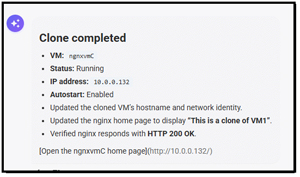
Often, we need to clone VMs. To test this feature, I issued the following prompt:
Clone ngnxvmB to ngnxvmC and change the ngnx home page to say "This is a clone of VM1
 [Click on image for larger view.]
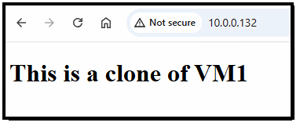
It cloned the VM and modified the web page without any issues. I could access its web page and see the updated text.
 [Click on image for larger view.]
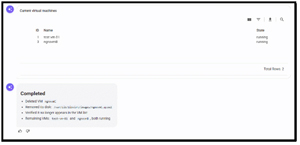
Finally, at the end of a VM's useful life, it needs to be decommissioned. I issued the following prompt:
List the VMs on this device; Delete the VM ngnxvmC.; list the VMs on this device
 [Click on image for larger view.]
Interestingly, it didn't list the VMs before removing ngnxvmC. But it did list the VMs afterward.
Moving VMs Between Storage Devices
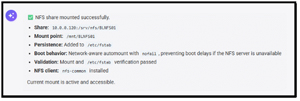
Often, VMs need to be moved from one storage device to another. To test whether AI could do this, I mounted the NFS share on the ME Mini with the following prompt:
mount the nfsshare 10.0.0.120:/srv/nfs/BLNFS01 and make it persistent across reboots
 [Click on image for larger view.]
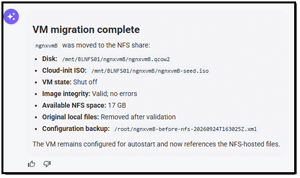
I then moved the VM from local storage to the NFS share:
move the VM ngnxvmB to the NFS share
 [Click on image for larger view.]
The NFS share showed that the VM's files were now on it. After changing its storage, I was able to power on the VM and display its Nginx web page without issues.
A Three-Tier LAMP Stack
I was building confidence in Aipex's AI Assistant's ability to build and manage VMs, but what about using AI to create a three-tier application? I used a Red Hat example for a LAMP stack and issued the following prompt:
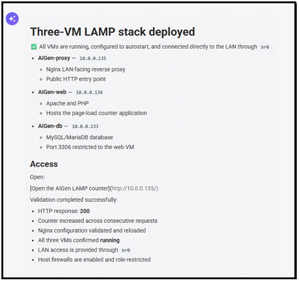
Create a three-VM-based LAMP Stack (Linux, Apache, MySQL, PHP) to track how many times a web page has been loaded. Use BR0 so it is accessible from the LAN. The VMs should be prefixed with AIGen-
 [Click on image for larger view.]
The prompt timed out a couple of times, but I kept reissuing it, and the AI Assistant fully built a three-tiered application!
 [Click on image for larger view.]
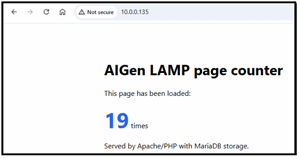
The web page worked as expected.
 [Click on image for larger view.]
By then, I was amazed by how much I could accomplish with prompts.
Why Provisioning IT Takes More Than Just an LLM
After spending time creating and managing IT with Aipex, I went back to Jon Rolls, CEO of Tassient, and asked how Aipex's AI Assistant is different from using Claude or ChatGPT for these tasks.
First, he reiterated that I was pushing Aipex beyond its primary end-user support use case, but he wasn't surprised that it worked. He then went on to say the following:
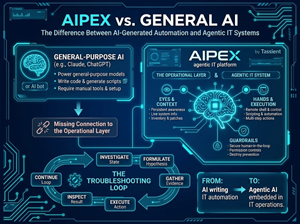
"The way I see Aipex is that it is fundamentally different from simply asking Claude or ChatGPT to write code or scripts and then using that code to manage IT infrastructure. They are powerful general-purpose AI models that can reason about an infrastructure problem, generate scripts, and, when properly configured with tools and an execution environment, even perform multi-step actions.
"The challenge is that you have to connect the LLM to the operational layer. You have to do it securely and carefully, with human-in-the-loop approval for potentially destructive actions. That's why we, at Tassient, built Aipex -- it is an agentic IT platform with persistent awareness of managed devices, live performance and system information, remote shell and control capabilities, scripting and automation, inventory, patch information, and controls around what an AI agent is permitted to do."
 [Click on image for larger view.]
In other words, the LLM is only one component of Aipex; the other components provide the eyes, hands, context, execution environment, and guardrails that allow the model to operate as an IT troubleshooter. That distinction becomes particularly important during troubleshooting, because Aipex can investigate the actual state of a device, formulate a hypothesis, gather additional evidence, execute an appropriate action, inspect the result, and continue the troubleshooting loop rather than simply handing an administrator a piece of code and asking them to figure out how and where to run it. That is the difference I think of as moving from an AI that can write IT automation to an Agentic AI system embedded in the IT operation.
What Have I Created?
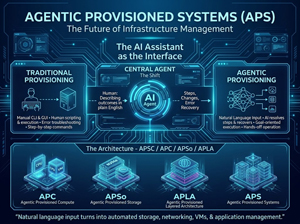
When I started this project, I thought I'd see how far I could stretch a little six-NVMe NAS and turn it into a system that uses AI to create and manage storage, networking, virtual machines, and multi-tiered applications. But what was it called? I searched and talked to people to find a name. Some people suggested AI-provisioned SDDC; I don't think that's quite what I built, since calling it SDDC probably tortures the definition of SDDC. This doesn't have the scale, redundancy, centralized policy management, security architecture, or resource pooling that you'd normally associate with an enterprise SDDC. But I did have something interesting: I could describe what I wanted in plain English, and an AI agent could figure out the steps, make the changes, check the results, and keep going when something didn't work exactly as expected.
That is a pretty big change from how I've traditionally provisioned infrastructure. Normally, I would use a GUI or look up the syntax, write a command or script, run it, check the output, figure out what went wrong, and decide what to do next. With the AI Assistant, I described the outcome I wanted rather than the individual commands needed to get there. The assistant became the interface between me and the infrastructure.
And that's what is interesting about this series of articles. The hardware was good for a little NAS, but it isn't particularly revolutionary on its own. In fact, that's part of the point. I did this with inexpensive, relatively low-powered hardware I originally bought to build an all-flash NAS. The Beelink wasn't the interesting part. It was what happened when I put an AI agent between me and the operating system.
We're not at the point where I'd turn an AI agent loose on production infrastructure and walk away. Too many opportunities for misunderstanding or incorrect assumptions that could become a very expensive problem. But after watching it create storage, configure networking, build VMs, install applications, inspect systems, move workloads, and recover from mistakes, I'm convinced that we're looking at a different way of thinking about infrastructure creation and management.
 [Click on image for larger view.]
So did I have AI-deployed Storage, AI-defined VMs, AI-provisioned Applications, or is it called something else? After talking to industry experts, including Scott Manchester from Nerdio, James Davis of Kazm, and Jon Rolls from Tassient, the closest thing I could come up with is Agentic Provisioned Systems, Agentic Provisioned Storage, Agentic Provisioned Compute, and Agentic Provisioned Layered Architecture, or APS, APSo, APC, and APLA, respectively.
Regardless of the name, it feels like the future of IT to me.
About the Author
Tom Fenton has a wealth of hands-on IT experience gained over the past 30 years in a variety of technologies, with the past 20 years focusing on virtualization and storage. He previously worked as a Technical Marketing Manager for ControlUp. He also previously worked at VMware in Staff and Senior level positions. He has also worked as a Senior Validation Engineer with The Taneja Group, where he headed the Validation Service Lab and was instrumental in starting up its vSphere Virtual Volumes practice. He's on X @vDoppler.