In-Depth
License to Thrill ... Meet Agent 365
With the availability of Microsoft 365 E7 licensing, it's time to take a deep dive into Agent 365 and what it actually brings to businesses looking to manage the invading hordes of agent barbarians.
We looked at the basics of Agent ID in Entra, and the governance features in Agent 365 just after Ignite, but this article will go deeper into the technical details for you to make a decision answering the question -- Which users (if any) in my organization actually need Microsoft 365 E7 licensing?
The Landscape
Big Tech is drunk on AI with everyone jostling to tell you how amazing it is, and how incredible it'll be for your business productivity. At the same time, they're laying off 10% or more of their workforce because of AI, so I'm pretty sure most of those people aren't that impressed with AI's influence.
I've been through enough technology "revolutions" as a consultant to know what's happening, not get caught up in it, and keep a steady hand on the steering wheel as I guide my clients. There are a LOT of decisions in businesses related to AI made out of fear of "missing the boat," and adoptions enforced because "productivity gains" are to be had. However, with any technology, doing it just "because everyone else is doing it," or because an influencer convinced your CIO that the organization would disappear if they didn't, isn't an AI transformation strategy.
A real AI strategy starts with acknowledging a few facts:
- Generative AI, LLMs and AI Agents can be transformative technologies in an organization.
- They can also be convincingly wrong, and like any automation, can make mistakes repeatedly and faster than any human.
- Fundamentally LLMs mix user data and the control plane into the same communication, leading to security risks that can't be engineered away (unlike SQL injections for example), and thus need to be mitigated.
- Agents and GenAI feed on data, and if your data governance is lax (or nonexistent), sprinkling AI on top will exacerbate this problem.
Given these facts you can then form an AI strategy that outlines goals the organization wants to achieve with AI and then look at how the current technology fits into that strategy. Of course, this is very much "build the plane while it's flying" as the capabilities of agents, models and applications are changing weekly, so if you have a strategy you can look at new entrants, experiment with them, and see if it fits into the plan, rather than just react to the latest shiny tech.
It's also worth noting for your strategy design that while the environmental cost of GenAI is abstracted away from our immediate purview, it should nevertheless be part of your calculus, because it's real.
Governing AI in Your Business
Gartner projects that there will be 1.3 billion agents in organizations worldwide by 2028. Whether that figure will pan out or not, the reality is that agents are already "employed" in your business, whether you know about it or not. We call this Shadow AI, following on from Shadow IT, and several Microsoft solutions mentioned below help you spot it in your business.
Some agents are assistive, working alongside users to help them with tasks, some can be told what to do and go off and do it, and some complete sequences of tasks independently, sub-contracting to other agents and tools as required.
Questions you need answers to are:
- Can you discover agents?
- Can you monitor agents and see what they're doing?
- Can you see what data they have access to and who they are sharing that data with?
- Do you have the guardrails in place to govern and audit agents?
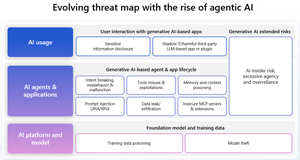
There are risks at each layer, in the underlying platform and model, in the AI agents and the applications that use AI, and when end users interact with AI.
 [Click on image for larger view.]
Threat Map for AI Agents (source: Microsoft).
[Click on image for larger view.]
Threat Map for AI Agents (source: Microsoft).
If you are using Defender for Cloud Apps, it'll discover Shadow AI usage in your organization.
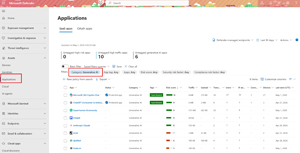 [Click on image for larger view.]Defender for Cloud Apps Shadow AI Discovery
However, if you have Global Secure access (Microsoft's Secure Access Services Edge, SASE), and have enabled the Internet traffic forwarding profile you not only get discovery of any AI apps or agents on any endpoint, you also get inbuilt prompt shielding for any AI tool through the inbuilt AI Gateway.
Agent 365 in the Microsoft 365 Admin Center
Agent 365 shows up in all the portals IT admins already use in Microsoft 365 -- the Admin Center, Entra ID, Purview and Defender.
Starting with the admin center, we have a new area called agents, with an Overview dashboard.
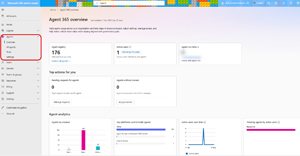 [Click on image for larger view.]Agent 365 Overview Dashboard
Next, we have the Registry, which shows all the agents available in your tenant, including Requests that you have from end user agent creators in your organization for their agent to be published and shared with others. For each agent (Microsoft, third party and in-house created) you can see if it's available, blocked, in draft or not activated. You can also filter by the channel where the agent can be accessed (Copilot, Outlook, Teams, M365 Apps and SharePoint). For each agent you can also see the details which users can have access to it, what data and tools it's going to access, the API permissions it requires, the certifications it comes with (HIPAA, SOC2 etc.) and any activity it's generated.
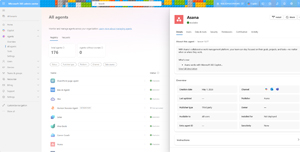 [Click on image for larger view.]Agent 365 Registry and Detailed View of One Agent
The most important tab for each agent though is the Security -- here you can apply policy control to agents, enforcing Conditional Access policies, Access Packages for controlling permissions and agent lifetime and Custom Security Attributes for fine grained control in your Conditional Access Policies. You can also enforce various policies from Entra ID, Purview, Defender and SharePoint through these templates.
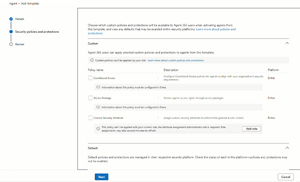 [Click on image for larger view.]Agent Template Settings
When you want to deploy an agent, you can select who it gets deployed to: you, all users or specific users / groups.
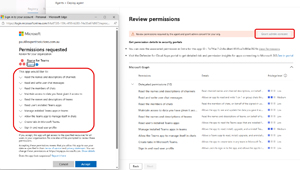 [Click on image for larger view.]Granting API Permissions Required by an Agent
You can also pin an agent, which will display it prominently in the left-hand menu in Copilot for example. In other words, IT admins control exactly which agents can be deployed, to whom, with what governance guardrails and controls, and they also maintain full control over the agent's lifetime. This is helped by the agent map, that shows you agents in "bubbles" based on the creation platform, and which other agents and tools they interact with -- the same information that's in the Registry list, but visualized.
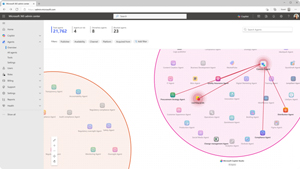 [Click on image for larger view.]Agent Map for Visualization of Interactions
Another task in Agent 365 is to manage ownerless agents. Each agent should have at least one owner who is a technical person that can change the configuration of it, and one sponsor from the business who can control access to the agent and understand how it's used in the business. If a person leaves the organization, or moves departments, you may need to assign a new owner, or have a policy that automatically assigns the leaving person's manager as the new owner.
And if you have a large fleet of agents, there's Graph API access to all these actions so it can be automated.
Agent ID in Entra
Behind the registry in the admin center lives the foundation of identity for agents. Every agent that's created in Copilot Studio, the Agent Builder (low code/no code) and in Teams / Microsoft Foundry (pro code) will automatically be given an identity in Entra ID.
Agents created in third party platforms can use the SDK to register agents here, but I assume Microsoft will work with the most popular platforms to make integration even easier.
There's a new type of object in Entra for agent identities, when you first introduce a particular agent type, it has a Blueprint principal, which in turn has an agent ID blueprint, which is a template for all instances of this agent type. None of these have a credential (that could be stolen) tied to them, they only work through OpenID Connect / OAuth 2 tokens. If a particular flavor of agent is misbehaving you don't need to manage them individually, deleting the blueprint will kill all of its agent instances. Optionally, if an agent needs a user account to interact with systems that only understand how to accept user interactions, you can create an Agent User for it.
In the public preview there was also a registry of all agents here in Entra ID, but that's being removed now that it's generally available in favor of the registry in the admin center.
Here you can also manage agent collections, there are two built in ones (Global for everyone and Quarantined for suspect agents) and you can create your own which control discoverability, only agents in the same collection can enlist the help of other agents to complete tasks.
In this screenshot you can see three agent identities, created from the same blueprint, which shows the tool (Copilot Studio) where they were created.
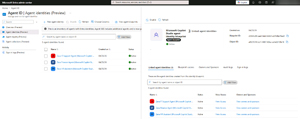 [Click on image for larger view.] Entra ID and Agent Blueprint
Agent 365 and Purview
For data management we turn to Purview, where each of the puzzle pieces in Purview contribute. Data Security Posture Management (DSPM) gives us AI observability and views into data accessed, oversharing and sensitive interactions. Data Loss Prevention (DLP) identifies sensitive data that shouldn't be shared with agents, and lets you apply policies to control this, just like you do today for data sharing through email, endpoint, Teams and document sharing.
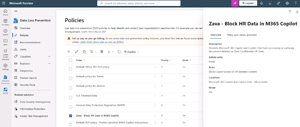 [Click on image for larger view.] Purview DLP Policies for AI Agents
Insider Risk Management (IRM) tracks agent activity over time, providing correlation between actions that by themselves aren't particularly suspicious but when seen in aggregate shows risky intent, just like it does for user activity.
Communications Compliance policies can apply to prompts between users and Copilot or agents, applying Machine Learning trainable classifiers for Prompt Shielding (catching prompt injection attempts) and identifying Protected Materials that shouldn't be shared.
Finally, and most importantly, Compliance Manager has a built-in AI Baseline Assessment to evaluate your posture against a recommended structure (based on NIST standards, the EU AI Act and others).
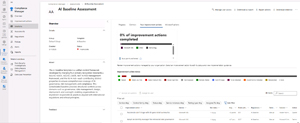 [Click on image for larger view.] AI Baseline in Purview Compliance Manager
Defender XDR -- Securing Your AI Agents
In Defender there's a new area under Assets for AI agents that displays agents created in Foundry, Copilot Studio, AWS Bedrock and GCP Vertex AI.
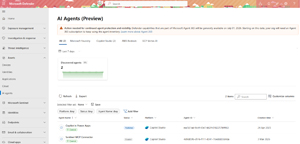 [Click on image for larger view.] AI Agents Inventory in Defender XDR
AI inventory data and interactions are also available for Advanced Hunting using KQL.
Each portal adds the necessary controls and visibility so identity admins can manage agents and their identities, data managers handle the interactions with (potentially sensitive) data in Purview, IT admins handle the publishing and guardrails for agents in the M365 Admin Center, and SOC analysts can handle incidents by risky agents in Defender.
For executives who don't need the gritty details, but who do need to understand the organization's overall posture and risks, there's a new Security Dashboard for AI. It shows AI models, MCP Servers, AI apps and agents, and gives a prioritized view of actions to take.
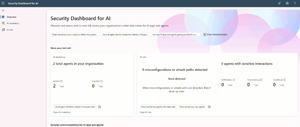 [Click on image for larger view.] Security Dashboard for AI
Microsoft 365 E7 -- The Ultimate License Bundle?
Back at Ignite 2025, when all the features that make up Agent 365 were released in public preview were announced, there was no word on licensing. Since then, the joke that's been going around in IT Pro circles for years became true -- "stop forcing us to pay for add-ons to M365 E5, just release the E7 suite." Microsoft obliged, and the Microsoft 365 E7 suite is available from the 1st of May 2026. Here's what's included:
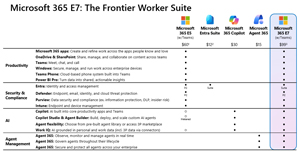 [Click on image for larger view.] Microsoft 365 E7 Comparison Chart (prices in USD) (source: Microsoft).
The E7 bundles everything that's in E5, plus the Entra Suite (but not the Intune suite interestingly enough), the full Defender and Purview protection suites, Microsoft 365 Copilot and the Agent 365 management tools. A cynic might point out that after several years of hard sell by Microsoft, only 3% of Microsoft 365 users have adopted M365 Copilot and bundling it into E7 is a way to boost those numbers. You can also add just the Agent 365 features to Microsoft 365 E3/E5 for $15. These prices are the SKUs that include Teams, just like for E3 and E5, there's an E7 SKU without Teams.
It's also worth mentioning that the On-Behalf-Of (OBO) flow for agent identity will be available on the 1st of May, where an agent receives a delegated token from a user, and then performs actions as if the user was performing them. The full Agent Identity where they authenticate using their own credentials will still be in preview then.
Conclusion
Agent 365 lets you apply Zero Trust principles to AI agents and tools in your organization. In fact, the free Zero Trust Workshop I covered previously now has an added pillar for AI deployment.
There are a lot of guardrails and tools in Agent 365 which will be handy for businesses deploying them widely, hopefully this overview has given clarity as to the extent Microsoft has gone to making sure that governance and management tools are in place when your organization does too.
About the Author
Paul Schnackenburg has been working in IT for nearly 30 years and has been teaching for over 20 years. He runs Expert IT Solutions, an IT consultancy in Australia. Paul focuses on cloud technologies such as Azure and Microsoft 365 and how to secure IT, whether in the cloud or on-premises. He's a frequent speaker at conferences and writes for several sites, including virtualizationreview.com. Find him at @paulschnack on Twitter or on his blog at TellITasITis.com.au.