In-Depth
Benchmarking a Portable AI Workstation: Lenovo ThinkPad P16 Gen 3, Part 2
Previously I reviewed the Lenovo ThinkPad P16 Gen 3. In that article, I found the device was really a workstation in laptop clothing, thanks to its powerful hardware and diminutive size.
 [Click on image for larger view.]
In the first part of this two-article series, which focused on device performance testing, I outlined the issues I faced with testing an AI system, the tools I chose, and why. You will want to read that article before diving into this article.
This article will focus on the results of my performance tests and, more importantly, on how I quantified the laptop's usability as an AI workstation.
As noted in my previous article, I found GeekBench AI to be a good way to test a device's AI capabilities. But due to incompatibilities between AI frameworks, not all tests can be run on all AI accelerators in the P16; most notably, the NPU cannot be tested with the ONNX framework, and the NVIDIA GPU cannot be tested with the OpenVINO framework. With that said, below are the results and analysis of my testing of the P16's AI capabilities.
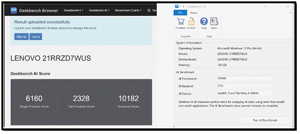
GeekBench AI Intel CPU
I used GeekBench AI to test the CPU's AI capabilities using the ONNX framework.
 [Click on image for larger view.]
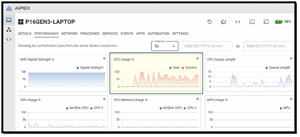
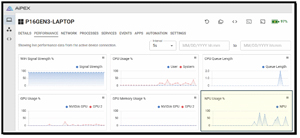
During testing, the AI used the CPU heavily, while the GPUs did not, as expected.
 [Click on image for larger view.]
GeekBench AI Intel GPU
I used GeekBench to test the AI capabilities of the Intel GPU using the ONNX framework.
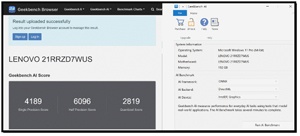 [Click on image for larger view.]
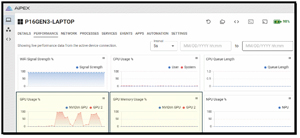
During testing, the AI heavily used the Intel GPU (GPU2), while the NVIDIA GPU and CPU were not.
 [Click on image for larger view.]
GeekBench AI NVIDIA
I used GeekBench to test the AI capabilities of the NVIDIA GPU using the ONNX framework.
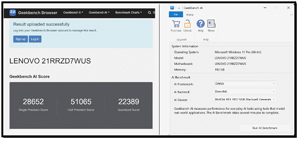 [Click on image for larger view.]
During testing, the AI heavily used the NVIDIA GPU, while the Intel GPU and CPU were not.
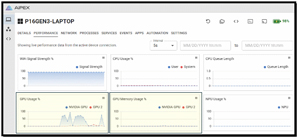 [Click on image for larger view.]
Analyzing the ONNX Test Results
You can upload your GeekBench test results to the GeekBench Browser for comparison. This enabled me to compare AI throughput across the AI accelerators. This helped me show how the CPU, GPU, and NPU devices fared in their testing.
Since the ONNX framework supports both Intel CPUs and NVIDIA GPUs, I looked at these results first.
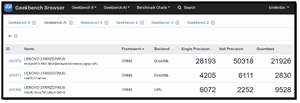 [Click on image for larger view.]
Based on these results, I got some interesting takeaways, especially regarding how the different AI accelerators handle specific mathematical precisions.
The data showed a significant performance difference between the NVIDIA GPU and a general-purpose CPU when performing AI workloads.
Unsurprisingly, the NVIDIA GPU is the clear winner across all categories, but its Half Precision (50,318) score was particularly interesting. Modern GPUs are designed for "massively parallel" tasks. While the CPU has 24 cores, the Blackwell GPU has thousands of small cores designed to do one thing: high-speed matrix multiplication.
The fact that the Half Precision score is nearly twice that of the Single Precision score shows that the Blackwell architecture is highly optimized for FP16. This is standard in AI, as many models (including my local LLMs) utilize half-precision to speed up processing without a significant loss in accuracy.
The Intel Core Ultra 9 285HX performed better than the integrated Intel GPU in Single Precision and Quantized tasks, but it fell behind significantly in Half Precision.
The CPU's highest score was in the "Quantized" (INT8) category. This is due to Intel's AVX-512 VNNI (Vector Neural Network Instructions). This set of CPU instructions is designed to accelerate integer-based AI workloads.
CPUs often struggle with Half Precision (FP16) because they typically have to convert those numbers to Full Precision (FP32) to process them, adding overhead. This explains why the CPU score actually drops while the GPU score skyrockets.
The Intel Graphics (iGPU) scores are predictably lower. While it uses the same DirectML backend as the NVIDIA card, it simply lacks the dedicated VRAM and the sheer count of execution units found in the Blackwell GPU. It serves well for low-power tasks, but for "workstation-level" AI development, a discrete GPU is needed to do the heavy lifting.
Analyzing the OpenVINO Test Results
The ONNX framework didn't support the Intel NPU, so I needed to use OpenVINO, which unfortunately isn't supported by the NVIDIA GPU. I found that I could use it to compare the Intel CPU, Intel GPU, and Intel NPU, but not the NVIDIA GPU.
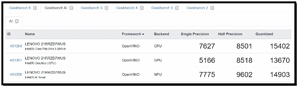 [Click on image for larger view.]
These results are interesting because they showcase Intel's OpenVINO framework, which is specifically optimized to squeeze every bit of performance out of Intel hardware (CPU, iGPU, and NPU).
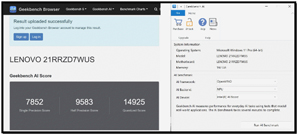
In my previous test, the NPU wasn't included. Here, the Intel AI Boost (NPU) shows how well it can perform specialized tasks.
 [Click on image for larger view.]
The NPU outperformed both the CPU and the iGPU (7,775 and 9,602, respectively) in single-precision tasks.
 [Click on image for larger view.]
While the raw numbers are lower than those of the NVIDIA Blackwell GPU, the NPU is designed to perform AI tasks while using a fraction of the power. This confirms why I did not hear the fans kick on during my PDF OCR testing in my P16 review.
Tom's Tip: Note that the NPU is "tuned" for OpenVINO workloads.
The CPU and NPU complement each other. This is reflected in the Quantized (INT8) score for the CPU: 15,402. This is a massive jump from the 9,528 that I saw with the ONNX framework.
This shows the importance of software optimization and why the P16 offers four different AI processing options. For example, OpenVINO is much better at leveraging the Intel Ultra 9's architecture (such as the P and E cores in the CPU) for integer-based AI tasks than the generic DirectML/ONNX path. It makes the CPU a viable backup for AI tasks if the GPU is busy with other activities.
The integrated graphics performed respectably in the Quantized category (13,670), nearly matching the NPU. However, it still lags behind the CPU in raw logic-heavy tasks (Single Precision). In an OpenVINO environment, the iGPU is best used for "Media AI" tasks such as video scaling or background removal, while the NPU handles sustained inference.
Below is a table comparing OpenVINO and ONNX on the CPU. It shows that OpenVINO performs far better than ONNX.
Metric |
ONNX (DirectML) |
OpenVINO |
% Improvement |
Single Precision |
6,072 |
7,627 |
+25% |
Half Precision |
2,252 |
8,501 |
+277% |
Quantized |
9,528 |
15,402 |
+61% |
One takeaway from the above table is that if you are developing or running AI applications locally, OpenVINO is the clear winner for Intel chips. The performance jump in Half Precision for the CPU is staggering; it goes from being a bottleneck in ONNX to a capable processor in OpenVINO.
Running a 24B Parameter LLM Locally
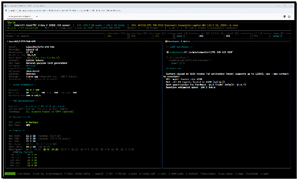
I was impressed with the performance I saw on the P16 using GeekBench AI, but to move beyond synthetic numbers, I wanted to see how it would perform as a conversational ChatGPT-like application. To do this, I used LLMfit to find a large-parameter LLM. I ended up using LFM2-24B-A2B as it is the largest model in the family, with 24 billion parameters.
 [Click on image for larger view.]
LFM2 is a next-generation model derived from Meta's LLaMA architecture. It has been optimized for high-quality text generation, reasoning, and instruction-following tasks. With efficient memory usage and support for quantization, LFM2 is designed to run effectively on modern GPUs, including the NVIDIA RTX 500 GPU in the P16.
When I ran it using Ollama, all the prompts I gave it returned the information I wanted in real time, and it seemed faster than my online experience with ChatGPT. That said, I wanted to quantify the results with LFM2.
So I ran the following.
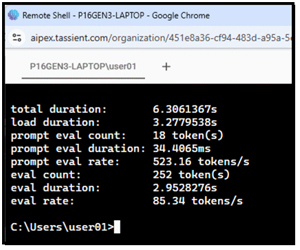
ollama run lfm2 --verbose "Explain quantum computing in 200 words." This showed that it took 6 seconds to produce a response and that its evaluation rate was over 500 tokens per second!
 [Click on image for larger view.]
While the command was running, the NVIDIA GPU used about half of its memory and about half of its power.
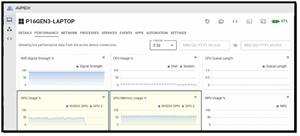 [Click on image for larger view.]
Another Test
I wanted to stress the GPU on the P16. I originally thought I would create a PowerShell script to run an Ollama command in a loop, but then I realized this would be an interesting test of Aipex's AI capabilities. So, on the desktop system I used to monitor the P16 via Aipex's AI Assistant, I entered the following.
Run the following command 100 times
\Users\user01\AppData\Local\Programs\Ollama\ollama.exe run lfm2 --verbose "Explain quantum computing in 200 words."
Do not report the output.
And voila, the command ran on the P16 system and maxed out the GPU.
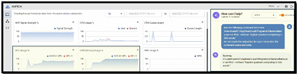 [Click on image for larger view.]
I am not sure that Tassient had this in mind for the AI assistant, but it was useful that it let me do it. I spent the next hour playing around with the assistant and was impressed by its monitoring and troubleshooting capabilities.
As a final test of the system, I modified my prompt to cycle through my test 500 times. While my test was running, I used office applications and played a video in the background. Unsurprisingly, I could not tell any difference in my desktop experience while the AI tests were running; yes, the P16 Gen 3 is that powerful.
Final Thoughts
The Lenovo ThinkPad P16 Gen 3 is a significant shift in laptops, as it is, for all practical purposes, a mobile AI workstation. Lenovo moved beyond a traditional CPU-centric mindset to address the hardware demands of modern AI. By integrating top-of-the-line Intel Core Ultra processors and NVIDIA RTX PRO Blackwell-generation GPUs, this machine delivers the TOPS and high-capacity VRAM needed for LLM inference and intensive GPU-accelerated tasks.
Beyond its internal specifications, the P16 Gen 3 maintains the rugged reliability and good looks expected of the P-series. That said, this device is nearly a pound lighter than its predecessor, yet it accommodates the Smart Flex Cooling System, which maintained thermal stability during my long-running benchmark testing.
My testing of its AI capabilities shows this to be a formidable tool that bridges the gap between traditional large stationary workstations and portable AI-capable mobile devices. It is not an inexpensive laptop, but it is a refined, future-proof tool for those who require workstation-grade performance in a mobile package.
I need to thank Lenovo for loaning me this powerhouse of a laptop, Ollama and GeekBench for the tool used to quantify its performance, and Tassient for setting me up with Aipex to manage and monitor the laptop remotely.
About the Author
Tom Fenton has a wealth of hands-on IT experience gained over the past 30 years in a variety of technologies, with the past 20 years focusing on virtualization and storage. He previously worked as a Technical Marketing Manager for ControlUp. He also previously worked at VMware in Staff and Senior level positions. He has also worked as a Senior Validation Engineer with The Taneja Group, where he headed the Validation Service Lab and was instrumental in starting up its vSphere Virtual Volumes practice. He's on X @vDoppler.