How-To
How to Make Your Router Reboot Itself When It Loses Internet Connectivity
The Problem
My home network is generally pretty reliable. I use a Nighthawk router, a higher-end consumer model, and overall, I have been happy with it. It does, however, occasionally lose its internet connection, a problem that a reboot clears. By occasionally, I mean once or twice a year. The problem is that those failures have an uncanny knack for happening when I am out of town.
When they happen while I am in town, fixing the problem is easy. I unplug the router, wait a few seconds, plug it back in and wait for it to boot. The problem becomes more troublesome when I am several hundred miles away, as the router is the gateway to my home lab, files, web cameras and all the other devices that I have become dependent on and need to access remotely. In extreme cases, when I absolutely need to access my home network, I have had to ask my neighbors to go into my house to reboot it. Since my Wi-Fi-enabled door lock can't access the internet, things get a little more interesting.
This is one of those situations where a relatively simple piece of hardware helped me solve this annoying problem. I recently started using an MSNSwitch2, specifically the UIS722t, and it has made router reboots automatic when it can't reach the internet.
Exploring Ways to Reboot It
Over the years, I have thought about different ways of dealing with this problem. The simplest approach was also the least sophisticated: set the router to a timer and have it cut power for a short period once a day. That works, but it has many, many drawbacks; it means I am deliberately rebooting a device every day because it might eventually have a problem, not because it does. My old-school IT thinking also tells me that deliberately powering off a computing device every day isn't a particularly good maintenance strategy, especially when that reboot could interrupt an update or other background operation. Lastly, if I do reboot the router daily, it could take up to 24 hours for the outage to be fixed.
I toyed with the idea of wiring a Raspberry Pi to a 120-volt relay. This was much more interesting from an engineering standpoint, and it is very much the kind of project I enjoy. I have written about using Raspberry Pi systems as inexpensive edge devices, including using the Raspberry Pi Zero 2 W as an edge computer and using one as a remote environment monitoring system. Heck, I have also used Raspberry Pi systems for VMware experiments, including running ESXi 8 on a Raspberry Pi 5.
For this, I would need a Pi, its power supply, software and relay hardware, plus time to do some scripting. I would have to build the software and figure out the hardware myself to control the power. That is a lot of moving parts for a problem that should have a fairly simple solution.
After searching, I couldn't find a piece of hardware to do this, even though the right answer seemed to be a device designed specifically for the job. In this case, I wanted something that could monitor the network, control power and keep working without requiring me to maintain another Linux system.
An Elegant Solution
Then, while looking at messages in a WhatsApp group I belong to, I saw one that seemed to be the answer to my problem.
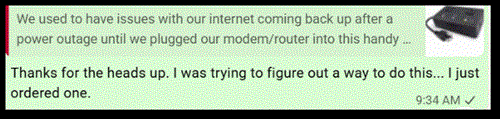 [Click on image for larger view.] A WhatsApp message about using a remote power switch to reboot a router. (source: Tom Fenton).
The device he used was an MSNSwitch2. The MSNSwitch2 is manufactured by Mega System Technologies, also known as MegaTec. It was designed specifically for remote control of AC-powered equipment. The manufacturer describes it as a watchdog for network equipment, including routers, modems, switches, hubs and cameras. The idea is simple: when the monitored device stops responding, the MSNSwitch2 will virtually pull the plug and then plug it back in.
The particular model I got was the UIS722t. The T version is manufactured in Taiwan for TAA compliance and is otherwise functionally equivalent to another device they offer, the UIS722b. The official MSNSwitch2 site provides more information about the product and its firmware, but below is a quick summary of its capabilities.
The UIS722t has two independently controlled outlets (NEMA 5-15R). The outlets share a maximum 10-amp load, and the unit accepts 100- to 250-volt AC input at 50 or 60 Hz. Network connectivity is provided through a 10/100 Ethernet port. The enclosure measures approximately 6.3 by 3.75 by 1.58 inches, so it is small enough to fit behind my networking equipment.
What makes it different from a conventional smart plug is the monitoring logic. The MSNSwitch2 can ping multiple internet targets and use the results to determine whether connectivity has been lost. The device supports up to seven targets, and the targets and fault tolerance can be configured. This is important because I do not want a single failed website to cause my router to reboot.
The MSNSwitch2 also supports scheduled power cycling. The documentation specifies that it can schedule up to 20 outlet power events by day and time, as well as countdown-based power cycling. It can also monitor a LAN or WAN address and has a heartbeat monitoring function. For someone who maintains equipment at a remote location, those features make this considerably more useful than a simple internet-connected outlet.
Another feature I like is that there are several ways to manage the device. I can use the ezDevice smartphone application, the Cloud4UIS service, the device's own web interface or its HTTP API. There is also a Netility utility for Windows and macOS. The MSNSwitch2 documentation provides considerably more information about these management options.
I ordered one from Amazon. It was $127 USD, compared with an MSRP of $149.95.
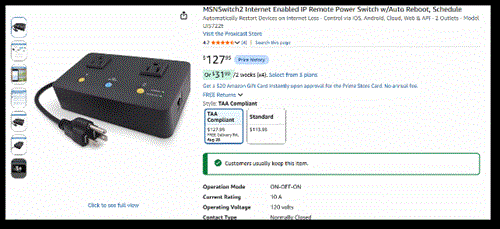 [Click on image for larger view.] An Amazon listing for the MSNSwitch2 UIS722t. (source: Amazon).
Setup and Use
The next day I received a 6-by-9-by-4-inch plain brown cardboard package with the MSNSwitch2 and an Ethernet cable inside.
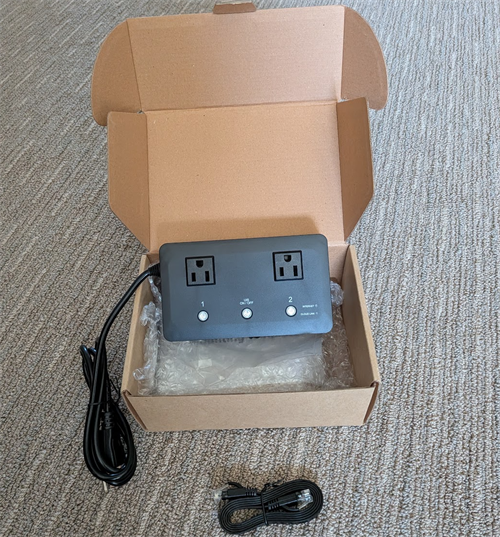 [Click on image for larger view.] The MSNSwitch2 UIS722t and accessories in its shipping box. (source: Tom Fenton).
Setting up the UIS722t was straightforward. I connected an Ethernet cable to the MSNSwitch2 and connected the router to one of its controlled outlets. The other outlet can be used for another device; I considered using it for the cable modem but left it unused until I am comfortable with the device.
I scanned the QR code on the back of the device and used the ezDevice application to discover and register the device. I initially used the ezDevice app to connect to the device, then switched to the Cloud4UIS web service for the final configuration so I could take screenshots. It appears to be functionally equivalent to the app.
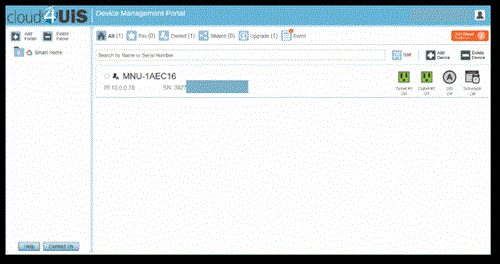 [Click on image for larger view.] The Cloud4UIS Device Management Portal showing a registered MSNSwitch2. (source: Tom Fenton).
The first thing I configured was the automatic reset function. I did this by clicking the A in the circle and enabling the UIS Reset feature.
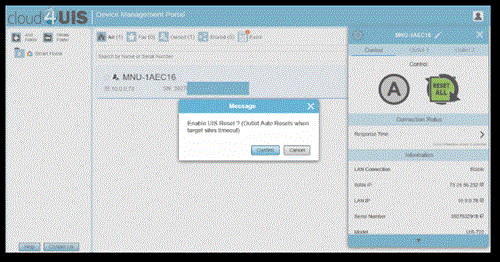 [Click on image for larger view.] The Cloud4UIS prompt for enabling the UIS Reset function. (source: Tom Fenton).
This is the feature that matters most to me. The MSNSwitch2 came with default internet-monitoring targets and settings, although the UIS function itself must be enabled.
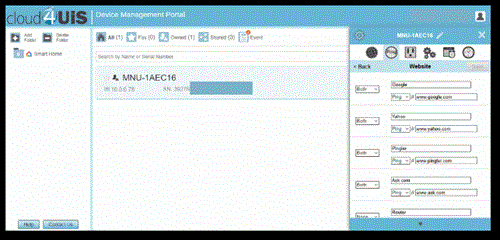 [Click on image for larger view.] Default internet-monitoring targets in Cloud4UIS. (source: Tom Fenton).
When the connectivity tests indicate the connection has failed, the UIS function will power-cycle the outlet connected to my router. In other words, the device does not need me to notice that the router has stopped responding and reset it; it will recognize the problem and perform the equivalent of my unplugging and plugging the router back in.
I also configured a preventive reboot every 25 days. That's my setting rather than a recommendation from the manufacturer; I wanted a periodic reboot without falling back to the daily reboot approach I had rejected.
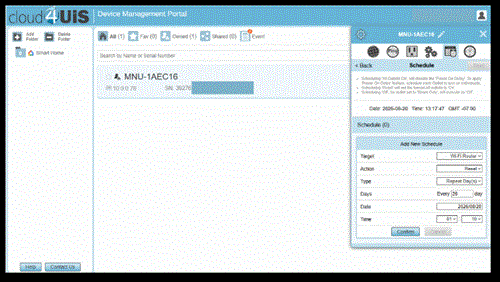 [Click on image for larger view.] A scheduled preventive reboot configured in Cloud4UIS. (source: Tom Fenton).
There is a difference between these two functions that I think is worth pointing out. The connectivity monitoring handles unexpected failures, while the schedule lets me perform preventive reboots. I can also manually control the outlet via the application or web interface to force a reboot, but this depends on the device having internet connectivity.
Testing
To test the device, I set the power-on delay to 60 seconds (so I would have time to verify the event occurred), plugged a lamp into the device's outlet and unplugged the network cable.
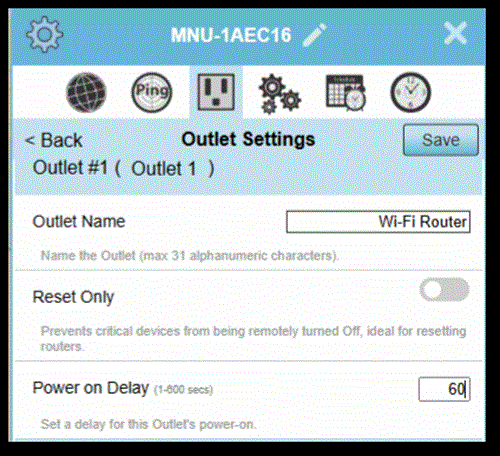 [Click on image for larger view.] The MSNSwitch2 outlet settings with a 60-second power-on delay. (source: Tom Fenton).
The documentation says that, with its default settings, the MSNSwitch2 will detect a loss of internet connectivity in roughly 35 to 50 seconds.
About a minute after unplugging the device's network cable, the lamp went out and then came back on, simulating a router reboot.
Diving Deeper
The documentation describes the MSNSwitch2's automatic reset function as a multi-parameter algorithm, so it is not simply a matter of missing one ping and immediately cutting power; it requires multiple targets to fail. The repeated failures are confirmed; then the outlet is power-cycled and connectivity is checked again. That is important for a device like this because internet connectivity can be transient. I do not want my router to be rebooting every time a particular website is unreachable. The manufacturer provides a technical note titled "Auto Reset Algorithm" that goes into more detail on how the reset logic works.
You can set the sensitivity and even set custom parameters for the internet timeout settings.
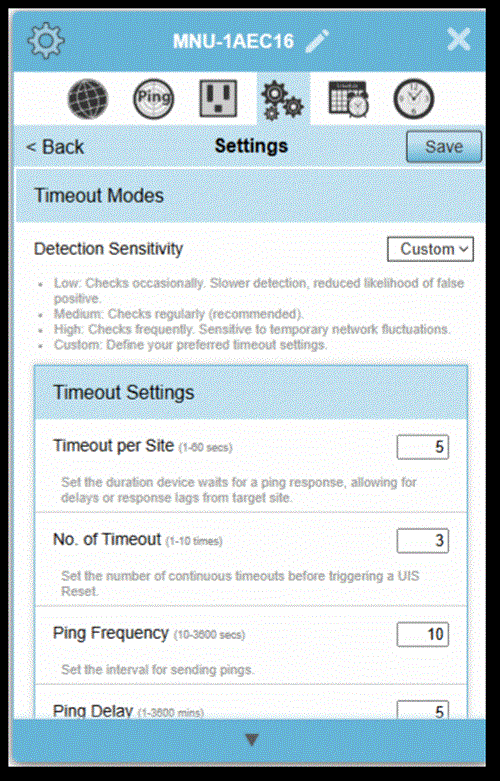 [Click on image for larger view.] Custom internet timeout settings for the MSNSwitch2. (source: Tom Fenton).
Other Options
After I purchased the device, Amazon, as it is apt to do, suggested a few other products. One was an AC power relay for the Pi for $60, but I would still need to write the code and wire it up to the Pi.
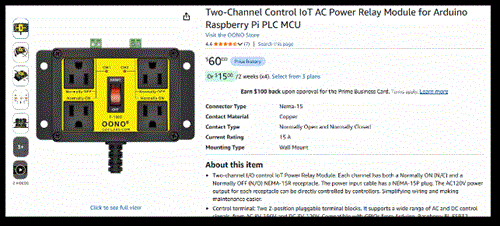 [Click on image for larger view.] An Amazon listing for a Raspberry Pi AC power relay. (source: Amazon).
It also suggested an enterprise-grade device that would perform the same functions but at four times the price.
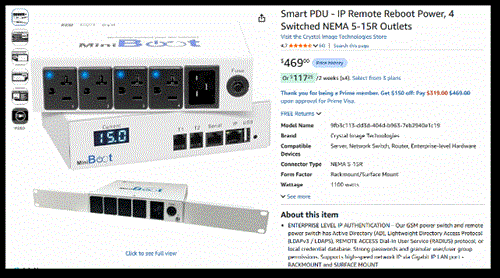 [Click on image for larger view.] An Amazon listing for an enterprise-grade remote reboot power device. (source: Amazon).
The MSNSwitch2 was the small, inexpensive purpose-built device I was looking for, as it is a dedicated hardware appliance that does one job particularly well.
Summary
The MSNSwitch2 UIS722t solved a problem that had beguiled me for many years--one that was easy to overlook until I was sitting in a hotel room, trying to access a file or a device connected to my home router that had stopped working.
I could have built a solution with a Raspberry Pi and a relay, used a simple timer or hoped the router would never need attention while I was traveling. Instead, I now have a purpose-built device that can monitor internet connectivity, automatically power-cycle my router when necessary and reboot it on a schedule. The device is roughly the size and complexity of a small networking appliance and costs a little more than a C-note; I found it to be a useful addition to my home network and home lab. More importantly, it means that the next time my router decides to stop working while I am out of town, I have a better chance of it fixing itself before I even know there was a problem.
With all that said, there are obvious limitations to this approach: the MSNSwitch2 can restart my router, but it can't restore service during an ISP outage. If the problem is upstream of my network, all the power cycling in the world won't bring the internet back.
About the Author
Tom Fenton has a wealth of hands-on IT experience gained over the past 30 years in a variety of technologies, with the past 20 years focusing on virtualization and storage. He previously worked as a Technical Marketing Manager for ControlUp. He also previously worked at VMware in Staff and Senior level positions. He has also worked as a Senior Validation Engineer with The Taneja Group, where he headed the Validation Service Lab and was instrumental in starting up its vSphere Virtual Volumes practice. He's on X @vDoppler.