News
Security Testing for Everyone
When your task is securing a Microsoft 365 tenant, you need a framework to fall back on -- whether that's Center for Internet Security (CIS), CISA's Secure Cloud Business Applications or Entra ID Security Config Analyzer (EIDSCA). However, the number of nonconfigurations or misconfigurations identified can be overwhelming, and if you're not an expert on every control, it'll take time and effort to remediate them.
This is compounded by the fact that Microsoft 365 (M365) is targeted at two very different audiences -- at one end of the spectrum, you have enterprises with large teams of experts managing individual parts of the underlying components. They expect configurability, scale, integration and enterprise options for governance, etc. At the other end, you have small businesses that need enterprise-class services but need them to "just work" securely out of the box with minimal configuration by IT generalists at the SMB itself or its Managed Service Provider (MSP). On top of this, it's an ever-changing cloud service with new and changed features every day. This is the tension that all of us IT pros who maintain M365 must contend with, especially when we have to manage the whole suite.
To help with this task, there's Microsoft 365 Lighthouse, which provides some experiences that can help an MSP, but it's a slowly developing solution. Then there are many third-party services with varying degrees of coverage and focus -- something I might come back to in a future article.
However, the best solution I've found for both individual M365 clients and MSPs taking care of scores of tenants is Maester. This free, open source, community project has gone from strength to strength over the last few years. We first looked at Maester over two years ago here, when it was version 0.1 and covered only Conditional Access (CA) policy settings. It has grown up considerably since then.
In this article, I'll look at the newest version of Maester, 3.0, currently in preview, and, even more excitingly, a cloud-based service that offers a platform for running regular Maester tests, comparing results and tracking improvement over time across many tenants -- Maester Cloud.
Maester -- Free, Open Source and Community Supported
The most important aspect of Maester, compared with other third-party services for multi-tenant evaluation and management, is that it's supported by the community, and boy, have they delivered over the last couple of years. From just evaluating your CA policies originally, it's now able to scan and evaluate settings across:
- Microsoft 365 overall, with 200+ Maester built-in tests.
- Entra ID Security Configuration Analyzer, with 44 tests.
- Microsoft 365 overall against CISA's Secure Cloud Business Applications guidance, with 76 tests.
- Microsoft 365 overall against the CIS Benchmark, which is extensively used in the industry, with 49 tests.
- Defender for Office 365, part of Defender XDR, against the Office 365 Recommended Configuration Analyzer (ORCA), with 67 tests.
- Active Directory, with a total of 267 tests.
That last one is particularly exciting because it extends the power of Maester to on-premises and hybrid infrastructure. While AD is less common in SMBs nowadays, it's still around, and, of course, many enterprises still rely on it. It involves some configuration to have the tests run against your DCs (as usual, only read permissions are required), especially if you want to automate them to run on a regular schedule. A normal interactive run of Maester in PowerShell excludes the AD tests.
If you can't find the tests you need in Maester, you can write your own and potentially share them with the world. Version 2.3 and earlier is built on Pester, so it's fairly straightforward to create your own tests. If you're not a developer, AI can help with skills that help your chosen LLM structure tests correctly. There are also collections of custom tests that you can adopt if they match your needs. However, the structure of a test in 3.0 is different, so if you're writing new tests, see instructions here.
Version 2.3 from early October 2026 brought Entra Agent ID checks and CIS M365 Benchmark version 7.0, but most importantly, a new Affected Objects report that lets you see every test that failed for a specific user, group, app registration, CA policy or enterprise application. That shifts the focus from "this control isn't configured correctly" to "this object isn't protected appropriately," which is very useful. The release also added Entra Agent ID.
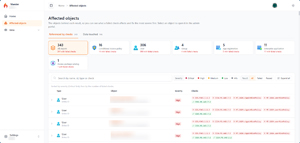 [Click on image for larger view.] Figure 1: Maester Affected Objects Report.
Version 3.0 -- In Preview
Almost in parallel with the 2.3 release, version 3.0 is now available in preview. There are two main changes: a built-in test engine, replacing Pester (which is still there for your custom tests), and an underlying PowerShell requirement moving from 5.1 to 7.4 or later.
There are 747 native tests in 3.0, and each test is a native PowerShell function file paired with a Markdown (.md) file containing the description and remediation steps. Connection and license checks were repeated in every test in 2.3 and earlier; now, they're native to the engine itself. A license check skips tests for which you don't have the required licensing -- for example, there's no need to point out that you should have a CA policy for user accounts that are at risk if you don't have Entra ID P2 licenses.
You can convert existing tests to the new format with Convert-MtTest. The built-in scheduler currently runs tests sequentially to match 2.3 behavior, but it's engineered to support parallel tests in the future. If you have automation built to run Maester tests, make sure you keep it on the release build until you can test the new engine yourself. As mentioned above, the structure of tests in 3.0 is completely different from earlier versions because it doesn't rely on Pester. The best way to figure it out is to use the test builder in the docs; you can also point your AI agent at that page to help it structure custom tests accurately. The coolest feature here is the license explorer, which helps you find the actual service plan SKU names required for the tests to run. There are also good AI and agent instructions in the GitHub repo for building custom tests.
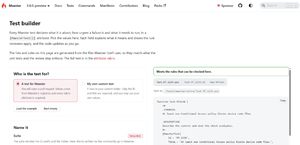 [Click on image for larger view.] Figure 2: Maester 3.0 Test Builder.
You can now also tag each test to match a security framework such as CIS or CISA to track adherence before an audit, for example.
The most notable difference, though, is the new dashboard, which shows progress as the tests run, tenant information, weakest areas and an ETA for when the tests will be done. It's a very good user experience improvement.
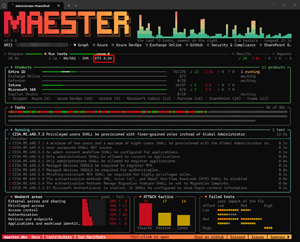 [Click on image for larger view.] Figure 3: Maester 3.0 Dashboard During a Run.
Extending Maester with collections of tests is also getting easier with Maester Packs, with three available today, including one that takes tests from Microsoft's Zero Trust assessment and brings them into Maester.
If all goes well during the preview period, we should see 3.0 take over in late November or early December.
Maester Cloud
The biggest challenge I've found with operationalizing Maester across my SMB clients is the complexity of building automation to run it regularly and compare results across runs. The documentation has tutorials for GitHub, Azure DevOps, GitLab, Bitbucket, Azure Automation and a few more for a single tenant, and for running reports across multiple tenants and aggregating results into a single report. But it's definitely not easy for someone like me who's "developer challenged."
Merill Fernando, the main architect behind Maester, left Microsoft a few months ago and started Maester Cloud, a paid service on top of Maester that simplifies setting up and running regular reports.
Today, you provide your own Azure subscription, and the service runs in a container instance, but a SaaS version is forthcoming. There's a guided setup where you provide your Azure subscription, and it creates (and subsequently updates as they come out) the required infrastructure.
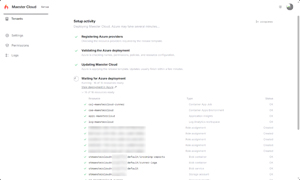 [Click on image for larger view.] Figure 4: Maester Cloud Setup.
You then add your tenants with a simple link for a sufficiently permissioned account to grant, provided that you can either give them the permissions or run the process yourself if you have them.
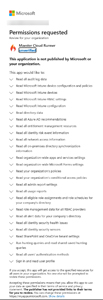 [Click on image for larger view.] Figure 5: Maester Cloud Permissions Required.
While that looks like an intimidating long list, it's actually adhering to least privilege, as all the permissions are read-only. There's a great page where the exact permissions needed for each part of Maester Cloud are detailed. Transparency and a product designed with security and least privilege from day one are important. Keep in mind, though, that whether you're using Maester or Maester Cloud to run your tests, the results are sensitive and shouldn't be shared with the wider world, as they could empower attackers to spot gaps in your defenses.
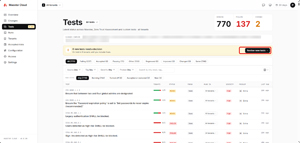 [Click on image for larger view.] Figure 6: Maester Cloud Tests Across Monitored Tenants.
New tests that are added are shown for you to approve or reject (approval is the default, though you can also auto-approve them). You can do this for all tenants, or choose tests to skip in only some tenants. Options include turning off a test, in which case it's not included and nothing is recorded for it; accepting risk, which will still run and record a failure but tag it as risk accepted until it expires; or permanently excluding it, where its results are recorded in the raw log but not flagged or alerted on in reports. When you accept the risk, you enter a reason, mitigations, owner and expiry date, which helps operationalize not only the testing itself but also the context around working through hundreds of failed tests across potentially many tenants. For each tenant, you can also define its break-glass Entra accounts with a picker that reads the list of users in that tenant.
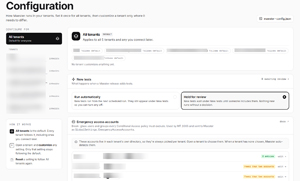 [Click on image for larger view.] Figure 7: Maester Cloud Configuration for Tenants.
Setting up a scheduled email report from an Exchange Online shared mailbox for all your tenants is also straightforward, resulting in this report:
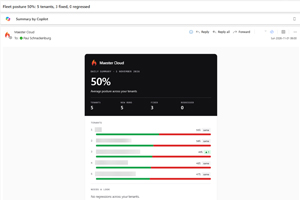 [Click on image for larger view.] Figure 8: Maester Cloud Email Report.
It's early days, but I spoke to Merill about what's coming in Maester Cloud. There are richer reports on the way, with more metadata for each test; easier, audit-ready reporting; the ability to run container instances isolated in Azure; and dedicated report pages depending on your role -- for example, if you deal only with identity-related controls, there's a custom page for you. The reason you'd want to run additional instances of Maester Cloud is if a client asks for live access to reports, in which case you obviously don't want any other client's data appearing. Licensing cost for the upcoming SaaS version will be based on the number of monitored tenants and users.
It's not all roses, though. There are some UI bugs, and the guided setup could use better documentation and context around why you're performing each step, but I'm sure these things will improve -- it's in preview, after all. As for the cost of running it in your Azure infrastructure, I've had it doing nightly runs against five SMB tenants, and the last seven days have cost me $2.50 AUD ($1.75 USD), so the running cost isn't going to break the bank.
On the roadmap is an AI assistant to help with fixing failed tests, an MCP server, ticketing sync with Jira, ServiceNow, etc., and CSP import to bring client tenants in directly from Microsoft's Partner Center.
Conclusion
I really like Maester, and Maester Cloud is going to be my posture verification engine for my clients going forward. The broad community support for creating accurate tests provides a strong foundation that I think most other paid services will find hard to match. The new built-in test engine in 3.0 is also intriguing, and I'm looking forward to seeing the feedback during the preview phase.
I'm not alone: more than 60,000 tenants use Maester, and about 40,000 of them run it daily for reporting.
If you need an easy-to-set-up platform to run in-depth testing against your own tenant, or you're an MSP with many tenants to manage, Maester has proven its worth over the last two years, and Maester Cloud makes it that much easier to use at scale. If you want to support it, see pricing here. After all, Microsoft runs Maester against more than 70 Microsoft game developer tenants with both built-in and custom tests, so you're in good company.
About the Author
Paul Schnackenburg has been working in IT for nearly 30 years and has been teaching for over 20 years. He runs Expert IT Solutions, an IT consultancy in Australia. Paul focuses on cloud technologies such as Azure and Microsoft 365 and how to secure IT, whether in the cloud or on-premises. He's a frequent speaker at conferences and writes for several sites, including virtualizationreview.com. Find him at @paulschnack on Twitter or on his blog at TellITasITis.com.au.